-
×InformationNeed Windows 11 help?Check documents on compatibility, FAQs, upgrade information and available fixes.
Windows 11 Support Center. -

-
×InformationNeed Windows 11 help?Check documents on compatibility, FAQs, upgrade information and available fixes.
Windows 11 Support Center. -
- HP Community
- Printers
- Printer Setup, Software & Drivers
- Re: pdf no longer available as scan option

Create an account on the HP Community to personalize your profile and ask a question
02-22-2021 02:13 PM
Suddenly today, I cannot get past the message "do you want to make HP better by sharing user data".
AND, when trying to scan manually through "printers and devices", the pdf option is gone, only jpegs, tiffs, pngs, and bmps.
I am furious!!! What is going on?
02-22-2021 04:24 PM
====================================================================
Welcome to the HP Community.
Be Aware:
Do not respond to individuals who post phone numbers or email addresses.
Do not respond to individuals who ask you to provide private information in a public Post.
These people might be scammers trying to steal your information / money.
====================================================================
The problem with HP Smart has been reported.
While we wait for a solution for HP Smart, consider using other Scan options.
Printer Software
If you have not done so, download-save-install the Full Feature Software / Full Driver for the printer
Full Driver / Full Feature Software does not require a sign-in to use the software.
Reminder:
If using USB, disconnect the USB cable between the printer and the computer before starting the installation. Connect the cable when instructed to do so (toward the end of the installation procedure).
Download - save - run
- Download-and-Save the printer software (Full Feature Software / HP Smart / Easy Start)
- Right-Click on the downloaded package and "Run as Administrator" to start the installation
- Reminder: If using Easy Start, select the Full Driver
Easy Start... The Journey
About 2/3 of the way through the setup, you will be given the opportunity to select the software - select the "Full Driver" set (as opposed to the basic driver).
You can Skip any suggestion that you add the HP Account – you’ll need the account at some point, but you can skip this suggestion (as many times as it insists it’s a good idea) during the full driver software installation. (
Side Bar: HP Smart requires that HP Account sign-in but HP Smart is NOT the same thing as the Full Feature Software / Full Driver.
If you see it, you can skip any suggestion regarding Instant Ink subscription.
Any...
If using USB: Connect the cable when instructed to do so (near the last part of the driver installation)
After the software is installed, Restart the computer and log in.
Full driver provides print and scan functions supported by your printer.
======================================================================
1. Start Scan using HP Scan (part of the Full Feature Software / Full Driver)
What else?
2. Windows Scan – Microsoft Store - Requires Windows 8 or higher
- “Get” the application from the Store > Windows Scan
3. Paint- the Original - Paint (mspaint) can be used to scan.
4. NAPS2– “Not Another PDF Scanner”
- Download-Save-Install > NAPS2
- Not another PDF Scanner – free program scans PDF files and image(s) as .jpeg or PDF file(s).
- Includes an OCR feature – may need Ghostscript add-on (See NAPS2 forum entry)
- Read the Support pages for information
- Download, save, and install the NAPS2 software to use.
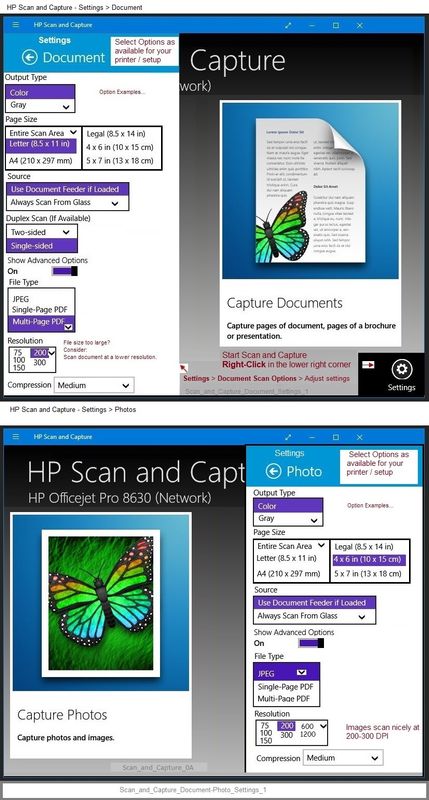
5. HP Scan and Capture - Microsoft Store - Requires Windows 8 or higher
- Download-Save-Install HP Scan and Capture
Printer Home Page - References and Resources – Learn about your Printer - Solve Problems
“Things that are your printer”
NOTE: Content depends on device type and Operating System
Categories: Alerts, Access to the Print and Scan Doctor (Windows), Warranty Check, HP Drivers / Software / Firmware Updates, How-to Videos, Bulletins/Notices, Lots of How-to Documents, Troubleshooting, User Guides / Manuals, Product Information (Specifications), more
When the website support page opens, Select (as available) a Category > Topic > Subtopic
HP OfficeJet Pro 8025 All-in-One Printer
Thank you for participating in the HP Community.
The Community is a separate wing of the HP website - We are not an HP business group.
Our Community is comprised of volunteers - people who own and use HP devices.
Click Thumbs Up to say Thank You.
Question Resolved / Answered, Click "Accept as Solution"