
-
×InformationNeed Windows 11 help?Check documents on compatibility, FAQs, upgrade information and available fixes.
Windows 11 Support Center. -
-
×InformationNeed Windows 11 help?Check documents on compatibility, FAQs, upgrade information and available fixes.
Windows 11 Support Center. -
- HP Community
- Printers
- Printer Setup, Software & Drivers
- print 3x5 cards on deskjet plus

Create an account on the HP Community to personalize your profile and ask a question
Your account also allows you to connect with HP support faster, access a personal dashboard to manage all of your devices in one place, view warranty information, case status and more.
Check some of the most frequent questions about Instant Ink: HP INSTANT INK, HP+ PLANS: INK AND TONER.
Check out our WINDOWS 11 Support Center info about: OPTIMIZATION, KNOWN ISSUES, FAQs AND MORE.

It has been a while since anyone has replied. Simply ask a new question if you would like to start the discussion again.

07-20-2021 03:58 PM
 HP Recommended
Product: deskjet plus 4155
Operating System: Microsoft Windows 10 (64-bit)
I am having problems with being able to get complete text to print on 3x5 cards. printer is cutting off approx 1/2 inch of the left side text on the card. All margins are set to 0", and I am using a 3x5 card template.
5 REPLIES 5


07-21-2021 09:43 AM
HP Recommended
This printer requires a larger margin along the bottom edge.
| Print Margin Bottom (A4) | 12.7 mm |
| Print Margin Left (A4) | 3 mm |
| Print Margin Right (A4) | 3 mm |
| Print Margin Top (A4) | 3 mm |
| Borderless Printing | No |
Borderless printing / zero margins are not an option.
References / Resources
Product Specifications for the HP DeskJet Plus 4155 All-in-One Printer (3XV13A)
HP Printer Support Home Page - References and Resources – Learn about your Printer - Solve Problems
“Things that are your printer”
NOTE: Content depends on device type and Operating System
Categories: Alerts, Access to the Print and Scan Doctor (Windows), Warranty Check, HP Drivers / Software / Firmware Updates, How-to Videos, Bulletins/Notices, Lots of How-to Documents, Troubleshooting, Manuals > User Guides, Product Information (Specifications), more
When the website support page opens, Select (as available) a Category > Topic > Subtopic
HP DeskJet Plus 4155 All-in-One Printer
Thank you for participating in the HP Community.
The Community is a separate wing of the HP website - We are not an HP business group.
Our Community is comprised of volunteers - people who own and use HP devices.
Click Thumbs Up to say Thank You.
Question / Concern Answered, Click "Accept as Solution"
Dragon-Fur

07-21-2021 10:12 AM
HP Recommended
Dragon-fur...Thank you for the response and suggestions, however, they did not work. received error msg stating margins were to large for the media. Any other suggestions would be appreciated. Thanks again, Garry
07-21-2021 11:04 AM - edited 07-23-2021 09:39 AM
HP Recommended
You are welcome.
The template may not respect the printer margin restriction.
?
True - the 1/2 inch margin restriction leaves little room for content.
I guess you could try creating a 3x5 inch document in Word and see if you can get it to print.
Set the page size and set the margins as custom.
Add content > save > see if you can print the document.
Example - Word - Mixed Content 3x5 card

What else?
You could try creating and printing an image on the little card and see if that works.
Create the content however you wish.
View the content on your screen at no more than 100% size.
Snip the content from the document and save the snip as an image.
Create a Snip of the information on the page > save the snipped image as a .jpg file > print that file.
Print the Image of the content onto the little paper.
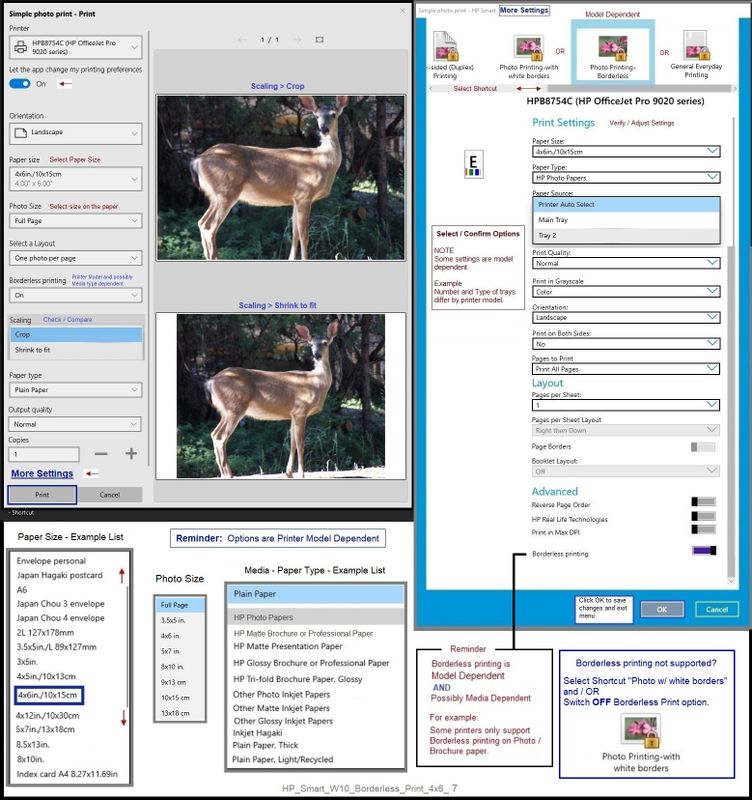
Select Paper Size 3x5 and Photo Size "Full"
Example - HP Smart Windows - Simple Photo Print
Reminder: Your Printer does not support borderless.
If I have anything else to add, I'll post back.
Thank you for participating in the HP Community.
The Community is a separate wing of the HP website - We are not an HP business group.
Our Community is comprised of volunteers - people who own and use HP devices.
Click Thumbs Up to say Thank You.
Question / Concern Answered, Click "Accept as Solution"
Dragon-Fur
07-23-2021 09:29 AM
HP Recommended
Tnanks again Dragon-Fur, however, tried to create 3x5 card file in word, file created OK, adjusted margins, but printer still cutting of approx 1/2 inch on left side and now it is cutting off the top, even with margin set at zero. it prints fine on reg paper. Guess i will have to just print on paper and cut it out and tape to 3x5 card....
Thanks again for the suggestions,
Garry
07-23-2021 09:47 AM
HP Recommended
You are welcome.
I would guess that setting the margin to zero in Word would not produce the desired effect.
The printer does not support the zero margin setting.
The Word document cannot control the outcome unless the margins (that are) set in the document reflect something supported by the printer.
If you are interested in trying it, set the margins in your Word document to "Narrow" , that is, 1/2 inch on a side.
Will that work?
Maybe.
Seems like the Snip / save image / print image would work - though, again, not my printer and I cannot judge the results.
Hmm..
Other than that, sure - print and cut.
That works when other options just fail to cooperate the way we expect / want.
Thank you for participating in the HP Community.
The Community is a separate wing of the HP website - We are not an HP business group.
Our Community is comprised of volunteers - people who own and use HP devices.
Click Thumbs Up to say Thank You.
Question / Concern Answered, Click "Accept as Solution"
Dragon-Fur

Be alert for scammers posting fake support phone numbers and/or email addresses on the community.
If you think you have received a fake HP Support message, please report it to us by clicking on "Flag Post".
† The opinions expressed above are the personal opinions of the authors, not of HP. By using this site, you accept the Terms of Use and Rules of Participation.


Didn't find what you were looking for?
Ask the community
† The opinions expressed above are the personal opinions of the authors, not of HP. By using this site, you accept the <a href="https://www8.hp.com/us/en/terms-of-use.html" class="udrlinesmall">Terms of Use</a> and <a href="/t5/custom/page/page-id/hp.rulespage" class="udrlinesmall"> Rules of Participation</a>.