
-
×InformationNeed Windows 11 help?Check documents on compatibility, FAQs, upgrade information and available fixes.
Windows 11 Support Center. -
-
×InformationNeed Windows 11 help?Check documents on compatibility, FAQs, upgrade information and available fixes.
Windows 11 Support Center. -
- HP Community
- Printers
- Printer Setup, Software & Drivers
- Re: printers do not print after changing black ink-from Appl...

Create an account on the HP Community to personalize your profile and ask a question
Your account also allows you to connect with HP support faster, access a personal dashboard to manage all of your devices in one place, view warranty information, case status and more.
Check some of the most frequent questions about Instant Ink: HP INSTANT INK, HP+ PLANS: INK AND TONER.
Check out our WINDOWS 11 Support Center info about: OPTIMIZATION, KNOWN ISSUES, FAQs AND MORE.

It has been a while since anyone has replied. Simply ask a new question if you would like to start the discussion again.

03-08-2020 10:52 AM
 HP Recommended
after changing black ink, printers (2 different HP) do not print from my Apple computer. printers OK with a Windows 10 computer.
Solved! Go to Solution.
1 ACCEPTED SOLUTION
Accepted Solutions
03-12-2020 09:45 AM
HP Recommended
Good morning again, Krazy Toad
Printer back in operation: Kudos to Molka Brahem ( HP chat somewhere in Tunisia): says that the problem was with the router, plyed around with my computer and printer and everything is back on track. ( Printer HP7520 is also OK, although she mentioned that it is obsolete and she could not do a thing about it). But the router problem being fixed, both my printers are back on line.
Thanks a lot for your time,
Cheers
6 REPLIES 6

03-10-2020 04:05 PM
HP Recommended
Welcome to HP Community
To assist you better please provide me with the printer models or the product number
You can refer to this Link: hp.care/2bygf7l for help in locating the Product Number.
Thank you
KrazyToad
I Am An HP Employee
03-10-2020 04:29 PM
HP Recommended
Good evening,
Printer is HP Envy Photo 7155 ( same problem now with HP Photosmart 7520).
chatted with HP ( 5 times, different technicians: when the try to see my computer screen using LogMeIn Rescue, that kills the chat and nothing more). Tried chat with Apple and they end up saying problem is with HP.
tried to reset printers many times, tried HP Smart, etc... same result. Still cannot print from my IMac but OK from my old Dell computer with Windows10. Also, I know very little about computers, which does not help.
Thanks for your interest. I have been reading about same complaints on the community, so I am not alone with this problem. It all came about after changing a black ink HP cartridge.
Thank you
03-11-2020 11:16 AM
HP Recommended
Please ensure your Mac and Printer have the latest updates
Printer Firmware: https://support.hp.com/in-en/document/c02919168
Mac update: https://support.apple.com/en-us/HT2015
After checking all those details, Remove and Re-add the printer using Airprint. AirPrint is an Apple technology that helps you create full-quality printed output without the need to download or install drivers.
1.) Click the Apple menu, click System Preferences, and then click Print & Scan or Printers & Scanners.
2.) Check if your printer name displays in the Printers list, If your printer is listed, click the printer name, click the minus sign  to delete the printer.
3.) If you see multiple printer queues for the same printer, remove all extra printers by selecting them one at a time, and then clicking the minus button at the bottom of the list.
4.) Click the plus sign  , click Add Printer or Scanner, click the printer name.
5.) Click the Use or Print Using menu, select AirPrint or Secure AirPrint in the pop-up menu. Then click Add.
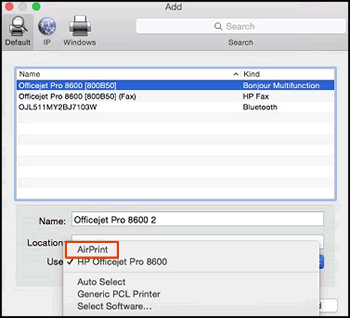
6.) Try to print
Let me know how it goes😊
If the information I've provided was helpful, give us some reinforcement by clicking the "Solution Accepted" on this Post and it will also help other community members with similar issue.
KrazyToad
I Am An HP Employee
03-12-2020 07:05 AM
HP Recommended
Hi Krazy Toad,
followed your instructions to the letter: no success. I should add that the same procedure was done about 20 times before ( on my own, when prompted by HP techs on chatline, when prompted with Apple techs on phone).
always ends up with ""unable to verify the printer on your network:, then" unable to connect to Envy Photo 7100 Series due to an error. Would you still like to create the printer", then "an error occurred while trying to add the selected device. Unable to communicate with the printer at this time".
So after 3 days of chatting, I'm back to square 1. I printer your email from my Windows PC but no joy with the IMac.
Thanks a lot for your interest. I'll go again to the chat lines with HP and Apple.
Cheers
03-12-2020 09:45 AM
HP Recommended
Good morning again, Krazy Toad
Printer back in operation: Kudos to Molka Brahem ( HP chat somewhere in Tunisia): says that the problem was with the router, plyed around with my computer and printer and everything is back on track. ( Printer HP7520 is also OK, although she mentioned that it is obsolete and she could not do a thing about it). But the router problem being fixed, both my printers are back on line.
Thanks a lot for your time,
Cheers
03-12-2020 10:55 AM
HP Recommended
I'm glad you got this issue sorted out
Do visit our HP Support Community and drop us a message anytime you need help
Thank you
If the information I've provided was helpful, give us some reinforcement by clicking the "Solution Accepted" on this Post and it will also help other community members with similar issue.
KrazyToad
I Am An HP Employee

Be alert for scammers posting fake support phone numbers and/or email addresses on the community.
If you think you have received a fake HP Support message, please report it to us by clicking on "Flag Post".
† The opinions expressed above are the personal opinions of the authors, not of HP. By using this site, you accept the Terms of Use and Rules of Participation.


Didn't find what you were looking for?
Ask the community
† The opinions expressed above are the personal opinions of the authors, not of HP. By using this site, you accept the <a href="https://www8.hp.com/us/en/terms-of-use.html" class="udrlinesmall">Terms of Use</a> and <a href="/t5/custom/page/page-id/hp.rulespage" class="udrlinesmall"> Rules of Participation</a>.