
-
×InformationNeed Windows 11 help?Check documents on compatibility, FAQs, upgrade information and available fixes.
Windows 11 Support Center. -
-
×InformationNeed Windows 11 help?Check documents on compatibility, FAQs, upgrade information and available fixes.
Windows 11 Support Center. -
- HP Community
- Printers
- Printer Setup, Software & Drivers
- Re: the selected printer is detected but not installed compl...

Create an account on the HP Community to personalize your profile and ask a question
Your account also allows you to connect with HP support faster, access a personal dashboard to manage all of your devices in one place, view warranty information, case status and more.
Check some of the most frequent questions about Instant Ink: HP INSTANT INK, HP+ PLANS: INK AND TONER.
Check out our WINDOWS 11 Support Center info about: OPTIMIZATION, KNOWN ISSUES, FAQs AND MORE.

It has been a while since anyone has replied. Simply ask a new question if you would like to start the discussion again.

07-09-2021 10:23 AM
 HP Recommended
Product: Officejet Pro 7730
Operating System: macOS 11.0 Big Sur
I’m trying to print on a custom size paper (418 x 147 mm)
It’s in the A3 Tray (420 x 297 mm)
In the Word, PDF and InDesign documents, I have managed to set the custom size, however not on the printer. Here I don’t get the option to select any custom paper size. When I print, the printer tells me that the selected paper does not fit the A3 paper in the tray…
When I try to modify this, I get the error message:
the selected printer is detected but not installed completely on your mac
12 REPLIES 12


07-12-2021 11:24 AM
HP Recommended
Hi @Schörschum,
I'd like to help!
I understand you are unable to print on a custom paper size.
To assist better-
- Are you able to make copies on the custom paper?
- What is the type and weight of the paper you are using?
Keep me posted.
And, Welcome to the HP Support Community.
Please click “Accept as Solution” if you feel my post solved your issue, it will help others find the solution.
Click the “Kudos, Thumbs Up" on the bottom right to say “Thanks” for helping
07-20-2021 01:49 AM
HP Recommended
Thanks Jay_G24
I also cannot copy onto the custom paper size 418 x 147 mm and get the following messages:
Paper Size Mismatch. The paper size detected by the printer in tray 2 does not match the size selected (A3 (297x420 mm)) for the print job.
I then press on "Print Anyway" and get the following message:
Paper Size Mismatch. The paper size detected by the printer in tray 2 does not match the size selected (A3 (297x420 mm)) for the print job. The current print job will be canceled.
Thanks for your help
So long Schörschu
07-21-2021 12:54 AM
HP Recommended
Thanks Jay_G24,
Unfortunately not.
My paper size is with 418 x 147 mm well inside the 420 x 297 mm.
The paper weight is 90 g/m2 so also well inside the 105 g/m2.
So technically the printer should be able to handle the custom paper size with no problem.
The issue is, that the printer seems to only accept A3 (430 x 297 mm) even when a custom size paper is in the tray.
On the unit itself, you can modify the "Tray 2 Paper Setup", however there is no selection for custom sizes, only A3, A4, B3, Letter etc.
In the softwares, Word, InDesign etc. in the paper setup menu I have chosen the custom paper size. In the print menu I left it at automatic, unfortunately this had the same error message so I tried fit to size, however, I still only can chose A3, A4, Letter etc.
Hopefully you can find a solution.
Thanks for your help
Kind regards Schörschu
07-23-2021 02:18 AM
HP Recommended
Hi Jay_G24
I have tried using the web browser tool. Under “Tray and Paper Settings” I found out that in Tray one you can choose custom, in tray 2 not. So I swopped my paper and gave it a try.
When trying to copy, the printer now shows:
Copy does not support Custom. Load a supported size of paper in Tray1.
When trying to print, I get the following message:
The paper size detected by the printer in Tray 1 does not match the paper size selected (A4 (210x297 mm)) for the print job. Make sure the paper size is correct to continue the job. Touch X to cancel the print job.
The printer shows Custom and the Print Setting in my Word document shows Automatic
Any ideas?
Thanks for your help
So long Schörschu
07-26-2021 12:30 PM - edited 07-26-2021 12:36 PM
HP Recommended
Create a custom paper size directly from the printer properties menu.
Load the custom-size paper into the paper input tray.
Open the item you want to print.
Click File, and then click Print.
In the Print window, click Preferences, Properties, or Printer Properties.
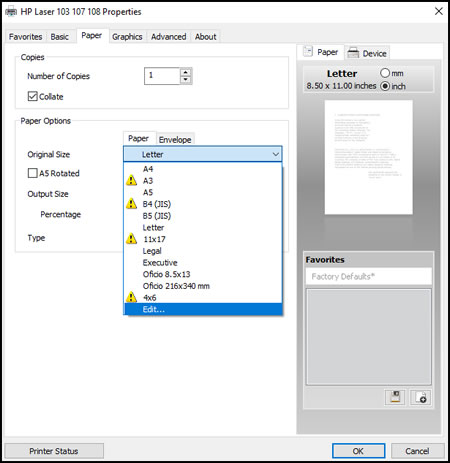
Click the Paper tab, and then select Edit from the Original Size menu.
Type a name for your custom paper size, adjust the width and height to your preference, and then click Add.
NOTE:
To change the dimensions to metric, click mm.
Your custom paper size is now saved. You can select this custom paper size in the future and edit it if needed.
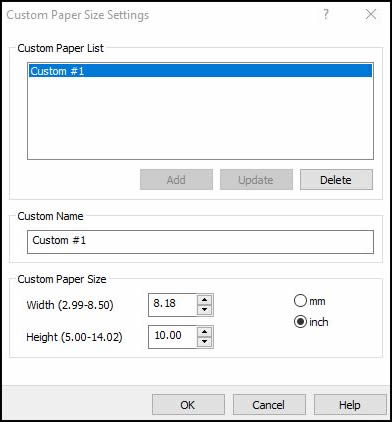
Click OK.
Click the Original Size drop-down menu, and then select your custom paper size.
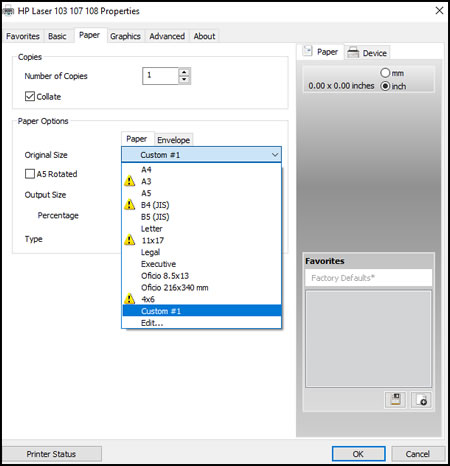
Make any other preference changes if necessary, and then click OK.
NOTE:
Supported paper sizes vary by printer. You cannot select a larger or smaller size than the printer supports.
Click OK or Print to print the document.
Change the paper type and tray in the printer settings, to know-how refer to -Print Driver Settings Guide (Windows)\
Let me know how this goes!
07-28-2021 09:54 AM
HP Recommended
Thanks Jay_G24
In my first post I stated that I had an OfficeJet Pro 7730 and my operating system was MacOS 11.0 Big Sur. Since this morning I have MacOS11.5.1 Big Sur.
When I click on File and then choose Print… I get the following window:


I do not get have a choice for paper sizes here, so I went to Page Setup…


I had already created a Custom Size Paper!

Card Infill 418 by 147 mm
Still did not wor!
I went to the Launchpad

And selected HP Smart

This is the main menu

By clicking on HP OfficeJet Pro 7730 I get the quick reference

Why is the “Installation Status:” “Not Installed”?
I also checked the “update”

The Tray and Paper Settings are as follows:

When I try to print, I get this on the printer’s display:

Thanks for your help
So long Schörschu

Be alert for scammers posting fake support phone numbers and/or email addresses on the community.
If you think you have received a fake HP Support message, please report it to us by clicking on "Flag Post".
† The opinions expressed above are the personal opinions of the authors, not of HP. By using this site, you accept the Terms of Use and Rules of Participation.


Didn't find what you were looking for?
Ask the community
† The opinions expressed above are the personal opinions of the authors, not of HP. By using this site, you accept the <a href="https://www8.hp.com/us/en/terms-of-use.html" class="udrlinesmall">Terms of Use</a> and <a href="/t5/custom/page/page-id/hp.rulespage" class="udrlinesmall"> Rules of Participation</a>.