• ×
    Information
    Need Windows 11 help?
    Check documents on compatibility, FAQs, upgrade information and available fixes.
    Windows 11 Support Center.
  • post a message
  • ×
    Information
    Need Windows 11 help?
    Check documents on compatibility, FAQs, upgrade information and available fixes.
    Windows 11 Support Center.
  • post a message
Guidelines
Seize the moment! nominate yourself or a tech enthusiast you admire & join the HP Community Experts!
Common problems for Connectivity Issues
We would like to share some of the most frequently asked questions about Printer Wi-Fi, Connectivity Issues and Offline Status. Check out this link: HP printer is offline or unavailable.
HP Recommended
HP LaserJet Pro M118dw
Microsoft Windows 10 (64-bit)

After printing a few pages without errors, different character heights are observed at the beginning and at the bottom of the page. Replaced toner and drum without improvements.

11 REPLIES 11
HP Recommended

Hi @Tunin,


Welcome to the HP Support Community


I'd like to help!


Could you share an image of the printed page, so i can understand the issue?


Let me know!

HP Recommended

Polish_20220528_173209171.jpg

 Here I send you an imago of the issue that is located at the end of the pronte page.

Could you please help me?

Thanks

HP Recommended

The difference looks between the caps and the numbers.


I am unable find an issue with document , could you try printing a different document?


Let me know!

HP Recommended

1654458207493.jpg

Polish_20220605_214944508.jpg

 I send you 2 images, in the second one I marked in red the issue of differt characters height.

I hope that this might help you.

Thanks

HP Recommended

To assist better -


  1. What application are you printing from?
  2. Have you tried other applications?
  3. Does the issue occur when you try and copy?


Let me know!

HP Recommended

The problem is encountered with Windows programs: Word and Acrobat Reader, and with Android apps: NokoPrint and Mopria print.

HP Recommended

To assist better -


Does the issue occur when you try and copy?

Have you tried printing using HP Smart?


Meanwhile, try printing the document as PDF.


Open the original PDF file.

Click File, and then select Print from the list.

The Print window opens.

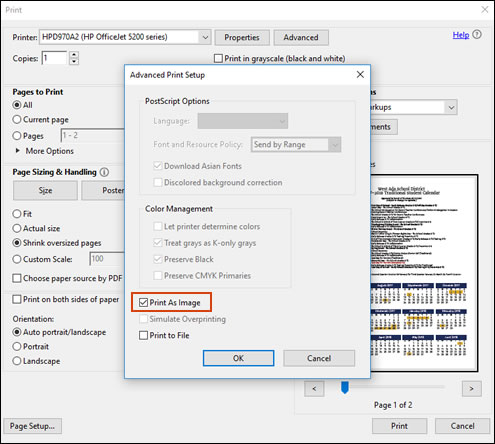
Click Advanced.

The Advanced Print Setup window opens.

Click the Print As Image checkbox, change any other settings as desired, and then click OK.

Printing the PDF file as an image


Also , refer to -https://support.hp.com/in-en/document/c01879546


Let me know how this goes!


HP Recommended

But in my opinion, it could be a mechanical problem, for example a defect in pulling the paper through the rollers.
Could this be true? What do you think?

HP Recommended

I do not think it is a mechanical problem , as the documemt is printing fine otherwise.


Were you able to try the suggested steps?


Let me know!


† The opinions expressed above are the personal opinions of the authors, not of HP. By using this site, you accept the <a href="https://www8.hp.com/us/en/terms-of-use.html" class="udrlinesmall">Terms of Use</a> and <a href="/t5/custom/page/page-id/hp.rulespage" class="udrlinesmall"> Rules of Participation</a>.