• ×
    Information
    Need Windows 11 help?
    Check documents on compatibility, FAQs, upgrade information and available fixes.
    Windows 11 Support Center.
  • post a message
  • ×
    Information
    Need Windows 11 help?
    Check documents on compatibility, FAQs, upgrade information and available fixes.
    Windows 11 Support Center.
  • post a message
Guidelines
Seize the moment! nominate yourself or a tech enthusiast you admire & join the HP Community Experts!
Common problems for Connectivity Issues
We would like to share some of the most frequently asked questions about Printer Wi-Fi, Connectivity Issues and Offline Status. Check out this link: HP printer is offline or unavailable.
HP Recommended
HP Officejet Pro 8600 Plus e-All-in-One Printer - N911g
Microsoft Windows 11

So HP Smart in Advanced Settings shows the printer as online and "Status Ready".

g5qMnQ.png

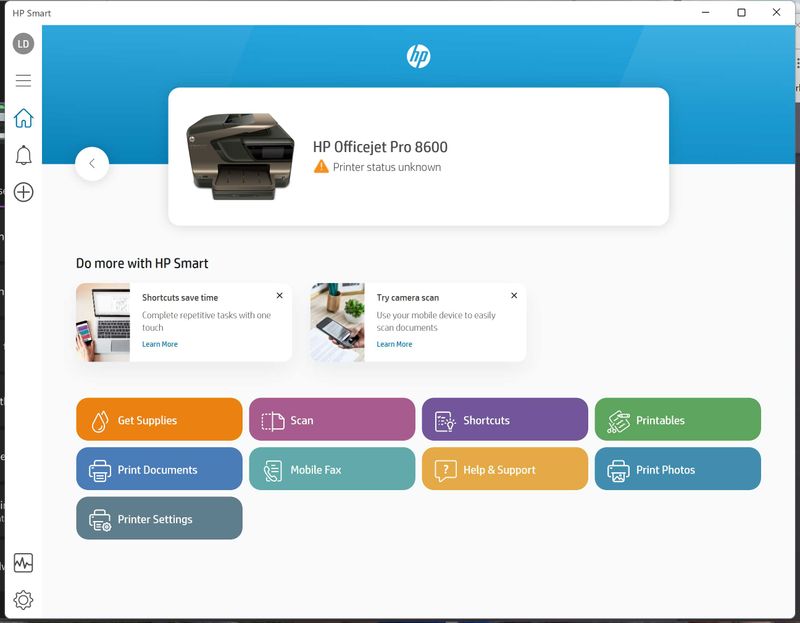
But HP Smart App shows "Printer status unknown". 

Y9LVjK.jpg

Doing a diagnosis and no issues were found. If I click the 'Test Print' it prints out the test page.

HJzAgp.png

From Windows Printers & Scanners utility, if I "Run the Troubleshooter", it couldn't find an issue. If I click the 'Print a test page' from the utility, it prints the page.


okfT7v.png

I've shutdown both printer & laptop and restarted with no luck.

I tried to download the "HP Print and Scan Doctor" from https://support.hp.com/us-en/help/printscandoctor-printing-problems#printer-offline 4 times but each time I got this corrupt message.
pZ9J3S.png

This is so frustrating.

1 REPLY 1
HP Recommended

Hi,

Please browse to This PC and make sure you have free hard-disk space on C Drive, also try downloading the HP PSDR utility from another browser.


For the printer software, the printer is not supported by the HP Smart app on a computer according to the HP Support site, please download and install its Full Feature Software:

https://ftp.hp.com/pub/softlib/software12/COL40120/bi-108858-4/Full_Webpack-1312_1-OJ8600_Full_Webpa...


Shlomi


Click the Yes button to reply that the response was helpful or to say thanks.
If my post resolve your problem please mark it as an Accepted Solution 🙂
† The opinions expressed above are the personal opinions of the authors, not of HP. By using this site, you accept the <a href="https://www8.hp.com/us/en/terms-of-use.html" class="udrlinesmall">Terms of Use</a> and <a href="/t5/custom/page/page-id/hp.rulespage" class="udrlinesmall"> Rules of Participation</a>.