• ×
    Information
    Need Windows 11 help?
    Check documents on compatibility, FAQs, upgrade information and available fixes.
    Windows 11 Support Center.
  • post a message
  • ×
    Information
    Need Windows 11 help?
    Check documents on compatibility, FAQs, upgrade information and available fixes.
    Windows 11 Support Center.
  • post a message
Guidelines
Seize the moment! nominate yourself or a tech enthusiast you admire & join the HP Community Experts!
Common problems for Connectivity Issues
We would like to share some of the most frequently asked questions about Printer Wi-Fi, Connectivity Issues and Offline Status. Check out this link: HP printer is offline or unavailable.
HP Recommended
HP OfficeJet Pro 8710 All-in-One Printer

I cannot log in to the HP OfficeJet Pro 8710 Embedded Web Server. I need to change network settings. I have performed a factory reset but no default credentials work. I have tried blank, admin, Administrator, etc. 

2 REPLIES 2
HP Recommended

I have tried both semi-full reset and OOBE reset.

HP Recommended

Hi @AmelPL,


Welcome to HP Support Community.

Thank you for posting your query, I will be glad to help you.


For accessing the Embedded Web Server (EWS) on an HP OfficeJet Pro 8710, especially after a factory reset, and if the common default credentials such as "admin" with no password or "Administrator" are not working, there are a few steps you can try:

Use "admin" for both username and password: Sometimes, both fields are set to "admin".


Check the printer documentation: Sometimes, the default credentials or the procedure to reset them is mentioned in the user manual or setup guide that came with the printer.


Look for a sticker or label on the printer: Some printers have a label or sticker that might contain default login information or a serial number that could be used.


Serial Number or Printer Information as Password: In some cases, HP uses the printer's serial number, or part of it, as the default password post-reset. This is a security measure to prevent unauthorized access. You can typically find the serial number on the printer's back or under the scanner lid.

You may change the password:


Secure your printer by changing the default username and password to log in to the printer EWS.

Open the EWS.

Click Login in the top-right corner, and then type admin for the user name. If a password is required, use the WPS Security PIN which can be found by printing a Network Configuration Report.

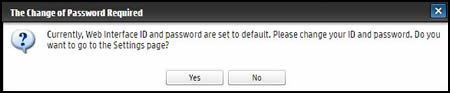
A prompt displays requesting the user to change the ID and password.

NOTE:

If you are already logged in, hover over the Security tab, click System Security, and then click System Administrator.

The Change of Password Required dialog box displays

Click Yes.

In the Web Interface Security section, type a new login ID, type a new password, confirm the new password, and then click Apply.


I hope this helps.


Take care and have a good day.


Please click “Accepted Solution” if you feel my post solved your issue, it will help others find the solution. Click the “Kudos/Thumbs Up" on the bottom right to say “Thanks” for helping!


Rachel571 

HP Support

.
Sneha_01- HP support
† The opinions expressed above are the personal opinions of the authors, not of HP. By using this site, you accept the <a href="https://www8.hp.com/us/en/terms-of-use.html" class="udrlinesmall">Terms of Use</a> and <a href="/t5/custom/page/page-id/hp.rulespage" class="udrlinesmall"> Rules of Participation</a>.