• ×
    Information
    Need Windows 11 help?
    Check documents on compatibility, FAQs, upgrade information and available fixes.
    Windows 11 Support Center.
  • post a message
  • ×
    Information
    Need Windows 11 help?
    Check documents on compatibility, FAQs, upgrade information and available fixes.
    Windows 11 Support Center.
  • post a message
Guidelines
Seize the moment! nominate yourself or a tech enthusiast you admire & join the HP Community Experts!
Common problems for Connectivity Issues
We would like to share some of the most frequently asked questions about Printer Wi-Fi, Connectivity Issues and Offline Status. Check out this link: HP printer is offline or unavailable.
HP Recommended
Microsoft Windows 11

Like many others, my OfficeJet Pro 9015 constantly loses its wifi radio signal. After I do a cold reset the problem typically resolves itself for a couple of weeks. My problem now is that I just signed up for Instant Ink and installed the new Instant Ink cartridges a few days ago. After the cold reset, my printer was no longer enrolled in Instant Ink, so two of the installed cartridges are not usable. The printer can't enroll in Instant Ink until a reestablish my wifi connection and I can't reestablish my wifi connection until the printer goes through its typical startup tasks, which includes printing an alignment page.The printer, of course, can't print an alignment page because it thinks I don't actually have an Instant Ink subscription so the cartridges won't work.


First, how do I skip the alignment page task so I can reestablish my wifi connection? Second, how do I keep the printer from dropping the wifi radio signal in the first place?

4 REPLIES 4
HP Recommended

@mk1020


Welcome to the HP support community.


I understand that due to wifi connectivity issues you are unable to enroll in an instant ink account, I am glad to assist you.
If you have connected the printer to wifi again, enable the web service so that you can enroll the printer to an instant ink account and print the alignment page.

Turn On Web Services

  • Make sure the printer is connected to a wired (Ethernet) or wireless network with an active internet connection.
  • NOTE: If you connect your printer to a computer with a USB cable, web-connected printing services do not work.
  • If your printer is connected with a wired (Ethernet) connection, check the cable and the lights on the printer’s Ethernet port. The green link light should be steady, and the orange activity light should blink when the cable is connected.
  • If your printer is connected with a wireless connection, make sure the wireless feature is on and the printer is connected to the same network as your computer.
  • Some printers have a wireless icon and a blue light on the front of the printer. If the printer has a blue light, and the light is on and not blinking, your printer is connected.
  • On your control panel, press the HP ePrint icon.
  • If your control panel does not have an HP ePrint icon, navigate to Web Services Setup, Network Setup, or Wireless Settings to open the Web Services menu.
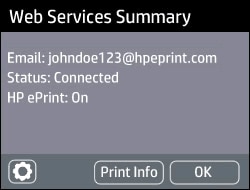
  • If a summary screen displays, Web Services is already on.
  • Example of Web Services Summary screen
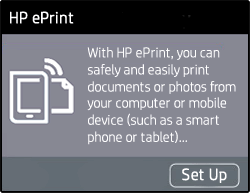
  • If a prompt to turn on Web Services or set up HP ePrint displays, follow the prompts to turn it on or set it up.
  • Example of the HP ePrint set up screen
  • If you are prompted to update the firmware, press OK.

Refer to this HP document for more assistance:- Click here


Let me know how it goes.

If this helps, please mark the public post as an accepted solution so that it benefits several others.

Cheers.

Sandytechy20
I am an HP Employee

HP Recommended

This does not solve my problem. I did a cold reset of my printer because it wouldn't connect to wifi (as I mentioned in my original post, this is a recurring issue).


At this point all I can do is unplug the printer and plug it back in. When the printer powers up my screen says that two of the cartridges can't be used because they are Instant Ink cartridges and after the cold reset my printer is no longer enrolled in Instant Ink.At that point the only thing I can do is push a button on my screen that says "Hide", there are no other options available on the screen. After I press "Hide", the screen automatically goes to the "Align the Printhead" screen with the only option being to press the button that says "Continue". When I press "Continue", the printer starts the alignment process, but locks on the screen that says "Printing the alignment page.." and there is no way for me to stop it other than unplugging the printer. No where during this process do I have the ability to get to any other menu options, so I can't reconnect to my wifi.

HP Recommended

Are there any other solutions to my problem? I haven't been able to use my printer for over a week now. Please assist.

HP Recommended

@mk1020


You might have to reset the printer.

You might have to perform a semi-full reset on the printer.

The reset instructions are specific for your printer and performing those steps on a different printer may brick the device.  

I am sending you a private message with the steps to reset the printer. Please check the mailbox icon at the top-right corner of this screen.


I hope this helps resolve this issue completely.

To thank me for my efforts to help you, please mark my post as an accepted solution so that it benefits several others.

Cheers.

Sandytechy20
I am an HP Employee

† The opinions expressed above are the personal opinions of the authors, not of HP. By using this site, you accept the <a href="https://www8.hp.com/us/en/terms-of-use.html" class="udrlinesmall">Terms of Use</a> and <a href="/t5/custom/page/page-id/hp.rulespage" class="udrlinesmall"> Rules of Participation</a>.