• ×
    Information
    Need Windows 11 help?
    Check documents on compatibility, FAQs, upgrade information and available fixes.
    Windows 11 Support Center.
  • post a message
  • ×
    Information
    Need Windows 11 help?
    Check documents on compatibility, FAQs, upgrade information and available fixes.
    Windows 11 Support Center.
  • post a message
Guidelines
Seize the moment! nominate yourself or a tech enthusiast you admire & join the HP Community Experts!
Common problems for Connectivity Issues
We would like to share some of the most frequently asked questions about Printer Wi-Fi, Connectivity Issues and Offline Status. Check out this link: HP printer is offline or unavailable.
HP Recommended
HP Officejet 6954
Microsoft Windows 10 (64-bit)

I need to print a photo on photo paper 81/2 X 11 without borders and no headers or footers.

I got it to print without borders but it changed the width of the photo - removing part of it.


How can I print the entire photo without it changing the size when it prints.


Thank you for your help.

1 REPLY 1
HP Recommended

@Fgalen 


Welcome to the HP Community.


@Fgalen wrote:

I need to print a photo on photo paper 81/2 X 11 without borders and no headers or footers.

I got it to print without borders but it changed the width of the photo - removing part of it.


How can I print the entire photo without it changing the size when it prints.


Thank you for your help.


Whether you can print the image file the way you want depends on the shape of the image.

If the shape of the original image is not the same shape as the paper you are using, then "something" has to give.

That means,

If the image does not fit on the paper,

The image has to be "reshaped" to fit

For example,

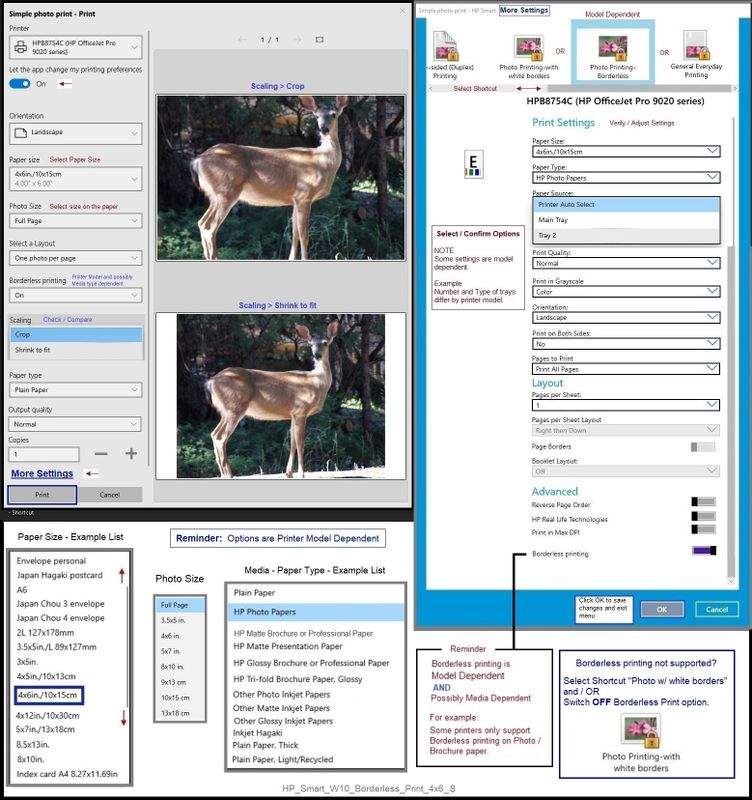
  • Crop,
  • Shrink to fit -- which can maintain the original shape but might create borders on one or more sides,
  • Manually Edit the image file > Change the shape of the image so it fits on the paper.


These basic rules apply regardless of the size of the paper.

To print the image in its original format (without edits or adjustments to the shape / size),

To print that file as Borderless,

The Shape of the the image must fit the shape of the paper.

This is the Aspect Ratio.


Aspect Ratio:  The ratio of the width to the height of an image or screen


Headers and Footers are not normally part of a photo image, though of course, it depends on the source of the image.


For example, if you pull an image from a document or from a browser, the image file might include spurious data along the edges.


Example - HP Smart - Windows - Simple Photo Print - 4x6 inch - Borderless

HP_Smart_W10_Borderless_Print_4x6_8HP_Smart_W10_Borderless_Print_4x6_8


------------------------------------------------------------------------------------------------------------

What about those "headers" or other extra data?

These can be removed from your saved image.


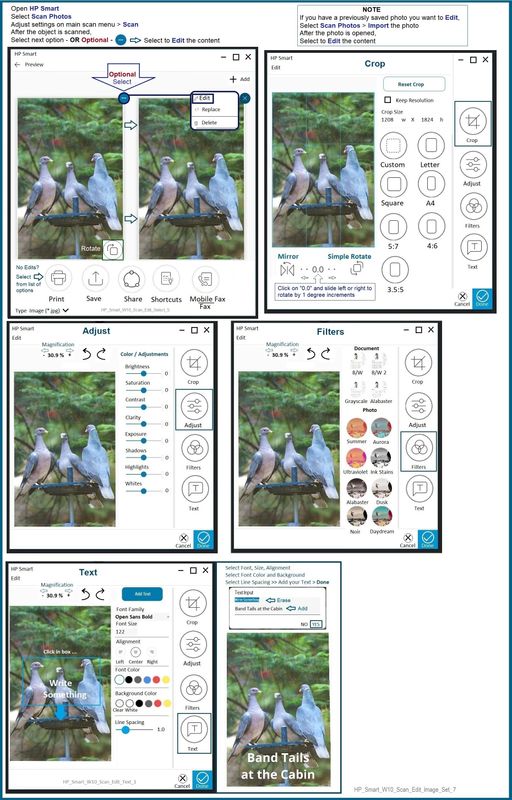
HP Smart - Windows - can be used to "Scan" and then "Import" your previously saved image file.

After the file is imported into HP Smart, it can be Edited > Cropped into preset shapes or a custom shape.

Note that the rules for "shape of image" as compared to "shape of paper" still apply.

Should it be necessary to edit the shape of the image, Decide where / how to crop the image boundaries.


Partial Example - HP Smart - Windows - Scan > Import > Scanned Image > Edit > Crop

HP_Smart_W10_Scan_Edit_Image_Set_7HP_Smart_W10_Scan_Edit_Image_Set_7


HP Printer Home Page - References and Resources – Learn about your Printer  - Solve Problems

 “Things that are your printer”

NOTE:  Content depends on device type and Operating System

Categories:  Alerts, Access to the Print and Scan Doctor (Windows), Warranty Check, HP Drivers / Software / Firmware Updates, How-to Videos, Bulletins/Notices, Lots of How-to Documents, Troubleshooting, Manuals > User Guides, Product Information (Specifications), more

HP OfficeJet 6954 All-in-One Printer 


Thank you for participating in the HP Community.

The Community is a separate wing of the HP website - We are not an HP business group.

Our Community is comprised of volunteers - people who own and use HP devices.

Click Thumbs Up to say Thank You.

Question / Concern Answered, Click "Accept as Solution"

Dragon-Fur

† The opinions expressed above are the personal opinions of the authors, not of HP. By using this site, you accept the <a href="https://www8.hp.com/us/en/terms-of-use.html" class="udrlinesmall">Terms of Use</a> and <a href="/t5/custom/page/page-id/hp.rulespage" class="udrlinesmall"> Rules of Participation</a>.