-
×InformationNeed Windows 11 help?Check documents on compatibility, FAQs, upgrade information and available fixes.
Windows 11 Support Center. -

-
×InformationNeed Windows 11 help?Check documents on compatibility, FAQs, upgrade information and available fixes.
Windows 11 Support Center. -

Create an account on the HP Community to personalize your profile and ask a question
10-13-2021 11:36 AM - edited 10-13-2021 02:18 PM
I have an OfficeJet Pro 9010 HP all in one printer. It worked fine for a long while, then the power in our neighborhood got knocked off during a storm. After that, the printer would not connect to the Wi-Fi network. It wouldn’t even see that there were Wi-Fi networks available. The Wi-Fi light is completely off which I’ve read means that the Wi-Fi radio isn’t on. When I try to turn it on there’s no option for the wireless set up wizard. It continuously says I need an ethernet cord to go into change the Wi-Fi. But when I put the cord in then there’s no option for Wi-Fi that shows up on my display. When I go into Network set up, I get a message that says I have to connect an ethernet cable. But when I do the wireless option disappear. What can I do to turn my Wi-Fi radio back on so that I can use the Wi-Fi on my printer and print remotely? It was working fine then after the storm it stopped.
10-13-2021 01:18 PM
Hi,
Do you have an ethernet cable connected to your printer?
Please connect a such and swipe down the top bar, then click the Ethernet icon (3 squares) to locate the IP Address.
From any device connected to the same network type the IP Address into your browser's address bar to access the EWS Page.
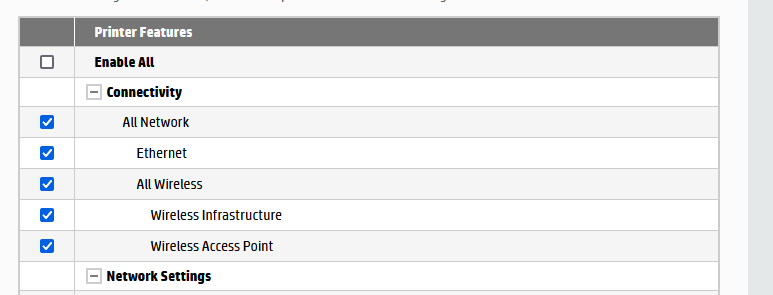
Click on Settings > Security > Administrator Settings and check the Connectivity section, ensure that any wireless feature is enabled there:
Shlomi
Click the Yes button to reply that the response was helpful or to say thanks.
If my post resolve your problem please mark it as an Accepted Solution 🙂
10-13-2021 01:41 PM
No, I did not have to connect through the cable when first setting it up - just logged on to our wifi and was able to print.
There was a similar post on your forum and the response was that the printer needed to be reset, but directions were sent via private message because they are different for each machine.
11-16-2021 04:13 PM
I'm having the same issue for the same reason. Power went out and now the WiFi option is completely gone. I tried turning it off, unplugging it, removed it from my computer and tried to add it back (but of course, now it can't find it). This is ridiculous!!!! Did you ever get yours fixed?