-
×InformationNeed Windows 11 help?Check documents on compatibility, FAQs, upgrade information and available fixes.
Windows 11 Support Center. -

-
×InformationNeed Windows 11 help?Check documents on compatibility, FAQs, upgrade information and available fixes.
Windows 11 Support Center. -
- HP Community
- Printers
- Printer Wireless, Networking & Internet
- Pin scan to Mail

Create an account on the HP Community to personalize your profile and ask a question
04-27-2021 08:06 AM
I tried to register my printer to send scans to email, established an hotmail account, should get a mail with the pin, never got mail? What to do?
04-27-2021 09:54 AM
====================================================================
Welcome to the HP Community.
Be Aware:
Do not respond to individuals who include phone numbers or email addresses in public posts.
Do not respond to individuals who ask you to provide private information in a public Post.
These people might be scammers trying to steal your information / money.
====================================================================
Not sure.
I had this nice printer model for a number of years - at least in my region (USA), the printer supported Digital Sending for Scan to Email. I never needed the App based "receive a pin" to set up the Scan to Email feature.
?
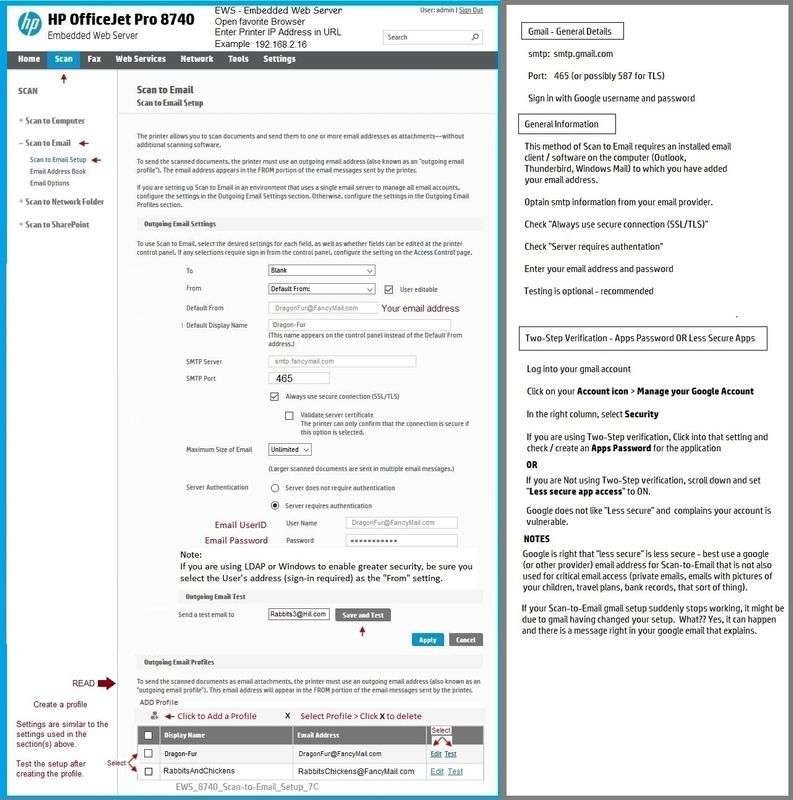
Please post an example of the screen in your EWS setup that says you will receive a PIN.
Examples - Embedded Web Server (EWS) - Scan to Email - SMTP setup
Open your favorite browser > type / enter Printer IP address into URL / Address bar
Tab Scan > Scan to Email > Settings / Scan to Email Setup
This first example is perhaps more similar to the 8630 than the second (which is an even newer printer).
For example, I don't remember how the Address book setup worked in the 8630...
That said, the general "Scan to Email" setup is likely similar for a printer the supports SMTP (digital sending).
Disclaimer
EWS_8740_Scan-to-Email_Setup_7C
Disclaimer
EWS_9020_Scan-to-Email_Setup_2
HP Printer Home Page - References and Resources – Learn about your Printer - Solve Problems
“Things that are your printer”
NOTE: Content depends on device type and Operating System
Categories: Alerts, Access to the Print and Scan Doctor (Windows), Warranty Check, HP Drivers / Software / Firmware Updates, How-to Videos, Bulletins/Notices, Lots of How-to Documents, Troubleshooting, Manuals > User Guides, Product Information (Specifications), more
When the website support page opens, Select (as available) a Category > Topic > Subtopic
HP Officejet Pro 8630 e-All-in-One Printer series
Thank you for participating in the HP Community.
The Community is a separate wing of the HP website - We are not an HP business group.
Our Community is comprised of volunteers - people who own and use HP devices.
Click Thumbs Up to say Thank You.
Question Resolved / Answered, Click "Accept as Solution"