• ×
    Information
    Need Windows 11 help?
    Check documents on compatibility, FAQs, upgrade information and available fixes.
    Windows 11 Support Center.
  • post a message
  • ×
    Information
    Need Windows 11 help?
    Check documents on compatibility, FAQs, upgrade information and available fixes.
    Windows 11 Support Center.
  • post a message
Guidelines
Seize the moment! nominate yourself or a tech enthusiast you admire & join the HP Community Experts!
Common problems for Connectivity Issues
We would like to share some of the most frequently asked questions about Printer Wi-Fi, Connectivity Issues and Offline Status. Check out this link: HP printer is offline or unavailable.
HP Recommended
HP 8630
Microsoft Windows 10 in S Mode

I tried to register my printer to send scans to email, established an hotmail account, should get a mail with the pin, never got mail? What to do?

1 REPLY 1
HP Recommended

@Gselli 

====================================================================

Welcome to the HP Community.

Be Aware:

Do not respond to individuals who include phone numbers or email addresses in public posts.

Do not respond to individuals who ask you to provide private information in a public Post.

These people might be scammers trying to steal your information / money.

====================================================================


Not sure.

I had this nice printer model for a number of years - at least in my region (USA), the printer supported Digital Sending for Scan to Email.  I never needed the App based "receive a pin" to set up the Scan to Email feature.


?


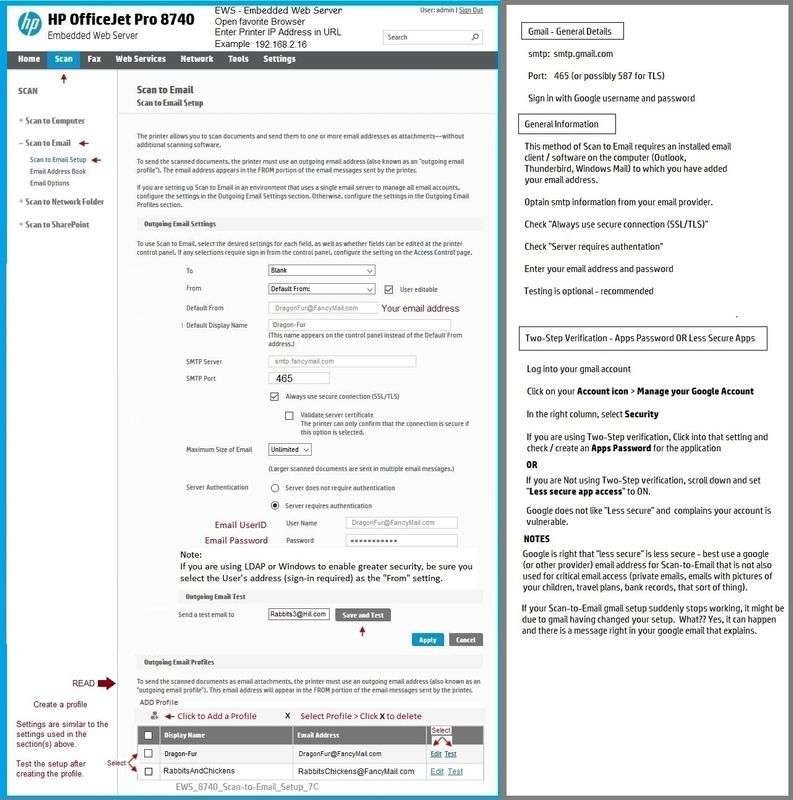
Please post an example of the screen in your EWS setup that says you will receive a PIN.


Examples - Embedded Web Server (EWS) - Scan to Email - SMTP setup


Open your favorite browser > type / enter Printer IP address into URL / Address bar

Tab Scan > Scan to Email >  Settings / Scan to Email Setup


This first example is perhaps more similar to the 8630 than the second (which is an even newer printer). 

For example, I don't remember how the Address book setup worked in the 8630...

That said, the general "Scan to Email" setup is likely similar for a printer the supports SMTP (digital sending).


Disclaimer

Remove_Private_Info_1.jpg

EWS_8740_Scan-to-Email_Setup_7CEWS_8740_Scan-to-Email_Setup_7C


Disclaimer

Remove_Private_Info_1.jpg

EWS_9020_Scan-to-Email_Setup_2EWS_9020_Scan-to-Email_Setup_2


HP Printer Home Page - References and Resources – Learn about your Printer  - Solve Problems

 “Things that are your printer”

NOTE:  Content depends on device type and Operating System

Categories:  Alerts, Access to the Print and Scan Doctor (Windows), Warranty Check, HP Drivers / Software / Firmware Updates, How-to Videos, Bulletins/Notices, Lots of How-to Documents, Troubleshooting, Manuals > User Guides, Product Information (Specifications), more

When the website support page opens, Select (as available) a Category > Topic > Subtopic

HP Officejet Pro 8630 e-All-in-One Printer series 


Thank you for participating in the HP Community.

The Community is a separate wing of the HP website - We are not an HP business group.

Our Community is comprised of volunteers - people who own and use HP devices.

Click Thumbs Up to say Thank You.

Question Resolved / Answered, Click "Accept as Solution"

Dragon-Fur

† The opinions expressed above are the personal opinions of the authors, not of HP. By using this site, you accept the <a href="https://www8.hp.com/us/en/terms-of-use.html" class="udrlinesmall">Terms of Use</a> and <a href="/t5/custom/page/page-id/hp.rulespage" class="udrlinesmall"> Rules of Participation</a>.