-
×InformationNeed Windows 11 help?Check documents on compatibility, FAQs, upgrade information and available fixes.
Windows 11 Support Center. -

-
×InformationNeed Windows 11 help?Check documents on compatibility, FAQs, upgrade information and available fixes.
Windows 11 Support Center. -
- HP Community
- Printers
- Printer Wireless, Networking & Internet
- Printer setup functions on only 1 of my 4 computers

Create an account on the HP Community to personalize your profile and ask a question
11-04-2022 08:20 PM
My 8025e printer works on only one of my four computers at a time. I used HP smart to assign it to my Windows 10 desk-top. When I set it up on my windows 11 deck-top it stopped working on the W-10. I set it up on my W-10 lap-top and it stopped working on the W-11 desktop. I got to work with my Android phone and then it wouldn't print from any of my other computers. I'm out of options if I want to use it on multiple computers without reinstalling it on another one.
Solved! Go to Solution.
Accepted Solutions
11-05-2022 09:04 AM
Normally, the printer should allow connections and support installed software to more than one device.
What, if anything, do the router logs indicate is happening?
What?
The interrupted "this one works then that one works" might be related to how the printer is connected to your network.
The description sounds a bit like a network tangle - perhaps locked / stuck IP/Mac address pairs in the router. (That situation is fairly rare -- mentioned as FYI.)
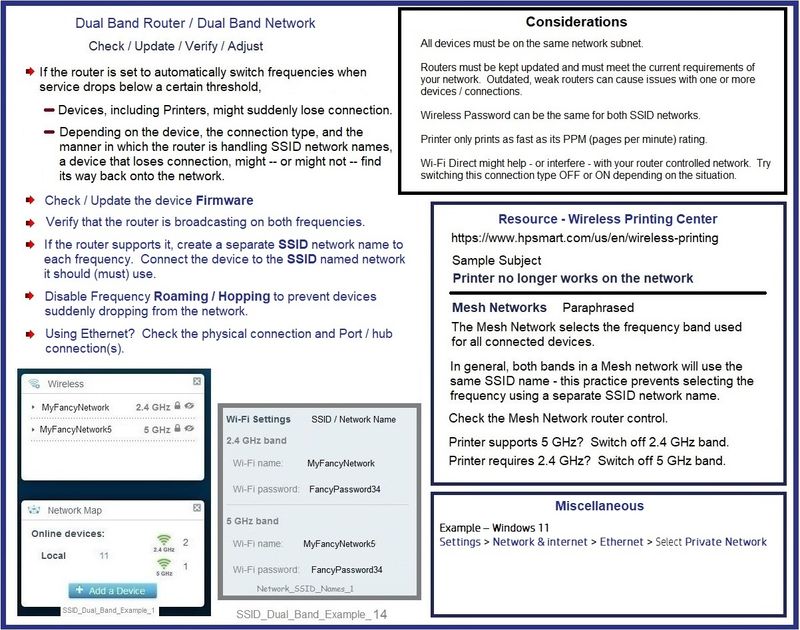
Also possible -- and also network themed -- the printer supports both 2.4GHz and 5GHz, but not at the same time.
Consider using a Manual / Static IP address for your printer AND connect it to a separate SSID named network on the frequency you want the printer to use.
Example - Dual Network - Considerations
SSID_Dual_Band_Example_14
What else?
Assuming the network is clean and the printer is connected to the network when checked on each computer / device
Then, for one of the Windows system(s)
Can you explain "not working"?
For example,
Are you able (or unable) to start any printer application or printer software on a system?
Which app / software have you tried / used?
and
Are you trying to install the Feature Software / full driver printer software?
If yes, have you managed to install the full driver printer software on any of the (Windows) computers?
If yes, are you using the Webpack installation package or are you installing using HP Easy Start Software?
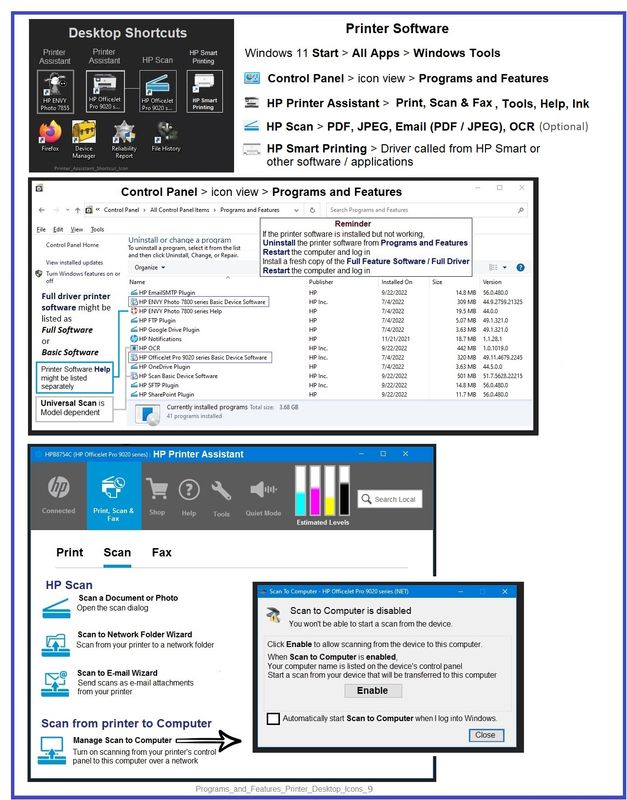
Example - Full Driver printer software - Installed Software - Programs and Features
Programs_and_Features_Printer_Desktop_Icons_9
References / Resources
Printer setup guide for: HP OfficeJet Pro 8025e All-in-One Printer
Easy to read articles on the subject of different Wireless standards
SignalBoosters - What are IEEE 802.11 Standards? : 802.11a/b/g/n/ac/ax
And
Lifewire - 802.11 Standards Explained: 802.11ax, 802.11ac, 802.11b/g/n, 802.11a
HP Printer Home Page - References and Resources – Learn about your Printer - Solve Problems
“Things that are your printer”
When the website support page opens, Select (as available) a Category > Topic > Subtopic
NOTE: Content depends on device type and Operating System
Categories: Alerts, Access to the Print and Scan Doctor (Windows), Warranty Check, HP Drivers / Software / Firmware Updates, How-to Videos, Bulletins/Notices, Lots of How-to Documents, Troubleshooting, Manuals > User Guides, Product Information (Specifications), Supplies, and more
Open
HP OfficeJet Pro 8025e All-in-One Printer
Thank you for participating in the HP Community.
Our Community is comprised of volunteers - people who own and use HP devices.
Click Yes to say Thank You
Question / Concern Answered, Click "Accept as Solution"
11-05-2022 09:04 AM
Normally, the printer should allow connections and support installed software to more than one device.
What, if anything, do the router logs indicate is happening?
What?
The interrupted "this one works then that one works" might be related to how the printer is connected to your network.
The description sounds a bit like a network tangle - perhaps locked / stuck IP/Mac address pairs in the router. (That situation is fairly rare -- mentioned as FYI.)
Also possible -- and also network themed -- the printer supports both 2.4GHz and 5GHz, but not at the same time.
Consider using a Manual / Static IP address for your printer AND connect it to a separate SSID named network on the frequency you want the printer to use.
Example - Dual Network - Considerations
SSID_Dual_Band_Example_14
What else?
Assuming the network is clean and the printer is connected to the network when checked on each computer / device
Then, for one of the Windows system(s)
Can you explain "not working"?
For example,
Are you able (or unable) to start any printer application or printer software on a system?
Which app / software have you tried / used?
and
Are you trying to install the Feature Software / full driver printer software?
If yes, have you managed to install the full driver printer software on any of the (Windows) computers?
If yes, are you using the Webpack installation package or are you installing using HP Easy Start Software?
Example - Full Driver printer software - Installed Software - Programs and Features
Programs_and_Features_Printer_Desktop_Icons_9
References / Resources
Printer setup guide for: HP OfficeJet Pro 8025e All-in-One Printer
Easy to read articles on the subject of different Wireless standards
SignalBoosters - What are IEEE 802.11 Standards? : 802.11a/b/g/n/ac/ax
And
Lifewire - 802.11 Standards Explained: 802.11ax, 802.11ac, 802.11b/g/n, 802.11a
HP Printer Home Page - References and Resources – Learn about your Printer - Solve Problems
“Things that are your printer”
When the website support page opens, Select (as available) a Category > Topic > Subtopic
NOTE: Content depends on device type and Operating System
Categories: Alerts, Access to the Print and Scan Doctor (Windows), Warranty Check, HP Drivers / Software / Firmware Updates, How-to Videos, Bulletins/Notices, Lots of How-to Documents, Troubleshooting, Manuals > User Guides, Product Information (Specifications), Supplies, and more
Open
HP OfficeJet Pro 8025e All-in-One Printer
Thank you for participating in the HP Community.
Our Community is comprised of volunteers - people who own and use HP devices.
Click Yes to say Thank You
Question / Concern Answered, Click "Accept as Solution"