• ×
    Information
    Need Windows 11 help?
    Check documents on compatibility, FAQs, upgrade information and available fixes.
    Windows 11 Support Center.
  • post a message
  • ×
    Information
    Need Windows 11 help?
    Check documents on compatibility, FAQs, upgrade information and available fixes.
    Windows 11 Support Center.
  • post a message
Guidelines
Seize the moment! nominate yourself or a tech enthusiast you admire & join the HP Community Experts!
Common problems for Connectivity Issues
We would like to share some of the most frequently asked questions about Printer Wi-Fi, Connectivity Issues and Offline Status. Check out this link: HP printer is offline or unavailable.
HP Recommended
Hp office jet 5212
Other

My husband insists that people can hack into our WiFi/Internet because our printer does not have a password. How can I prevent this from happening?

1 REPLY 1
HP Recommended

@Pinkbarbie614

Thank you for posting on HP Support Community.


Don't worry as I'll be glad to help,  

Wi-Fi Direct is a connection option available with most HP wireless printers released in 2014 and later. Use Wi-Fi Direct if connecting through a local Wi-Fi network is not an option or for guest printing.

Create a new password and change the printer name using the printer's Embedded Web Server (EWS).

  1. Connect your computer or mobile device to the printer with Wi-Fi Direct.

  2. In an Internet browser address bar, type 192.168.223.1, and then press the Enter key or click or tap the Search icon.

    Wi-Fi Direct IP address entered into the Chrome address bar

  3. If a website security certificate displays, click Continue to open the EWS.

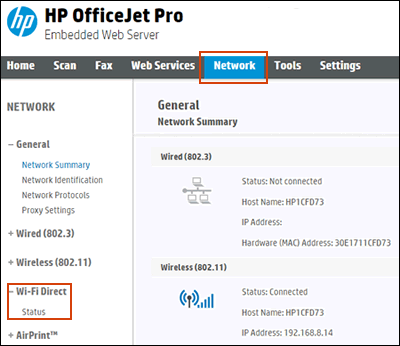
  4. Click or tap Network, click Wi-Fi Direct, and then click or tap Status.

    A message displays that you are being redirected to a secure HTTPS-enabled page. Click or tap OK or Redirect to HTTPS. If a Your connection is not private message displays, click or tap Advanced, and then click or tap Proceed to [Printer IP address].

    Opening the Wi-Fi Direct status details

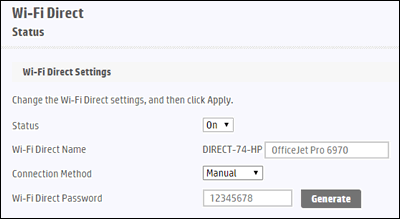
  5. On the Wi-Fi Direct Status screen, click or tap Edit Settings to make any changes, and then click or tap Apply.

    Changing Wi-Fi Direct settings

Hope this helps! Keep me posted for further assistance.
Please click “
Accept as Solution” if you feel my post solved your issue, it will help others find the solution.

ECHO_LAKE
I am an HP Employee

† The opinions expressed above are the personal opinions of the authors, not of HP. By using this site, you accept the <a href="https://www8.hp.com/us/en/terms-of-use.html" class="udrlinesmall">Terms of Use</a> and <a href="/t5/custom/page/page-id/hp.rulespage" class="udrlinesmall"> Rules of Participation</a>.