
-
×InformationNeed Windows 11 help?Check documents on compatibility, FAQs, upgrade information and available fixes.
Windows 11 Support Center. -
-
×InformationNeed Windows 11 help?Check documents on compatibility, FAQs, upgrade information and available fixes.
Windows 11 Support Center. -
- HP Community
- Printers
- Printer Wireless, Networking & Internet
- Re: Unexpected Change in Printer email

Create an account on the HP Community to personalize your profile and ask a question
Your account also allows you to connect with HP support faster, access a personal dashboard to manage all of your devices in one place, view warranty information, case status and more.
Common problems for Connectivity Issues
We would like to share some of the most frequently asked questions about Printer Wi-Fi, Connectivity Issues and Offline Status. Check out this link: HP printer is offline or unavailable.

It has been a while since anyone has replied. Simply ask a new question if you would like to start the discussion again.

11-10-2020 10:20 PM
 HP Recommended
Product: HP Officejet Pro 8600 Plus
A page was printed providing a new HP ePrint email address which was not changed by us. The printer is approx 8 years old, and our daughter recently experienced the same thing on her printer. Has anyone else had this occur with their printers? I really want to change it back but keep getting error messages. Any suggestions would be most appreciative.
13 REPLIES 13



11-19-2020 12:40 PM
HP Recommended
Hi @NCMimi,
I'd like to help!
The email address change could be because of the firmware update.
You can change your eprint address back, refer -Change Your HP ePrint Email Address
Hope this helps! Keep me posted.
And, Welcome to the HP Support Community.
Please click “Accept as Solution” if you feel my post solved your issue, it will help others find the solution.
Click the “Kudos, Thumbs Up" on the bottom right to say “Thanks” for helping
12-05-2020 07:25 AM
HP Recommended
Hi,
I tried the suggested procedure but unfortunately the web page doesn't work.
I logged into the HP smart website, selected my printer, scrolled down, inputted a new email address and clicked 'Save'. The web page said that the email already exited and it logged me off. I logged in again and inputed a random email address, the error came up and logged me off again. I've been trying to change the email address for months now and it never works.
Could you help us with that?
12-05-2020 10:43 AM
HP Recommended
Hi @BRiccardo,
I'd like to help!
May I have the exact model name of the product? Refer to this document for steps to find the product details. Do not share any of your personal information such as serial, phone number, email ID, etc.
Keep me posted.
And, Welcome to the HP Support Community.
Please click “Accept as Solution” if you feel my post solved your issue, it will help others find the solution.
Click the “Kudos, Thumbs Up" on the bottom right to say “Thanks” for helping
12-06-2020 10:04 AM
HP Recommended
Were you successful in changing the printer's email address?
Try the below suggestions-
The printer HP ePrint email address is different from the personal email address you used to set up your HP account. Open the HP account settings to change your personal email address.
-
Sign in to HP Smart, and then click the Account icon
 at the top of the webpage.
 -
Select Settings, and then scroll down to Account information.
-
Select the Edit icon
 next to Primary email address.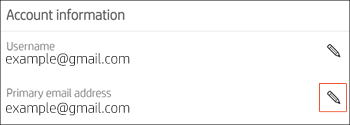
-
Change the email address, and then click Save.
-
Repeat these steps to change the Username, if necessary.
Keep me posted!
12-06-2020 10:26 AM
HP Recommended
No, nothing seems to work.
I'm not trying to change the email address of the account.
I'm trying to change the email address of the printer. The one you send documents to be printed when you're away from home. It ends in @hpeprint.com
12-06-2020 12:37 PM
HP Recommended
Let's disable webservices and re-enable it
--->Touch on the wifi icon ((i)) on the printer, and take down the IP address
--->Open a web browser (ex Chrome or Mozilla) and type in the printer's IP
---> click on webservices and remove webservices and re-enable it
An information page would print, then try and login to the account and check if you are able to change the eprint address.
Keep me posted!

Be alert for scammers posting fake support phone numbers and/or email addresses on the community.
If you think you have received a fake HP Support message, please report it to us by clicking on "Flag Post".
† The opinions expressed above are the personal opinions of the authors, not of HP. By using this site, you accept the Terms of Use and Rules of Participation.


Didn't find what you were looking for?
Ask the community
† The opinions expressed above are the personal opinions of the authors, not of HP. By using this site, you accept the <a href="https://www8.hp.com/us/en/terms-of-use.html" class="udrlinesmall">Terms of Use</a> and <a href="/t5/custom/page/page-id/hp.rulespage" class="udrlinesmall"> Rules of Participation</a>.