• ×
    Information
    Need Windows 11 help?
    Check documents on compatibility, FAQs, upgrade information and available fixes.
    Windows 11 Support Center.
  • post a message
  • ×
    Information
    Need Windows 11 help?
    Check documents on compatibility, FAQs, upgrade information and available fixes.
    Windows 11 Support Center.
  • post a message
Guidelines

Featured blog article:

Common problems for Connectivity Issues
We would like to share some of the most frequently asked questions about Printer Wi-Fi, Connectivity Issues and Offline Status. Check out this link: HP printer is offline or unavailable.

HP Recommended
HP OfficeJet Pro 9730e Wide Format All-in-One Printer

Is it possible to remotely wake uo the 9730e with a wake on lan signal or something similar? 

3 REPLIES 3
HP Recommended

Hi @TheOnlyAndyT 
 
Welcome to the HP Support Community!

Thanks for reaching out!
 

I understand you would like to remotely wake your HP OfficeJet Pro 9730e Wide Format All-in-One Printer using Wake-on-LAN.


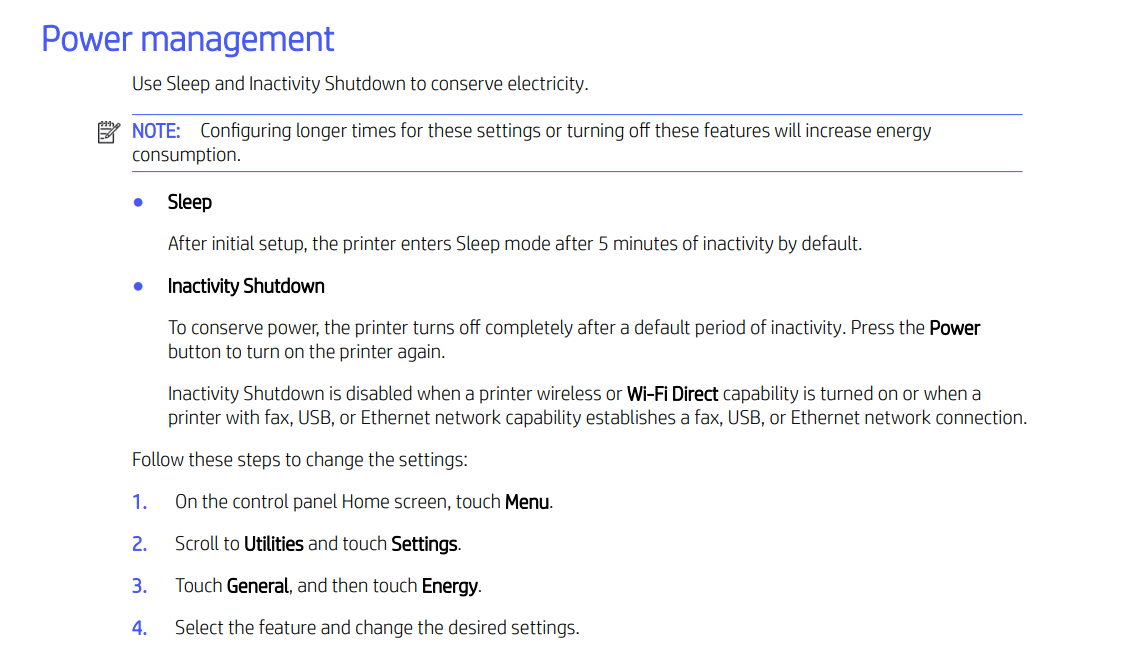
The printer has power-management and Sleep functionality, however, I could not find an HP-documented option for enabling traditional Wake-on-LAN using a magic packet on this model.


Kindly keep the printer powered on and connected to the network, allow it to enter Sleep mode, and test whether sending a print job wakes it automatically. Also, kindly make sure the printer has the latest firmware installed, as HP recommends firmware updates for network connectivity improvements on the 9730 series.


You can also review the HP OfficeJet Pro 9730e Setup and User Guides for the available power and network settings.

To explain further  Wake-on-LAN normally requires the device to support listening for a special network magic packet. For the 9730e, HP does not currently document a user-configurable WoL feature, so the recommended approach is to leave the printer powered on and allow its built-in Sleep mode to manage power while testing normal network print-job wake behaviour.


I hope this helps. 


I'm an HP Employee.


If this reply helped resolve your issue, please select the Accept as Solution as it helps others in the community quickly find the answer they’re looking for.


And if you found this reply helpful, clicking Yes below is a great way to let us know we’re providing the support you need, as it encourages us to keep improving and sharing helpful guidance.

HP Recommended

Thanks

Not the answer I wished for but if that is the sway it is nothing we can do about it. 

I thought the Wake on LAN  state was more energy efficient.

Hey ho. 

Thanks again. 

HP Recommended

Hi @TheOnlyAndyT,

Thank you for your understanding. I certainly understand why you were hoping to use Wake-on-LAN. We appreciate you sharing your feedback, and I hope the built-in Sleep mode works well for your setup.
 

Kindly let us know if there is anything else we can help you with.


I'm an HP Employee.


If this reply helped resolve your issue, please select the Accept as Solution as it helps others in the community quickly find the answer they’re looking for.


And if you found this reply helpful, clicking Yes below is a great way to let us know we’re providing the support you need, as it encourages us to keep improving and sharing helpful guidance.

† The opinions expressed above are the personal opinions of the authors, not of HP. By using this site, you accept the <a href="https://www8.hp.com/us/en/terms-of-use.html" class="udrlinesmall">Terms of Use</a> and <a href="/t5/custom/page/page-id/hp.rulespage" class="udrlinesmall"> Rules of Participation</a>.
-->