• ×
    Information
    Need Windows 11 help?
    Check documents on compatibility, FAQs, upgrade information and available fixes.
    Windows 11 Support Center.
  • post a message
  • ×
    Information
    Need Windows 11 help?
    Check documents on compatibility, FAQs, upgrade information and available fixes.
    Windows 11 Support Center.
  • post a message
Guidelines
Join the HP Community Solve‑a‑thon | Help Others & Share Your Solutions | Live on Zoom | 2:30 PM to 2:30 AM IST | Every Wednesday Click here to know more
Common problems for Connectivity Issues
We would like to share some of the most frequently asked questions about Printer Wi-Fi, Connectivity Issues and Offline Status. Check out this link: HP printer is offline or unavailable.
HP Recommended
HP ENVY 6055 All-In-One Printer
Microsoft Windows 10 (64-bit)

printer constantly goes offline.  Why?  

1 REPLY 1
HP Recommended

@Hardbop 


Welcome to the HP Community Forum.


@Hardbop wrote:

printer constantly goes offline.  Why?  


Typical "why" reasons include and are not limited to:

  • Poor connection to the router / network - frequency (band), router channel, distance, obstructions, or related issues
  • Incomplete or incorrect network configuration - router and or computer are not fully configured to maintain the connection
  • Connection type - for example, on the computer side, change the connection type to TCP/IP
  • Missing or incorrect SSID named network - this is related to configuration and / or the type of Network (standard / mesh).  For example, Printers do not hop between frequencies on Dual Band Networks.  Create an SSID named network for each frequency (band) and connect the printer to the SSID network you want it to use.  Reference: 

    HP Envy 6055e |6455e | HP Envy 6055 | HP Envy Pro 6455 : How to connect to 5GHz wireless network

  • Router outdated, weak, no longer suited to the task


Solutions vary and depend on your situation.


Start here...


Restart Everything, including the router that controls your network

Next,

Known solutions, presented in the order to be completed / considered

  HP printer is offline or not responding - Windows / Mac  


=+=+=+=+=+=+=+=+=+=+=+=+=+=+=+=+=+=+=+=+=

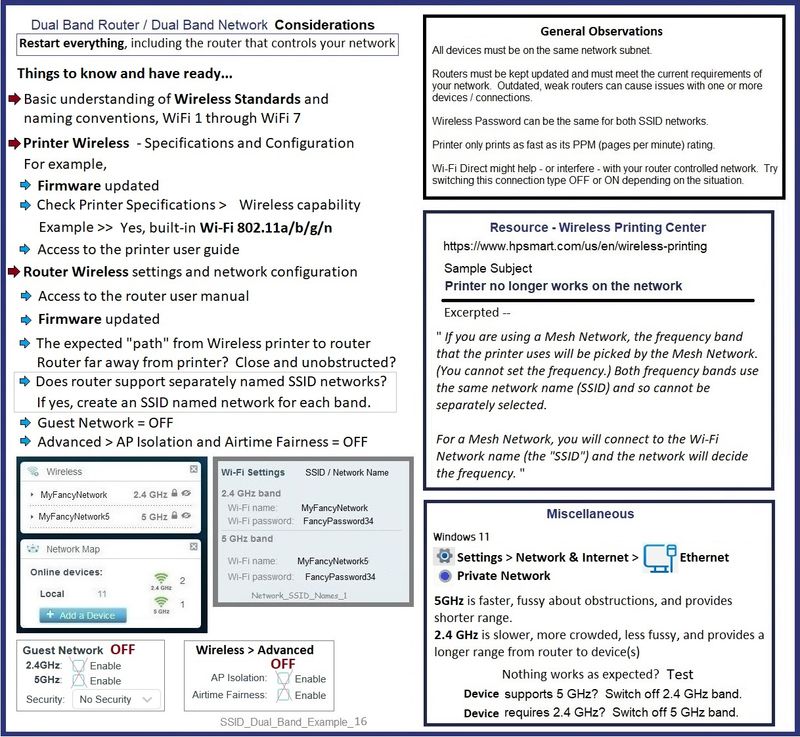
Example - Dual Band Network - Considerations

SSID_Dual_Band_Example_16SSID_Dual_Band_Example_16


=+=+=+=+=+=+=+=+=+=+=+=+=+=+=+=+=+=+=+=+=

HP Printer Home Page - References and Resources

Learn about your Printer  - Solve Problems

“Things that are your printer”

When the website support page opens, Select (as available) a Category > Topic Subtopic

NOTE:  Content depends on device type and Operating System

Categories:  Alerts, Access to the Print and Scan Doctor (Windows), Warranty Check, HP Drivers / Software / Firmware Updates, How-to Videos, Bulletins/Notices, Lots of How-to Documents, Troubleshooting, Manuals > User Guides, Product Information (Specifications), Supplies, and more

Open

HP ENVY 6055 All-In-One Printer 


Thank you for participating in the HP Community --

People who own, use, and support HP devices.

Click Yes to say Thank You

Question / Concern Answered, Click "Accept as Solution"


Dragon-Fur

† The opinions expressed above are the personal opinions of the authors, not of HP. By using this site, you accept the <a href="https://www8.hp.com/us/en/terms-of-use.html" class="udrlinesmall">Terms of Use</a> and <a href="/t5/custom/page/page-id/hp.rulespage" class="udrlinesmall"> Rules of Participation</a>.