
-
×InformationNeed Windows 11 help?Check documents on compatibility, FAQs, upgrade information and available fixes.
Windows 11 Support Center. -
-
×InformationNeed Windows 11 help?Check documents on compatibility, FAQs, upgrade information and available fixes.
Windows 11 Support Center. -
- HP Community
- Printers
- Printer Wireless, Networking & Internet
- Wifi connection issues

Create an account on the HP Community to personalize your profile and ask a question
Your account also allows you to connect with HP support faster, access a personal dashboard to manage all of your devices in one place, view warranty information, case status and more.
Common problems for Connectivity Issues
We would like to share some of the most frequently asked questions about Printer Wi-Fi, Connectivity Issues and Offline Status. Check out this link: HP printer is offline or unavailable.

It has been a while since anyone has replied. Simply ask a new question if you would like to start the discussion again.

9 REPLIES 9


05-13-2022 11:34 AM
 HP Recommended
Hi @createdpcbypc,
Welcome to the HP Support Community.
I'd like to help!
I understand you are trying to connect the printer to the old network
Please try the steps below to connect your printer to the network.-
● Press the Wireless button ((i)) and the Cancel button (X) from the printer control panel at the same time, and then hold them for three seconds.
-->On the printer control panel, press and hold the Wireless button and the Resume button together for three seconds. (When Wi-Fi Direct is turned on, the Wi-Fi Direct icon on the display stays on)
--->On your computer or phone go to wifi and connect it to your printer
--->Select your printer with DIRECT in the name from the list of available networks (example: DIRECT-74-HP Deskjet2700).
--->Select the Wi-Fi Direct printer signal in Wi-Fi settings
--->If prompted for a password, type 12345678. This is the default password to log in.
--->Now open a browser and type 192.168.223.1
--->you will be able to access the printer's EWS page
--->on the page, you will find network - click on it
--->go to wireless and select wireless setup wizard
--->now select the network that you want your printer to connect to and type in the password
--->the printer will have solid blue light if it's connected
--->then connect your phone back to your network
You may also refer to - No Connection after Router or Wi-Fi Settings Change
Hope this helps! Keep me posted.
Please click “Accept as Solution” if you feel my post solved your issue, it will help others find the solution.
Click the “Yes" on the bottom right to say “Thanks” for helping
05-13-2022 01:07 PM
HP Recommended
Can you print and share the wireless test report?
On the printer's control panel, press the Wireless button  and the Information button
  at the same time.
Both a Wireless Network Test Report and a Network Configuration Page print.
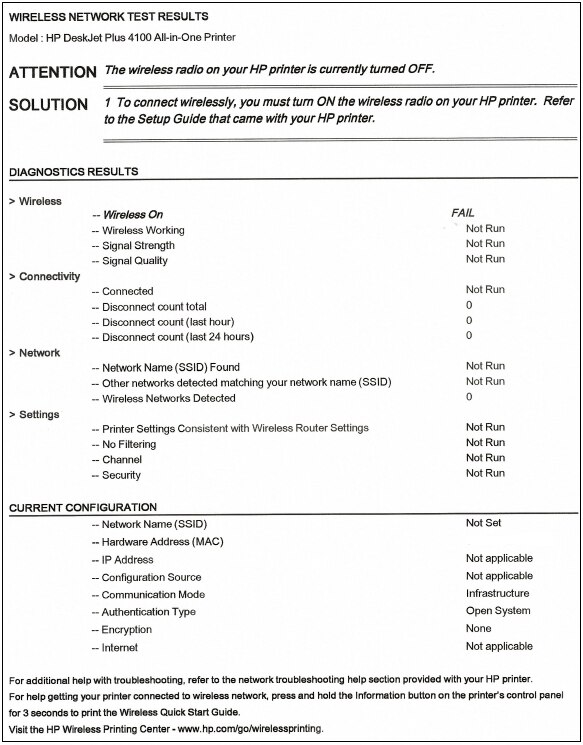
Let me know!
05-15-2022 01:44 PM
HP Recommended
Please send us a private message with your Instant Ink account details or you may also respond to the private message I've sent out and I'll help you out, accordingly. Check next to your profile name, you should see a little blue envelope, please click on it.
Let me know.

Be alert for scammers posting fake support phone numbers and/or email addresses on the community.
If you think you have received a fake HP Support message, please report it to us by clicking on "Flag Post".
† The opinions expressed above are the personal opinions of the authors, not of HP. By using this site, you accept the Terms of Use and Rules of Participation.


Didn't find what you were looking for?
Ask the community
† The opinions expressed above are the personal opinions of the authors, not of HP. By using this site, you accept the <a href="https://www8.hp.com/us/en/terms-of-use.html" class="udrlinesmall">Terms of Use</a> and <a href="/t5/custom/page/page-id/hp.rulespage" class="udrlinesmall"> Rules of Participation</a>.