• ×
    Information
    Need Windows 11 help?
    Check documents on compatibility, FAQs, upgrade information and available fixes.
    Windows 11 Support Center.
  • post a message
  • ×
    Information
    Need Windows 11 help?
    Check documents on compatibility, FAQs, upgrade information and available fixes.
    Windows 11 Support Center.
  • post a message
Guidelines
Join the HP Community Solve‑a‑thon | Help Others & Share Your Solutions | Live on Zoom | 2:30 PM to 2:30 AM IST | Every Wednesday Click here to know more
Common problems for Connectivity Issues
We would like to share some of the most frequently asked questions about Printer Wi-Fi, Connectivity Issues and Offline Status. Check out this link: HP printer is offline or unavailable.
HP Recommended
office jet 9020
Microsoft Windows 10 (64-bit)

I have hp instant ink subscription. Got a message saying ink is low when printing. Went to instant ink page on web and under notifications it says my printer is not connected to internet. When  I click on status the printer syncs and  the page tells me how many pages i have used and have left. Yet the red notification remains saying printer not connected to internet. What is going on? Thanks, Jeramy

1 REPLY 1
HP Recommended

@jfrankine


Welcome to the HP support community.


Check the Internet proxy server settings

  1. Locate the Internet proxy settings.

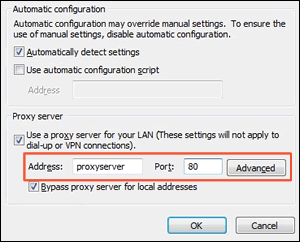
    • Windows: Search Windows for Internet, and then click Internet Options in the list of results. On the Internet Properties window, click the Connections tab, select your network, if necessary, and then click Settings.

      The network settings menu displays with the proxy settings.

      Figure : Example of proxy settings in Windows

      Example of proxy settings in Windows
    • Write down the Address and Port values for your proxy server connection.
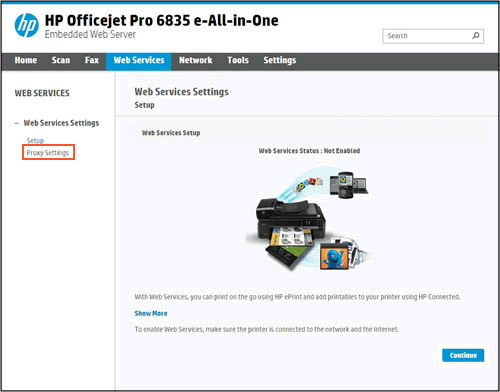
  2. From the EWS, click the Web Services tab, and then click Proxy Settings.

    Figure : Clicking Proxy Settings

    Clicking Proxy Settings
  3. Type the Address and Port values for your proxy server connection, and then click Apply.

  4. Try to turn on Web Services.

You can refer this HP document for more assistance:- Click here


Let me know how it goes.

To thank me for my efforts to help you, please mark my post as an accepted solution so that it benefits several others.

Cheers.

Sandytechy20
I am an HP Employee

† The opinions expressed above are the personal opinions of the authors, not of HP. By using this site, you accept the <a href="https://www8.hp.com/us/en/terms-of-use.html" class="udrlinesmall">Terms of Use</a> and <a href="/t5/custom/page/page-id/hp.rulespage" class="udrlinesmall"> Rules of Participation</a>.