• ×
    Information
    Need Windows 11 help?
    Check documents on compatibility, FAQs, upgrade information and available fixes.
    Windows 11 Support Center.
  • post a message
  • ×
    Information
    Need Windows 11 help?
    Check documents on compatibility, FAQs, upgrade information and available fixes.
    Windows 11 Support Center.
  • post a message
Guidelines
Seize the moment! nominate yourself or a tech enthusiast you admire & join the HP Community Experts!
Archived This topic has been archived. Information and links in this thread may no longer be available or relevant. If you have a question create a new topic by clicking here and select the appropriate board.

HP Recommended
HP office jet 7510 wide format
Microsoft Windows 10 (32-bit)

Just bought my print not long ago.


However the top part of the document did not get to print out only the bottom to middle part of the document get to print out it affect my PDF, Microsoft word and printing from the website all having these problem.


My window 10 just get update on March 16 not sure if it is related to the upgrading all the printing have gone haywire.

6 REPLIES 6
HP Recommended

Hi @ALVIN-3,

Welcome to the HP Support Forums! It is a great place to find the help you need, from other users, HP experts, and other support personnel. I understand you are having an issue with the top of print is missing. I will be glad to help you.


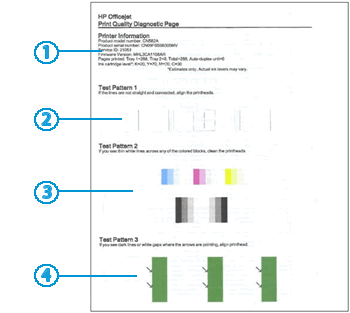
I wish to test the printer first. Can you do A Print Quality diagnostic report for me. 


A Print Quality Diagnostic Report helps identify the source of print quality issues.

  1. Load U.S. Letter or A4 size, unused, plain white paper into the input tray.

  2. On the printer control panel, swipe the display to the left, and then touch Setup (). The Setup menu displays.

  3. Swipe up on the display, touch Reports, and then touch Print Quality Report. A Print Quality Diagnostic Page prints.

Figure : Example of the Print Quality Diagnostic Page

Image: Example of the Print Quality Diagnostic Page

  1. Printer information

  2. Test Pattern 1

  3. Test Pattern 2

  4. Test Pattern 3

Did it print the top of page per image supplied?

Tell me how each pattern is?


Can you make a black copy please.

Did tthe copy come out ok?


Please get back to me and I will continue to help you.


Tardis40
I work on behalf of HP
Please click Accept as Solution if you feel my post solved your issue, it will help others find the solution.
Click Kudos Thumbs Up on the right to say “Thanks” for helping!
HP Recommended

Capture 1.JPG

HP Recommended

This is what I get while printing out from the microsoft document the top part was cut off.

HP Recommended

Capture 2.JPG

HP Recommended

The second piece this was the end result while print out mutiple pages out the whole page get slanted and printed out the same problem top part get cut off.

HP Recommended

Hi to all expertise in this area is there any way to solve this problem?

Archived This topic has been archived. Information and links in this thread may no longer be available or relevant. If you have a question create a new topic by clicking here and select the appropriate board.
† The opinions expressed above are the personal opinions of the authors, not of HP. By using this site, you accept the <a href="https://www8.hp.com/us/en/terms-of-use.html" class="udrlinesmall">Terms of Use</a> and <a href="/t5/custom/page/page-id/hp.rulespage" class="udrlinesmall"> Rules of Participation</a>.