
-
×InformationNeed Windows 11 help?Check documents on compatibility, FAQs, upgrade information and available fixes.
Windows 11 Support Center. -
-
×InformationNeed Windows 11 help?Check documents on compatibility, FAQs, upgrade information and available fixes.
Windows 11 Support Center. -
- HP Community
- Printers
- Scanning, Faxing, and Copying
- Re: 5740: 2-sided scanning (duplex) using ADF

Create an account on the HP Community to personalize your profile and ask a question
Your account also allows you to connect with HP support faster, access a personal dashboard to manage all of your devices in one place, view warranty information, case status and more.
Common problems HP Solution Center not working : Adobe Flash Player Error and Unable to scan
We would like to share some of the most frequently asked questions about HP Solution Center not working : Adobe Flash Player Error and Unable to Scan.

It has been a while since anyone has replied. Simply ask a new question if you would like to start the discussion again.

09-10-2016 05:12 AM
 HP Recommended
If anyone else is following this thread I have found a programme "NAPS2" that has a feature that will automatically sort (reverse interleave) a doublesided document scanned on a NON duplex ADF such as on 5740 series.

09-10-2016 05:24 AM
HP Recommended
So will this program...
HP Scan Extended
ftp://ftp.hp.com/pub/scanners/HPScanExt/HPScanExt.msi For Windows.
Once it's downloaded and installed, go to Start > All Programs > HP > HP Scan Extended > Run "HP Scan Extended"
09-10-2016 09:12 AM
HP Recommended
Thanks for that bit of info Sabretooth04 it all appears to work fine.
Why oh Why could HP not included that as standard? Whilst I am on a moan "HP Scan Extended" does not appear to integrate with the "HP Officejet 5740 series" software so two programmes to open to use all teh functions of the printer (havent restarted the computer though). HP I think you can do better.
09-10-2016 09:17 AM
HP Recommended
HP Scan Extended is a stand alone TWAIN program that works on many other manufacturers printer/scanners. It does not integrate into the front display of the printers, as you have seen.
Only the Full Featured Software and Drivers version will you be able to Scan from Printer to computer as far as I know.
09-24-2016 04:54 PM
HP Recommended
I agree with Bob. I am also having this problem.
It used to work fine so I can ABSOLUTELY confirm that the printer is ABLE to scan double sided and put the pages in the proper order.
The problem does seem to work with the latest version of the software - i used "Full_Webpack-40.2.1073-0J5740_Full_Webpack" version from their site. The HP Scan (2014 and earlier) software works fine.
Specifically it seems related to the HP printer assistant.
I cannot seem to get by this and "downgrade" to the HP Scan that worked before.
09-25-2016 03:58 AM
HP Recommended
I did go to the effort of phoning HP support to raise this issue but got nowhere meaningful and I ran out of enthusiasme.
However I can now scan multipage two sided documents by running the document through the scanner twice (making sure the document is the correct way up second time through!!) using the HP scan extended software and it will sort the scanned document into the correct order.
Sadly HP Scan extended does not integrate into the HP 5740 suite of software.
Thanks to all who assisted
09-25-2016 06:32 AM
HP Recommended
@BobT1 wrote:If anyone else is following this thread I have found a programme "NAPS2" that has a feature that will automatically sort (reverse interleave) a doublesided document scanned on a NON duplex ADF such as on 5740 series.
Actually it's called Alternate Interleave under Reorder. You have to click on that to perform the reorder of pages. Works good too, like you said.
It's not automatic so you can continue to scan 2 sided for a long as you want.
@you wrote:
> Sadly HP Scan extended does not integrate into the HP 5740 suite of software.
I can't see in your previous post that you fully removed the HP software and reinstalled the Full Featured Software and Drivers from the HP web site.
Please try this if you have not done so already.
09-28-2016 06:04 PM
HP Recommended
I too was somewhat surprise that a recent "update" of the 5740 sw did nothing to improve performance that I could notice, just had me go thru the time and motions of installing the "improved" program replacing that which I had orginally installed in Dec 2015. When I saw that I could no longer select 2-sided scan, I uninstalled the sw and reinstalled my original sw for the HP 5740, OJ5740_117.exe. Now that I've "downgraded" my sw, the 2-sided scanning switch option is available and works perfectly. WHY does HP fix things that aren't broke?

08-18-2018 12:47 PM
HP Recommended
Bob-99...great tip...I was stuck on this...and when I got to the first comment, I was afraid that I would have to go the long route...I am now in the middle of copying my manual, and it is going great...many thanks!
~R~
08-19-2018 09:07 PM
HP Recommended
I just downloaded the HP Scan Extended application and use that.
Gives a full range of options for saving as PDF and Jpeg.
Here is a screen shot:
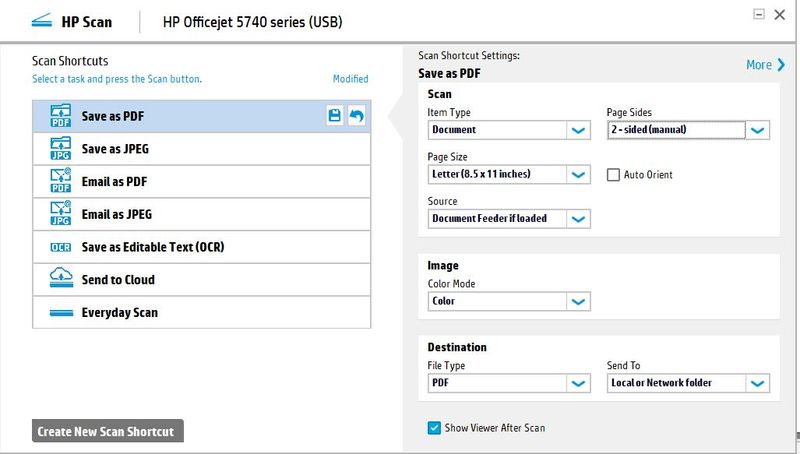
This is a link to the software as posted by Green Turtle back in 01-11-2011 so not sure if still available or not.
ftp://ftp.hp.com/pub/scanners/HPScanExt/HPScanExt.msi
I am using it with a pc upgraded to Windows 10 from Windows 8.1
- « Previous
-
- 1
- 2
- Next »

Be alert for scammers posting fake support phone numbers and/or email addresses on the community.
If you think you have received a fake HP Support message, please report it to us by clicking on "Flag Post".
† The opinions expressed above are the personal opinions of the authors, not of HP. By using this site, you accept the Terms of Use and Rules of Participation.


Didn't find what you were looking for?
Ask the community
† The opinions expressed above are the personal opinions of the authors, not of HP. By using this site, you accept the <a href="https://www8.hp.com/us/en/terms-of-use.html" class="udrlinesmall">Terms of Use</a> and <a href="/t5/custom/page/page-id/hp.rulespage" class="udrlinesmall"> Rules of Participation</a>.