
-
×InformationNeed Windows 11 help?Check documents on compatibility, FAQs, upgrade information and available fixes.
Windows 11 Support Center. -
-
×InformationNeed Windows 11 help?Check documents on compatibility, FAQs, upgrade information and available fixes.
Windows 11 Support Center. -
- HP Community
- Printers
- Scanning, Faxing, and Copying
- Auto duplex printing (single-pass)

Create an account on the HP Community to personalize your profile and ask a question
Your account also allows you to connect with HP support faster, access a personal dashboard to manage all of your devices in one place, view warranty information, case status and more.
Common problems HP Solution Center not working : Adobe Flash Player Error and Unable to scan
We would like to share some of the most frequently asked questions about HP Solution Center not working : Adobe Flash Player Error and Unable to Scan.

It has been a while since anyone has replied. Simply ask a new question if you would like to start the discussion again.

02-03-2026 11:50 AM
 HP Recommended
What HP printer with auto duplex scanning single-pass is better than hp 9125e?
Solved! Go to Solution.
1 ACCEPTED SOLUTION
Accepted Solutions


02-08-2026 01:53 AM
HP Recommended
Thanks for replying.
Great question — let’s break this down clearly so you can make the best choice without overspending.
Key Considerations
- Single-pass duplex scanning: The HP OfficeJet Pro 9125e does support auto duplex scanning in a single pass, so it already meets your requirement.
- Budget (~$200): This narrows options, since most enterprise-class or laser models with advanced duplex scanning cost more.
- Inkjet vs. Laser: Inkjets (like OfficeJet Pro) are cheaper upfront, while lasers (like Color LaserJet Pro) cost more but handle higher volumes.
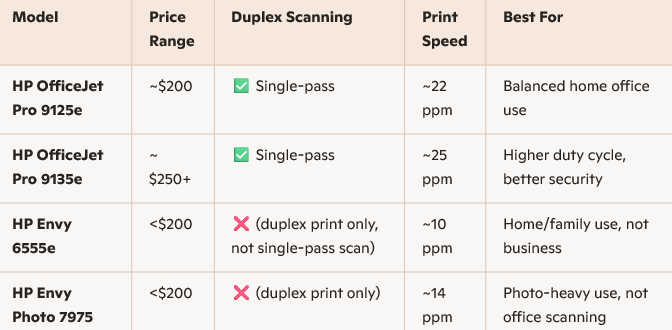
Comparison of Options in Your Price Range
Trade-offs & Limitations
- Under $200: You’ll mostly find Envy models, which do not have single-pass duplex scanning — they only support duplex printing.
- 9125e: It’s essentially the lowest-cost model that still gives you single-pass duplex scanning. Anything cheaper will drop that feature.
- 9130/9135e and Laser models: Superior, but priced higher ($250–$400+).
Recommendation
If single-pass duplex scanning is essential and you want to stay near $200, the HP OfficeJet Pro 9125e is your best option.
If you can stretch slightly above $200, the HP OfficeJet Pro 9135e is worth it for faster speeds, better paper handling, and stronger security.
Regards,
Hawks_Eye
I'm an HP Employee.
If this reply helped resolve your issue, please select the Accept as Solution as it helps others in the community quickly find the answer they’re looking for.
And if you found this reply helpful, clicking Yes below is a great way to let us know we’re providing the support you need, as it encourages us to keep improving and sharing helpful guidance.
5 REPLIES 5
02-05-2026 05:29 AM
HP Recommended
Hi @Enter4
Welcome to the HP Support Community! We're here to help you get back up and running.
For a superior HP printer with single-pass auto duplex scanning compared to the HP OfficeJet Pro 9125e, consider the HP OfficeJet Pro 9130b or the HP Color LaserJet Pro MFP 4301fdw. These models offer faster speeds, enhanced security, and better duty cycles for business-class performance.
Here are top HP printers that outperform the HP OfficeJet Pro 9125e in single-pass duplex scanning and overall capabilities:
HP OfficeJet Pro 9130b All-in-One Printer
- Direct successor to the 9125e, offering improved performance and reliability.
- Single-pass duplex scanning with faster scan speeds and better paper handling.
- Print speed: Up to 25 ppm (black/color), faster than the 9125e.
- Monthly duty cycle: Up to 30,000 pages, ideal for high-volume offices.
- HP Wolf Pro Security for advanced protection.
- Smart Admin Dashboard for centralized management of multiple printers.
HP Color LaserJet Pro MFP 4301fdw
- Laser-class performance with single-pass duplex scanning.
- Print speed: Up to 35 ppm (black/color), significantly faster than inkjets.
- High-quality color output, ideal for professional documents.
- Robust security features and mobile printing support.
- Recommended monthly volume: 750 to 4,000 pages.
HP LaserJet Enterprise MFP M480f
- Enterprise-grade laser printer with single-pass duplex scanning.
- Print speed: Up to 29 ppm.
- Advanced workflow features including customizable shortcuts and secure printing.
- Ideal for small to medium businesses needing reliable, high-volume performance.
HP PageWide Pro 577dw
- PageWide technology delivers laser-like speed with inkjet efficiency.
- Single-pass duplex scanning with fast scan and print speeds.
- Print speed: Up to 50 ppm (black/color).
- Lower cost per page than traditional laser printers.
- High monthly duty cycle: Up to 50,000 pages.
Would you prefer inkjet or laser technology? And is color printing essential for your use case? I can help narrow it down further based on your specific needs.
If my response helped, please mark it as an Accepted Solution! ✅ It helps others and spreads support. 💙 Also, tapping "Yes" on "Was this reply helpful?" makes a big difference! Thanks! 😊
Take care, and have an amazing day!
Regards,
Hawks_Eye
I'm an HP Employee.
If this reply helped resolve your issue, please select the Accept as Solution as it helps others in the community quickly find the answer they’re looking for.
And if you found this reply helpful, clicking Yes below is a great way to let us know we’re providing the support you need, as it encourages us to keep improving and sharing helpful guidance.
02-05-2026 11:47 AM
HP Recommended
Thank you for taking the time to reply to my question. I did look up each of your suggestions and think any of those would be fine for me. I need to narrow my search for a printer somewhere in the lower $200 range. Will the HP 9125e handle auto duplex printing with a single-pass? Is there another one in this lower price range that would also be acceptable? Thank you.
02-08-2026 01:53 AM
HP Recommended
Thanks for replying.
Great question — let’s break this down clearly so you can make the best choice without overspending.
Key Considerations
- Single-pass duplex scanning: The HP OfficeJet Pro 9125e does support auto duplex scanning in a single pass, so it already meets your requirement.
- Budget (~$200): This narrows options, since most enterprise-class or laser models with advanced duplex scanning cost more.
- Inkjet vs. Laser: Inkjets (like OfficeJet Pro) are cheaper upfront, while lasers (like Color LaserJet Pro) cost more but handle higher volumes.
Comparison of Options in Your Price Range
Trade-offs & Limitations
- Under $200: You’ll mostly find Envy models, which do not have single-pass duplex scanning — they only support duplex printing.
- 9125e: It’s essentially the lowest-cost model that still gives you single-pass duplex scanning. Anything cheaper will drop that feature.
- 9130/9135e and Laser models: Superior, but priced higher ($250–$400+).
Recommendation
If single-pass duplex scanning is essential and you want to stay near $200, the HP OfficeJet Pro 9125e is your best option.
If you can stretch slightly above $200, the HP OfficeJet Pro 9135e is worth it for faster speeds, better paper handling, and stronger security.
Regards,
Hawks_Eye
I'm an HP Employee.
If this reply helped resolve your issue, please select the Accept as Solution as it helps others in the community quickly find the answer they’re looking for.
And if you found this reply helpful, clicking Yes below is a great way to let us know we’re providing the support you need, as it encourages us to keep improving and sharing helpful guidance.
02-09-2026 09:29 AM
HP Recommended
You are welcome!
Great follow‑up question. When I mentioned stronger security on the HP OfficeJet Pro 9135e, I was referring to the additional protections built into its design compared to lower‑tier models like the 9125e.
Here’s what that means in practice:
- HP+ Platform Integration
- Firmware Updates & Protections
- Cloud Connectivity & Access Control
Why It Matters
- Protection Against Counterfeit Supplies: Ensures only genuine or properly remanufactured cartridges work, preventing damage and maintaining print quality.
- Reduced Vulnerability: Regular firmware updates help patch potential exploits.
- Controlled Access: Account‑based printing and cloud integration add a layer of user authentication.
In short, the 9135e offers a more robust security framework through HP+ and continuous updates, making it better suited for environments where data integrity and device reliability are priorities.
Regards,
Hawks_Eye
I'm an HP Employee.
If this reply helped resolve your issue, please select the Accept as Solution as it helps others in the community quickly find the answer they’re looking for.
And if you found this reply helpful, clicking Yes below is a great way to let us know we’re providing the support you need, as it encourages us to keep improving and sharing helpful guidance.

Be alert for scammers posting fake support phone numbers and/or email addresses on the community.
If you think you have received a fake HP Support message, please report it to us by clicking on "Flag Post".
† The opinions expressed above are the personal opinions of the authors, not of HP. By using this site, you accept the Terms of Use and Rules of Participation.


Didn't find what you were looking for?
Ask the community
† The opinions expressed above are the personal opinions of the authors, not of HP. By using this site, you accept the <a href="https://www8.hp.com/us/en/terms-of-use.html" class="udrlinesmall">Terms of Use</a> and <a href="/t5/custom/page/page-id/hp.rulespage" class="udrlinesmall"> Rules of Participation</a>.