
-
×InformationNeed Windows 11 help?Check documents on compatibility, FAQs, upgrade information and available fixes.
Windows 11 Support Center. -
-
×InformationNeed Windows 11 help?Check documents on compatibility, FAQs, upgrade information and available fixes.
Windows 11 Support Center. -
- HP Community
- Printers
- Scanning, Faxing, and Copying
- Re: Can not scan from touch screen on HP5255

Create an account on the HP Community to personalize your profile and ask a question
Your account also allows you to connect with HP support faster, access a personal dashboard to manage all of your devices in one place, view warranty information, case status and more.
Common problems HP Solution Center not working : Adobe Flash Player Error and Unable to scan
We would like to share some of the most frequently asked questions about HP Solution Center not working : Adobe Flash Player Error and Unable to Scan.

It has been a while since anyone has replied. Simply ask a new question if you would like to start the discussion again.

06-26-2021 12:24 PM
 HP Recommended
Product: HP5255
Operating System: macOS 11.0 Big Sur
I cant scan from my HP5255 to my Mac (11.4). I get the msg- download HP software and drivers. I have tried everything I can think of. I have uninstalled and reinstalled the printer; have have gone to the HP site and made sure there were no update s for my printer; I have reset the network settings; Turn off/on the printer several times including unplugging it; I have run the fix doctor and nothing is wrong. I can scan if I use the HP smart but it is quicker and easier to use the touch screen. Any thoughts on what I can try next.
Thanks
SL531
Solved! Go to Solution.
1 ACCEPTED SOLUTION
Accepted Solutions


07-06-2021 02:37 AM
HP Recommended
Unfortunately, drivers aren't available for Big Sur at the moment. Once they are available you would be able to scan from the Printer.
If the information I've provided was helpful, give us some reinforcement by clicking the Accepted Solution and Kudos buttons, that'll help us and others see that we've got the answers!
Thanks!
Have a great day!
I am an HP Employee
11 REPLIES 11
06-29-2021 01:14 PM
HP Recommended
Welcome to the HP Support Community.
We'll have to perform a reset on the Printer for this. I have sent you a private message, for more details that cannot be shared in a public post.
Please do check your inbox on the communities page for the private message.
Let me know if this helps.
If the information I've provided was helpful, give us some reinforcement by clicking the Accepted Solution button, that'll help us and others see that we've got the answers!
Thanks!
I am an HP Employee
06-30-2021 02:49 PM
HP Recommended
Please do answer these questions:
- Did you uninstall the software using the uninstaller?
- While installing, did you use bonjour multifunction?
- When you scan from printer front panel - is MAC pc name listed?
Thanks 🙂
I am an HP Employee
06-30-2021 03:03 PM
HP Recommended
Yes I uninstalled using the uninstaller
I dont know what Bojour multifunction is...On the HP setup site it had me downloading HP smart and installing and setting up my printer from there so that is what I did.
when i touch the scan button, it just takes me to the msg...I previous wrote.
06-30-2021 03:24 PM
HP Recommended
Install this software: https://support.hp.com/us-en/drivers/selfservice/swdetails/hp-officejet-5200-all-in-one-printer-seri...
While installing:
When clicked on the plus button to add the Printer, it will list the printer twice, you need to select Bonjour multifunction which will be mentioned on the right hand side of the same screen.
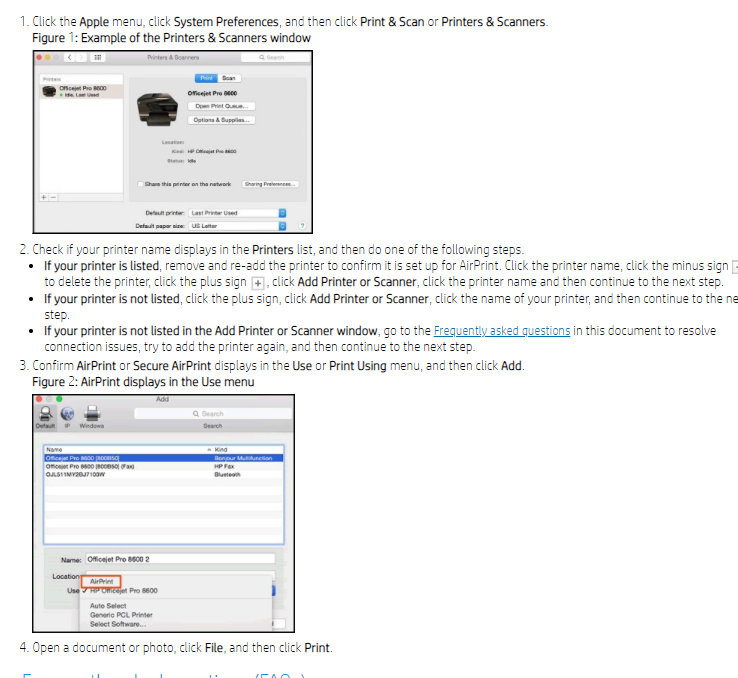
Let me know if this helps.
If the information I've provided was helpful, give us some reinforcement by clicking the Accepted Solution and Kudos buttons, that'll help us and others see that we've got the answers!
Thanks!
Have a great day!
I am an HP Employee
06-30-2021 04:08 PM
HP Recommended
the link that you set me is the same process that I have been doing all along, I download /HP Smart click the plus sign to add the printer again and go through the steps of setting up. At no time do I ever get the Bonjour multifuntion option.
on the print screen, the location says iMac(I have it connected with usb). I can print using AirPrint - tested it by printing something from my phone.
still cant use the scan button on the touch scan
07-06-2021 02:37 AM
HP Recommended
Unfortunately, drivers aren't available for Big Sur at the moment. Once they are available you would be able to scan from the Printer.
If the information I've provided was helpful, give us some reinforcement by clicking the Accepted Solution and Kudos buttons, that'll help us and others see that we've got the answers!
Thanks!
Have a great day!
I am an HP Employee

Be alert for scammers posting fake support phone numbers and/or email addresses on the community.
If you think you have received a fake HP Support message, please report it to us by clicking on "Flag Post".
† The opinions expressed above are the personal opinions of the authors, not of HP. By using this site, you accept the Terms of Use and Rules of Participation.


Didn't find what you were looking for?
Ask the community
† The opinions expressed above are the personal opinions of the authors, not of HP. By using this site, you accept the <a href="https://www8.hp.com/us/en/terms-of-use.html" class="udrlinesmall">Terms of Use</a> and <a href="/t5/custom/page/page-id/hp.rulespage" class="udrlinesmall"> Rules of Participation</a>.