
-
×InformationNeed Windows 11 help?Check documents on compatibility, FAQs, upgrade information and available fixes.
Windows 11 Support Center. -
-
×InformationNeed Windows 11 help?Check documents on compatibility, FAQs, upgrade information and available fixes.
Windows 11 Support Center. -
- HP Community
- Printers
- Scanning, Faxing, and Copying
- Connection issue

Create an account on the HP Community to personalize your profile and ask a question
Your account also allows you to connect with HP support faster, access a personal dashboard to manage all of your devices in one place, view warranty information, case status and more.
Common problems HP Solution Center not working : Adobe Flash Player Error and Unable to scan
We would like to share some of the most frequently asked questions about HP Solution Center not working : Adobe Flash Player Error and Unable to Scan.

It has been a while since anyone has replied. Simply ask a new question if you would like to start the discussion again.

01-27-2020 03:22 AM
 HP Recommended
Product: Deskjet 2620
Operating System: macOS 10.13 High Sierra
Hello,
I'm having some issues connecting my printer. I've been through all the solutions, including turning it off for a minute and turning it on again as well as getting some help from the HP virtual assistant. Unfortunately, after spending several hours trying several solutions, I'm starting to be desperate. Help would be very much appreciated.
Thanks & regards,
Fab
Solved! Go to Solution.
1 ACCEPTED SOLUTION
Accepted Solutions
02-02-2020 03:22 AM
HP Recommended
It's working again. What I did was to erase the app on my Mac, reset the printer, download the app again and start the installation from the beginning through the USB cable (not wifi). Later on, I was giving the choice to connect to wifi. I did it and it worked.
Thanks for your help again.
Regards,
Fab
5 REPLIES 5


01-29-2020 04:21 PM
HP Recommended
I understand your concerns and I would like to help. We need to check few details first and we could try adding the printer as Airprint
- Do you have any Anti-virus software installed on your MAC? If you do, please deactivate it for now.
- Ensure the printer and the MAC are connected to the same wireless network.
-Note:- This printer supports only 2.4GHz network. Do not connect it to 5 GHz Network incase your Router supports both 2.4 and 5 GHz
- If you have a Dual-band router and both 2.4GHz and 5GHz networks share the same name/SSID, then the printer will not be able to connect to the network. In this case, contact your Internet service provider to assign different names to both the networks.
Please check with your Internet service provider if your router is able to forward 'Bonjour packets'. This is very important
Bonjour locates devices such as printers, other computers, and the services that those devices offer on a local network using multicast Domain Name System (mDNS) service records. The software comes built-in with Apple's macOS and iOS operating systems.
Also perform a ping test using the Mac Network Utility and let me know the results. Use the printer IP address to perform a ping test, the printer IP can be located by touching the wireless icon on the printer display or by printing a Network Configuration Page
Next ensure your Mac and Printer have the latest updates
Printer Firmware: https://support.hp.com/in-en/document/c02919168
Mac update: https://support.apple.com/en-us/HT2015
After checking all those details and if the Ping Test is successful, Remove and Re-add the printer using Airprint. AirPrint is an Apple technology that helps you create full-quality printed output without the need to download or install drivers.
1.) Click the Apple menu, click System Preferences, and then click Print & Scan or Printers & Scanners.
2.) Check if your printer name displays in the Printers list, If your printer is listed, click the printer name, click the minus sign  to delete the printer.
3.) If you see multiple printer queues for the same printer, remove all extra printers by selecting them one at a time, and then clicking the minus button at the bottom of the list.
4.) Click the plus sign  , click Add Printer or Scanner, click the printer name.
5.) Click the Use or Print Using menu, select AirPrint or Secure AirPrint in the pop-up menu. Then click Add.
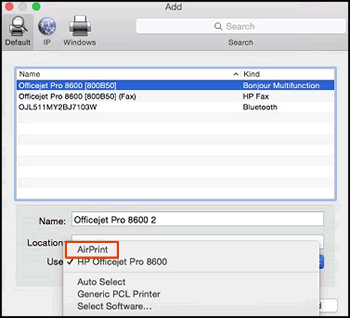
6.) Try to print
Let me know how it goes😊
If the information I've provided was helpful, give us some reinforcement by clicking the "Solution Accepted" on this Post and it will also help other community members with similar issue.
KrazyToad
I Am An HP Employee
02-01-2020 03:44 AM
HP Recommended
Thanks for your help. I've checked everything you asked me to check. The thing is, my printer doesn't appear on AirPrint. I have another HP printers that does appear (an HP OfficeJet 7510) but not the DeskJet 2620 with which I have that issue. I disconnected and reconnected the printer several times, did some resets, but nothing works.
Best regards,
Fab

02-02-2020 03:22 AM
HP Recommended
It's working again. What I did was to erase the app on my Mac, reset the printer, download the app again and start the installation from the beginning through the USB cable (not wifi). Later on, I was giving the choice to connect to wifi. I did it and it worked.
Thanks for your help again.
Regards,
Fab


02-02-2020 03:45 PM
HP Recommended
@Fab973 I'm glad its been sorted,
let us know if you need anything else.
Have a good day.
Riddle_Decipher
I am an HP Employee
Learning is a journey, not a destination.
Let's keep asking questions and growing together.

Be alert for scammers posting fake support phone numbers and/or email addresses on the community.
If you think you have received a fake HP Support message, please report it to us by clicking on "Flag Post".
† The opinions expressed above are the personal opinions of the authors, not of HP. By using this site, you accept the Terms of Use and Rules of Participation.


Didn't find what you were looking for?
Ask the community
† The opinions expressed above are the personal opinions of the authors, not of HP. By using this site, you accept the <a href="https://www8.hp.com/us/en/terms-of-use.html" class="udrlinesmall">Terms of Use</a> and <a href="/t5/custom/page/page-id/hp.rulespage" class="udrlinesmall"> Rules of Participation</a>.