• ×
    Information
    Need Windows 11 help?
    Check documents on compatibility, FAQs, upgrade information and available fixes.
    Windows 11 Support Center.
  • post a message
  • ×
    Information
    Need Windows 11 help?
    Check documents on compatibility, FAQs, upgrade information and available fixes.
    Windows 11 Support Center.
  • post a message
Guidelines
Seize the moment! nominate yourself or a tech enthusiast you admire & join the HP Community Experts!
Common problems HP Solution Center not working : Adobe Flash Player Error and Unable to scan
We would like to share some of the most frequently asked questions about HP Solution Center not working : Adobe Flash Player Error and Unable to Scan.
HP Recommended
OfficeJet Pro 8715

Problem: Copying a document placed on the flatbed is painfully slow. Printing from PC or laptop is normal. 

The printer is very slow -- it seems to be scanning/printing the document as if it's a photo. 


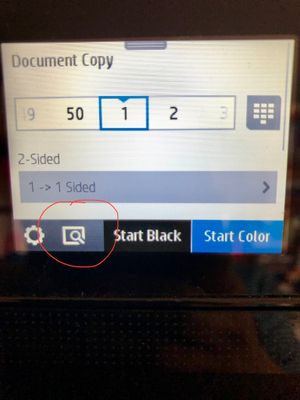
This problem arose after I copied an old 4x6" photo onto plain paper to send in a card. I chose this red circled setting on the screen for photo quality:

Honormaple_0-1617652511182.jpeg

Attempted Solutions:

I have turned off and rebooted the printer twice. No change.

Device was purchased 1/2018 so out of warranty.

I attempted to go to "Copy" setting several times with hope that the copier will reset to normal printing mode. 


I had also done an update during this time and again another update today. None of the updates resolved this issue. Could an update have coincidentally caused this problem?  


I use this copier feature on my All-In-One frequently for my teaching so I am seeking an urgent resolution. 


Thank you to anyone who can assist me. 


2 REPLIES 2
HP Recommended

I would select the gear next to the preview icon you circled in red and make sure you have no accidently set some defaults that are slowing the system down.

If you find the information provided useful or solves your problems, help other users find the solution easier by marking my post as an accepted solution. Clicking "yes" on "was this reply helpful" also increases the chances that this solution will help others.
I am a volunteer, offering my knowledge to support fellow users, I do not work for HP nor speak for HP.


HP Recommended

I checked the gear settings, and everything on normal.

† The opinions expressed above are the personal opinions of the authors, not of HP. By using this site, you accept the <a href="https://www8.hp.com/us/en/terms-of-use.html" class="udrlinesmall">Terms of Use</a> and <a href="/t5/custom/page/page-id/hp.rulespage" class="udrlinesmall"> Rules of Participation</a>.