• ×
    Information
    Need Windows 11 help?
    Check documents on compatibility, FAQs, upgrade information and available fixes.
    Windows 11 Support Center.
  • post a message
  • ×
    Information
    Need Windows 11 help?
    Check documents on compatibility, FAQs, upgrade information and available fixes.
    Windows 11 Support Center.
  • post a message
Guidelines
Seize the moment! nominate yourself or a tech enthusiast you admire & join the HP Community Experts!
Common problems HP Solution Center not working : Adobe Flash Player Error and Unable to scan
We would like to share some of the most frequently asked questions about HP Solution Center not working : Adobe Flash Player Error and Unable to Scan.
HP Recommended
HP Laserjet Pro MFP M426fdw
Microsoft Windows 10 (64-bit)

I'm trying to create individual PDFs from multiple pages. I don't have the HP Scan app, but I do have HP Smart, but i'm unable to locate how to do it.

1 REPLY 1
HP Recommended

@harceneaux 


Full Solution Software (Print / Scan / Fax as available for your printer model)


If you decide to install it, the Full Solution Software is here:

HP LaserJet Pro MFP M426f-M427f PCL 6 v3 Full Solution


How to document:

Scan by using the HP Scan software (Windows)


+++++++++++++++++++++++++++++++++++++++++++++++++++++++++++++++++++

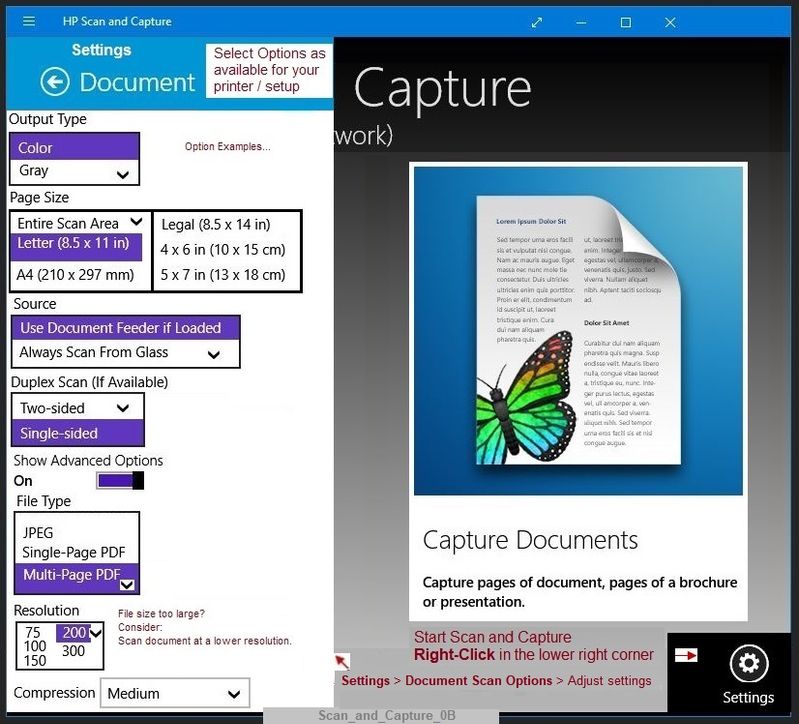
HP Scan and Capture


The following software is available from the Windows Store and provides the feature to scan into separate files.

HP Scan and Capture

Windows Store - Requires Windows 8 or higher


Example - Scan and Capture - Document Settings

Scan_and_Capture_0BScan_and_Capture_0B


And / Or


NAPS2


Available as free software - I've used this one for years.


Reminder:  "Import" only works with files that were originally scanned using the NAPS2 software.

Link and Download  NAPS2 

NOTES

  • Not another PDF Scanner – free program scans PDF files and image(s) as .jpeg or PDF file(s).
  • Includes an OCR feature – may need Ghostscript add-on (See NAPS2 forum entry)
  • Read the Support pages for information
  • Download, save, and install the NAPS2 software to use.


NOTE:  The following examples are intended to show how to create a Profile to be used with your scan job(s).


General Example - NAPS2 - Scan Profile

Scan_NAPS_1Scan_NAPS_1


Scan_NAPS2_Profile_1BScan_NAPS2_Profile_1B


More information from the How-to  Topic Scan category


Reference and Resources – Places to find (more) help and learn about your Printer

Printer Homepage – “Things that are your printer”

NOTE:  Content depends on device type

Drivers / Software / Firmware Updates, How-to Videos, Bulletins/Notices, Lots of How-to Documents, Troubleshooting, User Guides, Product Information, more

HP LaserJet Pro MFP M426fdw


Thank you for participating in the HP Community Forum.

We are a world community of HP enthusiasts dedicated to supporting HP technology.

Click Thumbs Up on a post to say Thank You!

Answered? Click post "Accept as Solution" to help others find it.


Dragon-Fur

† The opinions expressed above are the personal opinions of the authors, not of HP. By using this site, you accept the <a href="https://www8.hp.com/us/en/terms-of-use.html" class="udrlinesmall">Terms of Use</a> and <a href="/t5/custom/page/page-id/hp.rulespage" class="udrlinesmall"> Rules of Participation</a>.