• ×
    Information
    Need Windows 11 help?
    Check documents on compatibility, FAQs, upgrade information and available fixes.
    Windows 11 Support Center.
  • post a message
  • ×
    Information
    Need Windows 11 help?
    Check documents on compatibility, FAQs, upgrade information and available fixes.
    Windows 11 Support Center.
  • post a message
Guidelines
Join the HP Community Solve‑a‑thon | Help Others & Share Your Solutions | Live on Zoom | 2:30 PM to 2:30 AM IST | Every Wednesday Click here to know more
Common problems HP Solution Center not working : Adobe Flash Player Error and Unable to scan
We would like to share some of the most frequently asked questions about HP Solution Center not working : Adobe Flash Player Error and Unable to Scan.
HP Recommended
HP ENVY 5644
Microsoft Windows 10 (64-bit)

I'd like to know how to delete an incorrect email address from my printer?

1 REPLY 1
HP Recommended

@Warthog11


Let me take a moment to thank you for posting on the HP Support Forums. 


I understand that you have an HP ENVY 5644 e-All-in-One Printer and would like to know how to delete an incorrect email address from the printer. I'll be glad to assist you with this case.


I did some research on this and came across this HP document. This document provides steps to change/delete your HP ePrint email address.


Secondly, if it is not an ePrint email address that you wish to delete. And it is an email address that is used to scan and send an email to, then there is 2 ways you can delete the email addresses - through the software and through Embedded

Web Server.


We will cover the software method here.


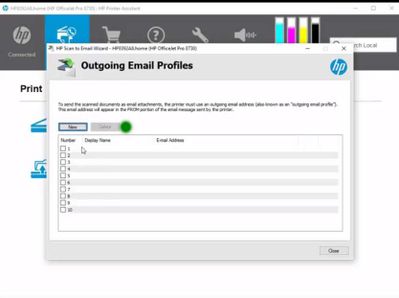
1. Through the Software which helped you to setup the email address. There is a "Delete" function.


(Watch this on how to setup (where the delete is @ time  59 secs)


Scan to Email setup and use  (Example: HP Officejet Pro 8700 series)


Scan to Email._deletejpg.jpg


You can select the email that you want to delete and "delete".


If you want to delete the email from the EWS page of the printer then the following steps will help:

  • Touch the wireless icon on the printer screen and you should get the printer's IP address.


  • Type the IP address into the URL of the web browser. Hit enter. This will open the EWS page of the printer.
  • In the EWS page, please navigate and search for the Scan option and remove the email address from there. 


Hope this helps. Let me know. All the best! 🙂


† The opinions expressed above are the personal opinions of the authors, not of HP. By using this site, you accept the <a href="https://www8.hp.com/us/en/terms-of-use.html" class="udrlinesmall">Terms of Use</a> and <a href="/t5/custom/page/page-id/hp.rulespage" class="udrlinesmall"> Rules of Participation</a>.
-->