• ×
    Information
    Need Windows 11 help?
    Check documents on compatibility, FAQs, upgrade information and available fixes.
    Windows 11 Support Center.
  • post a message
  • ×
    Information
    Need Windows 11 help?
    Check documents on compatibility, FAQs, upgrade information and available fixes.
    Windows 11 Support Center.
  • post a message
Guidelines
Seize the moment! nominate yourself or a tech enthusiast you admire & join the HP Community Experts!
Common problems HP Solution Center not working : Adobe Flash Player Error and Unable to scan
We would like to share some of the most frequently asked questions about HP Solution Center not working : Adobe Flash Player Error and Unable to Scan.
HP Recommended
Microsoft Windows 10 (64-bit)

I have an Officejet 8015e and am unable to duplex copy documents. Despite trying to alter the setup to allow duplex copying, the gizmo insists on printing the image from the scanning bed - where there is no image to be copied, the documents are sitting, waiting, in the feed tray.

Can anyone help?

1 REPLY 1
HP Recommended

@TheBoF 


Welcome to the HP Community Forum.


According to the Product Specifications for the HP OfficeJet 8015e All-in-One Printer (228F5A)

The printer supports two sided copy:

Copier SettingsNumber of Copies; Two-Sided; Lighter/Darker; ID Copy; Resize; Quality; Paper Size; Paper Type; Collate; Margin Shift; Crop; Copy Preview; Enhancements


IF your printer supports the option in the Embedded Web Server (EWS),

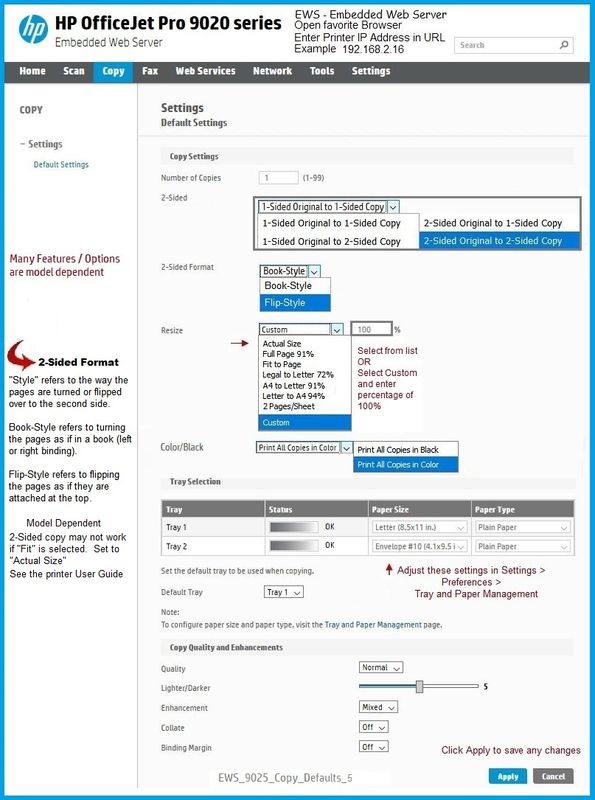
Try setting the Copy Defaults


Example

Open your favorite browser > type / enter Printer IP address into URL / Address bar

Tab Copy > Settings > Default SettingsCopy Defaults


Example

EWS_9025_Copy_Defaults_5EWS_9025_Copy_Defaults_5


What else?


Scan > Save > Open / Print 2-sided


This printer does not support automatic 2-sided scan.

That said,

If you have not done so,

Install the Full Feature Software / full driver printer software

Reference Video: 

HP Officejet Pro 8025 | 8020 | 8035 : Download and install full software solution (updated Feb2021)


(then)

Use HP Scan to scan the document and reorder the pages.

HP Officejet Pro 8025 | 8025e | 8020 | 8035 Printer : Scan 2-sided document using HP Scan


==============================================

References / Resources


User Guide

Starting on Page 60


HP Printer Home Page - References and Resources

Learn about your Printer  - Solve Problems

“Things that are your printer”

When the website support page opens, Select (as available) a Category > Topic Subtopic

NOTE:  Content depends on device type and Operating System

Categories Alerts, Access to the Print and Scan Doctor (Windows), Warranty Check, HP Drivers / Software / Firmware Updates, How-to Videos, Bulletins/Notices, Lots of How-to Documents, Troubleshooting, Manuals > User Guides, Product Information (Specifications), Supplies, and more

Open

HP OfficeJet 8015e All-in-One Printer 


Thank you for participating in the HP Community --

People who own, use, and support HP devices.

Click Yes to say Thank You

Question / Concern Answered, Click "Accept as Solution"


Dragon-Fur

† The opinions expressed above are the personal opinions of the authors, not of HP. By using this site, you accept the <a href="https://www8.hp.com/us/en/terms-of-use.html" class="udrlinesmall">Terms of Use</a> and <a href="/t5/custom/page/page-id/hp.rulespage" class="udrlinesmall"> Rules of Participation</a>.