
-
×InformationNeed Windows 11 help?Check documents on compatibility, FAQs, upgrade information and available fixes.
Windows 11 Support Center. -
-
×InformationNeed Windows 11 help?Check documents on compatibility, FAQs, upgrade information and available fixes.
Windows 11 Support Center. -
- HP Community
- Printers
- Scanning, Faxing, and Copying
- Re: Easy Scan saving some files larger size and some files t...

Create an account on the HP Community to personalize your profile and ask a question
Your account also allows you to connect with HP support faster, access a personal dashboard to manage all of your devices in one place, view warranty information, case status and more.
Common problems HP Solution Center not working : Adobe Flash Player Error and Unable to scan
We would like to share some of the most frequently asked questions about HP Solution Center not working : Adobe Flash Player Error and Unable to Scan.

It has been a while since anyone has replied. Simply ask a new question if you would like to start the discussion again.

06-15-2019 09:58 AM
 HP Recommended
Product: Photosmart 7520 multi-function printer
Operating System: macOS 10.14 Mojave
Using 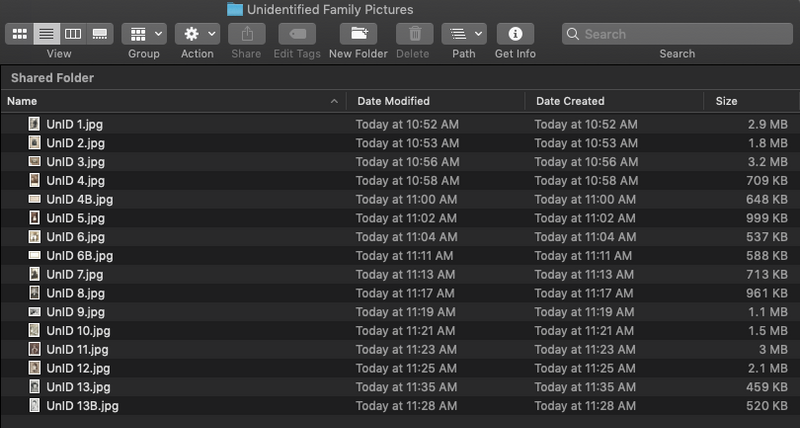
Solved! Go to Solution.
1 ACCEPTED SOLUTION
Accepted Solutions
06-15-2019 02:48 PM
HP Recommended
To summarize:
If I edit settings settings from preset general purpose to 300 resolution, and crop to "none" and rescan and manually crop when the scan yields multiple pieces, I can get a high quality scan file in one piece. This has to be reset every time the program is closed and reopened. Have not found a way to retain my changed settings for future scanning sessions.
6 REPLIES 6
06-15-2019 10:32 AM
HP Recommended
I see now that my settings changed overnight on their own. Yesterday all my scans were good. However, Now when I change resolution to 300 and maximize for picture quality in the user defined settings, I am getting the picture in 2 pieces, or just getting a tiny sliver of the picture and missing the actual picture. What could cause this?
06-15-2019 02:48 PM
HP Recommended
To summarize:
If I edit settings settings from preset general purpose to 300 resolution, and crop to "none" and rescan and manually crop when the scan yields multiple pieces, I can get a high quality scan file in one piece. This has to be reset every time the program is closed and reopened. Have not found a way to retain my changed settings for future scanning sessions.


06-17-2019 11:45 AM
HP Recommended
Welcome to the HP Support Community!
Update the printer firmware
Click here to download and install the latest firmware from your computer.
Click here to know different methods of updating printer firmware.
Also, update the software on MAC
Click here to know how.
-
Open HP Easy Scan, and then make sure your printer is selected from the Scanner drop-down menu.
-
Open the Presets drop-down menu, edit settings
-
-
Change the Type from Automatic to Picture.
-
Change scan settings, such as orientation, color mode, resolution on this window as required.
-
-
-
Click Done to save the presets for this scan job.
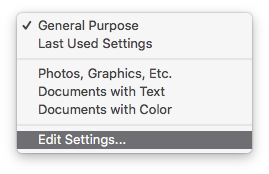
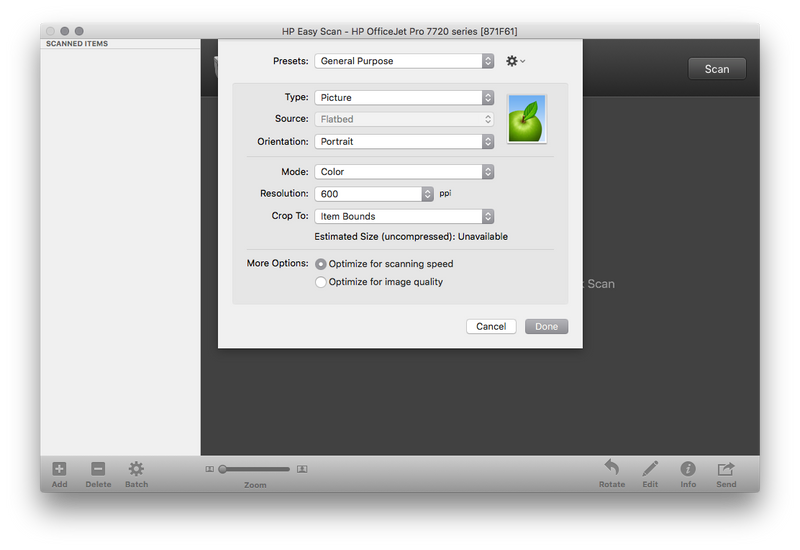
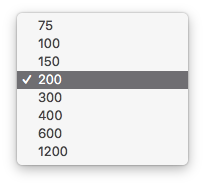
Let me know how this goes.
If you feel my post solved your issue, please click “Accept as Solution”, it will help others find the solution. Click the “Kudos/Thumbs Up" on the bottom right to say “Thanks” for helping!
KUMAR0307
I am an HP Employee
06-25-2019 01:38 PM
HP Recommended
Kumar, in general this is what I did do to create my own solution. However, I realized that the solution only applies to the existing scan session. Next time I open Easy scan, I have to reset settings again. I didn't change the general settings, only those for pictures. Thanks for trying to help.
06-25-2019 02:31 PM
HP Recommended
If the settings are changed and saved for Pictures under presets, the next time you try to scan make sure to choose the same option under preset.
Once the settings have been changed, scan a document to save the settings.
Keep me posted.
KUMAR0307
I am an HP Employee

Be alert for scammers posting fake support phone numbers and/or email addresses on the community.
If you think you have received a fake HP Support message, please report it to us by clicking on "Flag Post".
† The opinions expressed above are the personal opinions of the authors, not of HP. By using this site, you accept the Terms of Use and Rules of Participation.


Didn't find what you were looking for?
Ask the community
† The opinions expressed above are the personal opinions of the authors, not of HP. By using this site, you accept the <a href="https://www8.hp.com/us/en/terms-of-use.html" class="udrlinesmall">Terms of Use</a> and <a href="/t5/custom/page/page-id/hp.rulespage" class="udrlinesmall"> Rules of Participation</a>.