• ×
    Information
    Need Windows 11 help?
    Check documents on compatibility, FAQs, upgrade information and available fixes.
    Windows 11 Support Center.
  • post a message
  • ×
    Information
    Need Windows 11 help?
    Check documents on compatibility, FAQs, upgrade information and available fixes.
    Windows 11 Support Center.
  • post a message
Guidelines
Seize the moment! nominate yourself or a tech enthusiast you admire & join the HP Community Experts!
Common problems HP Solution Center not working : Adobe Flash Player Error and Unable to scan
We would like to share some of the most frequently asked questions about HP Solution Center not working : Adobe Flash Player Error and Unable to Scan.
HP Recommended

Solution - I uninstalled the printer and all the software including HP Doctor.  I then reinstalled the printer using the EN7640_Full_WebPack_40.13.1176.exe software that I had previously downloaded.  Then I installed HP Doctor and ran the scanner fix.  After that from my Windows 10 menu HP folder I ran "HP Twain Administration" - I don't think I had ever run this before.  Next I ran "HP Envy 7640 Series" from my Windows 10 menu HP folder and that opened the "HP Printer Assistant" in my browser - again, this was the first time I had seen that application.  From there I was able to choose the SCAN option and select from the "Page Sides" drop down box "2 - sided (manual)".

HP Recommended

@W3st3rm4n 


Well enough, then.

I am glad you resolved the problem and can again can two-sided.


Interesting that you could never get HP Scan to do the obvious.

It does lead back to the software having been corrupted in some odd manner.


No, I don't have an explanation - software sometimes needs to be completely uninstalled before it can be made to work with a fresh installation.


For those reading:

After having successfully installed the Full Feature software,

And for a supported version of the printer software,

TwainUtilityUI.exe is available in the same folder as HPScan.exe


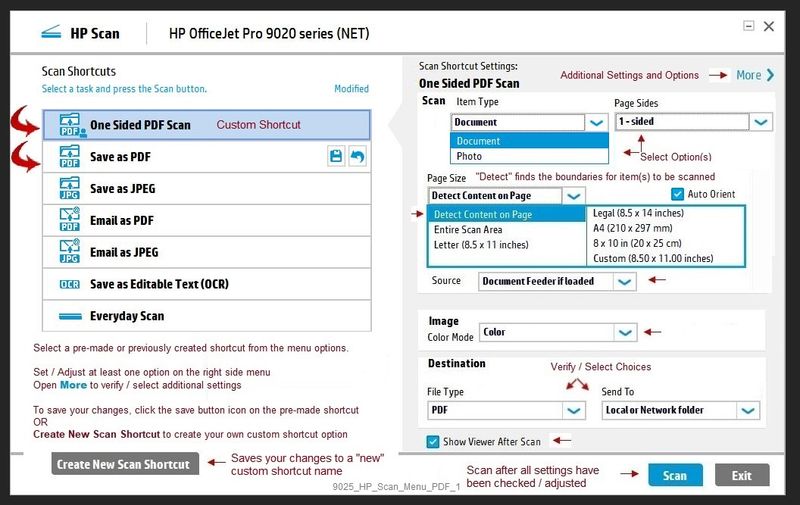
Structurally, "Twain" is very similar to HP Scan.

For example,

There is a main menu listing shortcuts on the left and options on the right,

There are submenus available in More > to select and fine-tune the setup.


The two programs offer a slightly different GUI experience.


Example path for an Officejet Pro 9025:

C:\Program Files (x86)\HP\HP OfficeJet Pro 9020 series\bin


Replace the name of the example with your printer model.


Reminder - it is "one" or the "other", not both at once...

While the programs are somewhat different visually, that is, the "Twain" software provides some of the same features found in HP Scan, you cannot have bothHPScan and TwainUtilityUI open at the same time.


Example

HPScan

9025_HP_Scan_Menu_PDF_19025_HP_Scan_Menu_PDF_1


Example

TwainUtilityUI

9025_Twain_Scan_Menu_19025_Twain_Scan_Menu_1


Thank you for participating in our HP Community.

We are a world community of volunteers dedicated to supporting HP technology

Click Thumbs Up to say Thank You for the assist.

Answered? Click "Accept as Solution" to help others find it.


Dragon-Fur

† The opinions expressed above are the personal opinions of the authors, not of HP. By using this site, you accept the <a href="https://www8.hp.com/us/en/terms-of-use.html" class="udrlinesmall">Terms of Use</a> and <a href="/t5/custom/page/page-id/hp.rulespage" class="udrlinesmall"> Rules of Participation</a>.