• ×
    Information
    Need Windows 11 help?
    Check documents on compatibility, FAQs, upgrade information and available fixes.
    Windows 11 Support Center.
  • post a message
  • ×
    Information
    Need Windows 11 help?
    Check documents on compatibility, FAQs, upgrade information and available fixes.
    Windows 11 Support Center.
  • post a message
Guidelines
Is your HP DeskJet 3830 series scanner not working? Here is the solution Click here to view the instructions!
Common problems HP Solution Center not working : Adobe Flash Player Error and Unable to scan
We would like to share some of the most frequently asked questions about HP Solution Center not working : Adobe Flash Player Error and Unable to Scan.
HP Recommended
HP Officejet 4500 G510-G
Microsoft Windows 10 (64-bit)

I have been trying to send out a fax and it wasn’t going through. I tried to have someone fax me and it says the fax line is busy which is weird because the home line and fax line are the same and no else is using the phone. The fax was supposed to answer after the second ring. The phoneline being used is not the wall jack but a modem provided by the cable company.  I put jack splitter in and one line goes to the AIO and one line goes to the cordless base.  Not sure what the problem is, any help would be appreciated

3 REPLIES 3
HP Recommended

@IronLionBKNY This is how you'll need to set up your fax in order for it to work:

The Modem needs to be connected to the splitter and then to the printer, and then, using the extension port on the printer, connect it to the cordless base of your phone, if you are connecting the cable from splitter and using it to connect both the printer and the phone, it may not work as it would show the busy message.


If you are using the right setup and yet it isn't working, try the steps mentioned under Page. 40 Fax: Click here for steps.

For more details: Click here


Let me know how that pans out,

If you feel I was helpful, simply click on Accept as Solution to help the community grow,

That said, I will have someone follow-up on this to ensure you've been helped,

Just in case you don't get back to us within 24 - 48hrs, and have a good day, ahead.

Riddle_Decipher
I am an HP Employee


Learning is a journey, not a destination.
Let's keep asking questions and growing together.
HP Recommended

I confirmed the setup where a line runs from the modem to the fax/printer Line 1 and another line runs from the EXT to the base of the cordless phone. I changed the fax speed to slow as I thought that may have been an issue. I still get the message that the fax line is busy. Do you have another suggestion, any help would be greatly appreciated.

HP Recommended

@IronLionBKNY I suggest you disconnect the phone and check if it's working fine, and if the phone isn't working as it should, please contact the phone company for assistance in resolving this issue,

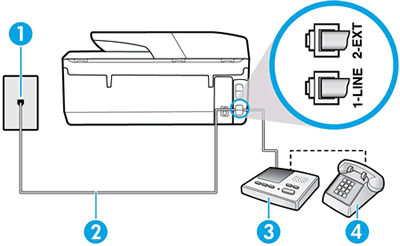
That said, if the phone works fine, check all the connections and ensure its as explained in the below image, also let me know if you are able to receive a fax.


  1. Wall jack

  2. Two-wire phone cord

  3. Answering machine

  4. Single-line telephone

I hope that answers your query,  

If it did, simply select "Accept as solution", to help the community grow, 

And if you wish to thank us for our efforts, click on the thumbs up for kudos.

Have a great day ahead.

Riddle_Decipher
I am an HP Employee


Learning is a journey, not a destination.
Let's keep asking questions and growing together.
† The opinions expressed above are the personal opinions of the authors, not of HP. By using this site, you accept the <a href="https://www8.hp.com/us/en/terms-of-use.html" class="udrlinesmall">Terms of Use</a> and <a href="/t5/custom/page/page-id/hp.rulespage" class="udrlinesmall"> Rules of Participation</a>.