-
×InformationNeed Windows 11 help?Check documents on compatibility, FAQs, upgrade information and available fixes.
Windows 11 Support Center. -

-
×InformationNeed Windows 11 help?Check documents on compatibility, FAQs, upgrade information and available fixes.
Windows 11 Support Center. -
- HP Community
- Printers
- Scanning, Faxing, and Copying
- HP APP - WIN 10

Create an account on the HP Community to personalize your profile and ask a question
01-09-2021
09:29 AM
- last edited on
02-26-2026
08:13 AM
by
Animatryx
Hi evreybody,
i have a little problem with HP APP for WIN 10 from 18/12/2020 when it has been updated last time.
I have an old HP Officejet 3830 that works perfectly but after the last update (ver. 122.1.778.0) i never been able to scan from my HP ProBook (Win 10, 64 bit).
It try to load "HP CLOUD SERVICE...." and then return to HP APP home page without open scan page.
During this Holiday, i have recived a new print HP Officejet Pro 9015 that, after full installation, have the same matter.
I discover also that from iOS HP app it works perfectly, do the scan and send it by mail or other.
Now can someone tell me if there is a mistake in the last update that crash the WIN 10 app without permitting scan use?
Loading HP Cloud Service....
Ready print
Solved! Go to Solution.
Accepted Solutions
01-09-2021
09:40 AM
- last edited on
03-01-2026
10:21 AM
by
Animatryx
==============================================================
Welcome to the HP Community.
Reminder to those reading:
Do NOT respond to vermin who post phone numbers or email addresses.
HP does not post phone numbers or email in Community messages.
==============================================================
Make sure you are signed into the HP application with your HP Account. The latest versions of HP app require this step.
Make sure your Windows 10 is updated.
Reminder: Much older versions of Windows 10 might not be as compatible with HP app .
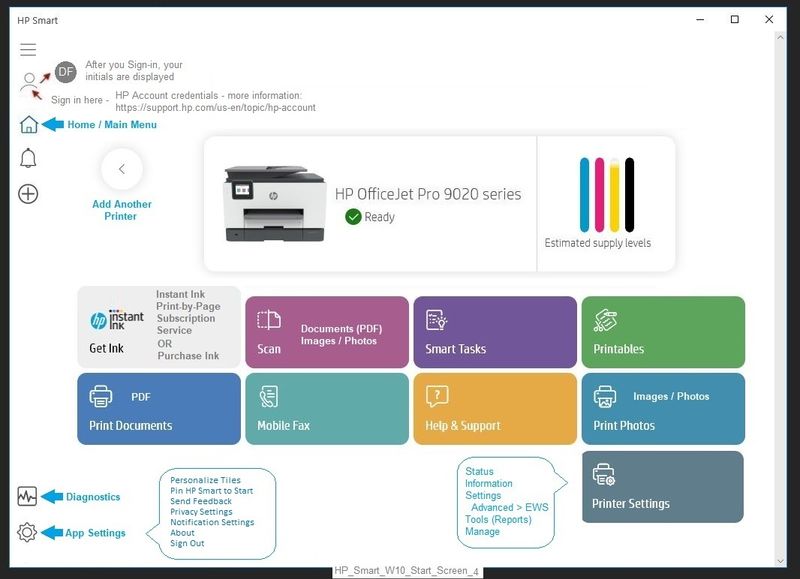
Example - HP app - Windows - Main Menu
HP_Smart_W10_Start_Screen_4
Problems with HP Windows App?
Can’t log into HP app using your HP Account?
- Make sure you are running the latest (newest) app version.
- Make sure your Windows Updates in current and installed.
- Try reloading the HP Application:
Uninstall HP app > Restart the computer and log in > Install the application from the Microsoft Store
Settings > Apps > Apps and Features
Search or scroll down and find HP app
Left-Click on the item > Uninstall
Restart the computer and log in
"Get" a new copy of the Application from the Microsoft Store
Printer Home Page - References and Resources – Learn about your Printer - Solve Problems
“Things that are your printer”
NOTE: Content depends on device type and Operating System
Categories: Alerts, Access to the Print and Scan Doctor (Windows), Warranty Check, HP Drivers / Software / Firmware Updates, How-to Videos, Bulletins/Notices, Lots of How-to Documents, Troubleshooting, User Guides / Manuals, Product Information (Specifications), more
When the website support page opens, Select (as available) a Category > Topic > Subtopic
HP OfficeJet 3830 All-in-One Printer series
Thank you for participating in the HP Community.
The Community is a separate wing of the HP website - We are not a business group of HP..
Our Community is comprised of volunteers - people who own and use HP devices.
Click Thumbs Up to say Thank You.
Question Resolved / Answered, Click "Accept as Solution" .
01-09-2021
09:40 AM
- last edited on
03-01-2026
10:21 AM
by
Animatryx
==============================================================
Welcome to the HP Community.
Reminder to those reading:
Do NOT respond to vermin who post phone numbers or email addresses.
HP does not post phone numbers or email in Community messages.
==============================================================
Make sure you are signed into the HP application with your HP Account. The latest versions of HP app require this step.
Make sure your Windows 10 is updated.
Reminder: Much older versions of Windows 10 might not be as compatible with HP app .
Example - HP app - Windows - Main Menu
HP_Smart_W10_Start_Screen_4
Problems with HP Windows App?
Can’t log into HP app using your HP Account?
- Make sure you are running the latest (newest) app version.
- Make sure your Windows Updates in current and installed.
- Try reloading the HP Application:
Uninstall HP app > Restart the computer and log in > Install the application from the Microsoft Store
Settings > Apps > Apps and Features
Search or scroll down and find HP app
Left-Click on the item > Uninstall
Restart the computer and log in
"Get" a new copy of the Application from the Microsoft Store
Printer Home Page - References and Resources – Learn about your Printer - Solve Problems
“Things that are your printer”
NOTE: Content depends on device type and Operating System
Categories: Alerts, Access to the Print and Scan Doctor (Windows), Warranty Check, HP Drivers / Software / Firmware Updates, How-to Videos, Bulletins/Notices, Lots of How-to Documents, Troubleshooting, User Guides / Manuals, Product Information (Specifications), more
When the website support page opens, Select (as available) a Category > Topic > Subtopic
HP OfficeJet 3830 All-in-One Printer series
Thank you for participating in the HP Community.
The Community is a separate wing of the HP website - We are not a business group of HP..
Our Community is comprised of volunteers - people who own and use HP devices.
Click Thumbs Up to say Thank You.
Question Resolved / Answered, Click "Accept as Solution" .