
-
×InformationNeed Windows 11 help?Check documents on compatibility, FAQs, upgrade information and available fixes.
Windows 11 Support Center. -
-
×InformationNeed Windows 11 help?Check documents on compatibility, FAQs, upgrade information and available fixes.
Windows 11 Support Center. -
- HP Community
- Printers
- Scanning, Faxing, and Copying
- Re: HP Easy Scan don't use Scanner Glass

Create an account on the HP Community to personalize your profile and ask a question
Your account also allows you to connect with HP support faster, access a personal dashboard to manage all of your devices in one place, view warranty information, case status and more.
Common problems HP Solution Center not working : Adobe Flash Player Error and Unable to scan
We would like to share some of the most frequently asked questions about HP Solution Center not working : Adobe Flash Player Error and Unable to Scan.

It has been a while since anyone has replied. Simply ask a new question if you would like to start the discussion again.

10-24-2019 11:11 AM
 HP Recommended
Product: MacBook Pro
Operating System: macOS 10.15 Catalina
Hi everyone!
I've updated my Mac to Catalina OS and since then, i'm only able to scan on HP Easy Scan from the Automatic Feeder and can't use on Scanner Glass, it just doesn't find it. Can anyone help me? Thank you! My printer is the Officejet 5230.
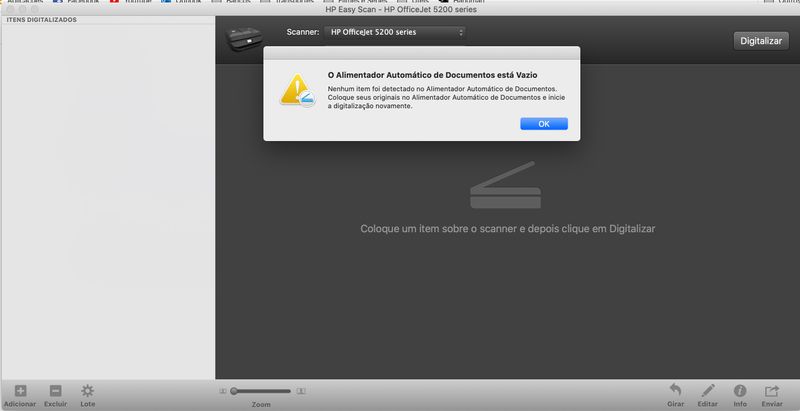
Solved! Go to Solution.
1 ACCEPTED SOLUTION
Accepted Solutions


01-08-2020
11:58 AM
- last edited on
02-10-2026
07:11 PM
by
 Raj_05
HP Recommended
Hi @Jane_
Welcome to the HP Support Community. I'd be happy to assist you.
If Apple Image Capture is not satisfactory, use HP app on your MAC to scan
Click here to download and know more about the app.
HP is working on the updated version of HP Easy Scan and it would be available soon.
Hope this helps! Keep me posted.
Please click “Accept as Solution” if you feel my post solved your issue, it will help others find the solution.
Click the “Kudos, Thumbs Up" on the bottom right to say “Thanks” for helping!
Have a great day!
KUMAR0307
I am an HP Employee
6 REPLIES 6


10-24-2019 11:23 AM
HP Recommended
Hi,
HP Easy Scan is not currently supported on Catalina.
As a workaround, please use Image Capture for now as described in the below support document:
https://support.hp.com/in-en/document/c06455960
Shlomi


Click the Yes button to reply that the response was helpful or to say thanks.
If my post resolve your problem please mark it as an Accepted Solution 🙂
01-06-2020 08:10 AM
HP Recommended
I have tried the workaround option by using Image Capture but it does not work properly, the pages are not scanned well, not every page can be saved as pdf, etc. I hope that HP finds a solution for Mac users using the latest Operating System Version fast to use EasyScan again.
01-08-2020
11:58 AM
- last edited on
02-10-2026
07:11 PM
by
Raj_05
HP Recommended
Hi @Jane_
Welcome to the HP Support Community. I'd be happy to assist you.
If Apple Image Capture is not satisfactory, use HP app on your MAC to scan
Click here to download and know more about the app.
HP is working on the updated version of HP Easy Scan and it would be available soon.
Hope this helps! Keep me posted.
Please click “Accept as Solution” if you feel my post solved your issue, it will help others find the solution.
Click the “Kudos, Thumbs Up" on the bottom right to say “Thanks” for helping!
Have a great day!
KUMAR0307
I am an HP Employee

01-28-2020 02:49 PM
HP Recommended
macOS 10.15.3 (released 1/28/2020) contains the fix for this issue. Once updated HP Easy Scan will be able to scan from the glass or the ADF as normal.
Scan to Computer is also fixed with 10.15.3.
I did notice that if the printer is in sleep mode, some times an error will be reported. But if you wake the printer by inserting a page in the ADF or touching the screen you will be able to scan normally.
While I may work for HP Inc, the views and opinions expressed here are my own.

Be alert for scammers posting fake support phone numbers and/or email addresses on the community.
If you think you have received a fake HP Support message, please report it to us by clicking on "Flag Post".
† The opinions expressed above are the personal opinions of the authors, not of HP. By using this site, you accept the Terms of Use and Rules of Participation.


Didn't find what you were looking for?
Ask the community
† The opinions expressed above are the personal opinions of the authors, not of HP. By using this site, you accept the <a href="https://www8.hp.com/us/en/terms-of-use.html" class="udrlinesmall">Terms of Use</a> and <a href="/t5/custom/page/page-id/hp.rulespage" class="udrlinesmall"> Rules of Participation</a>.