-
×InformationNeed Windows 11 help?Check documents on compatibility, FAQs, upgrade information and available fixes.
Windows 11 Support Center. -

-
×InformationNeed Windows 11 help?Check documents on compatibility, FAQs, upgrade information and available fixes.
Windows 11 Support Center. -
- HP Community
- Printers
- Scanning, Faxing, and Copying
- HP Smart Mobile Fax

Create an account on the HP Community to personalize your profile and ask a question
07-07-2020 08:19 AM
I've used the Mobile Fax a couple of times now to send a fax and it works fine, but I want to know if there's any way to print a copy of the document I faxed, especially the cover page. When I click on "export fax report," all I can see/save is the transmission information. I can view the cove page, but can't right click to save it or print it.
Is this just not possible? Frustrating as I need to save these in my files. What do I need to do, fax it to myself??
Thanks.
07-09-2020 09:12 AM
Hi @AmyinVA
Welcome to the HP Support Community. I'd be happy to assist you
Due to the current global COVID-19 situation, we're seeing an influx of customers coming in for support. We appreciate your patience.
Try the below steps to save the fax-
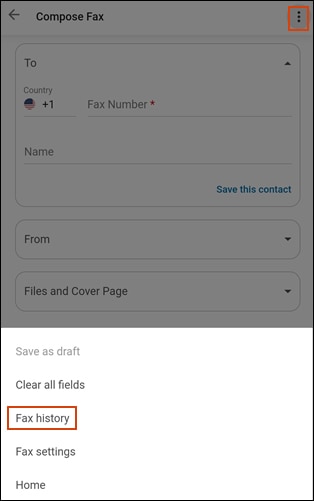
- Click the Mobile Fax tile, click the More icon
, and then click Fax history.

-
Click any fax to view the details of that fax.
-
Click Export Fax Log to save a fax to your mobile device, computer, or cloud account
Hope this helps! Keep me posted.
Please click “Accept as Solution” if you feel my post solved your issue, it will help others find the solution.
Click the “Kudos, Thumbs Up" on the bottom right to say “Thanks” for helping!
Have a great day!
07-09-2020 12:46 PM
That does not help, that only gives me a copy of the fax report/details. I am not trying to save a copy of the fax log/report, I am trying to save a copy of the actual cover sheet and document that was faxed. I can click on the magnifying glass icon to view the cover page and the document, but I can't save them or print them. I especially need to be able to save the cover page for my files.
Is there any way to do this?
07-10-2020 02:16 AM
I understand your concern. However, there are no other options to save or print the mobile fax sent or received. As a workaround, you may take a screenshot of the cover page and then save/print it.
Keep us posted for any other assistance.
KUMAR0307
I am an HP Employee
07-17-2020 09:43 AM
From the website help, there is a step for Saving Faxes, which is what I want to do.
How do I see (not a Preview) or save old faxes?
- Click the Mobile Fax tile, click the More icon, and then click Fax history.
- Click any fax to view the details of that fax.
- Click Export Fax Log to save a fax to your mobile device, computer, or cloud account.
There isn't an option to Export Fax Log.
07-17-2020 03:48 PM
I understand your concerns.
However, there are no other options to save or print the mobile fax sent or received. As a workaround, you may take a screenshot of the cover page and then save/print it.
Have a nice day!!