• ×
    Information
    Need Windows 11 help?
    Check documents on compatibility, FAQs, upgrade information and available fixes.
    Windows 11 Support Center.
  • post a message
  • ×
    Information
    Need Windows 11 help?
    Check documents on compatibility, FAQs, upgrade information and available fixes.
    Windows 11 Support Center.
  • post a message
Guidelines
Seize the moment! nominate yourself or a tech enthusiast you admire & join the HP Community Experts!
Common problems HP Solution Center not working : Adobe Flash Player Error and Unable to scan
We would like to share some of the most frequently asked questions about HP Solution Center not working : Adobe Flash Player Error and Unable to Scan.
HP Recommended

Trying to scan old documents using HP Smart Scan.   Cannot find the options to control contrast, color, etc.

1 REPLY 1
HP Recommended

@pobruce 


Welcome to the HP Community --


Product: Not Provided

Operating System: Not Provided

Software / Application: HP Smart

Connection Type: Not Provided

Content Type:  Not Provided


Example - HP Smart - Windows - Scan > Preset to PDF / Document

Scan > Edit > Adjust

HP_Smart_W10_Scan_Edit_Document_Set_1BHP_Smart_W10_Scan_Edit_Document_Set_1B


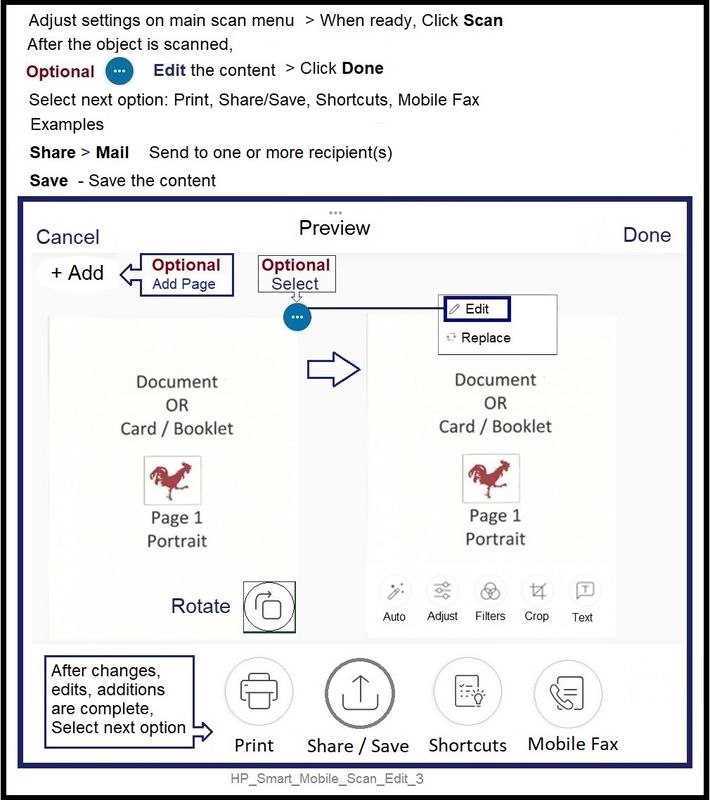
Example - HP Smart - Mobile (iPadOS)

Scan > Preset Document / PDF

Set options > Scan > Edit > Select and complete edit type (Adjust) > Done

HP_Smart_Mobile_Scan_Edit_3HP_Smart_Mobile_Scan_Edit_3


=== --- === --- === --- === --- === --- === --- === --- === --- ===


HP Printer Home Page - References and Resources

Learn about your Printer  - Solve Problems

“Things that are your printer”

When the website support page opens, Select (as available) a Category > Topic Subtopic

NOTE:  Content depends on device type and Operating System

Categories Alerts, Access to the Print and Scan Doctor (Windows), Warranty Check, HP Drivers / Software / Firmware Updates, How-to Videos, Bulletins/Notices, Lots of How-to Documents, Troubleshooting, Manuals > User Guides, Product Information (Specifications), Supplies, and more

Open

 Printer Product Home

 Enter the device type and model name of your HP product


Thank you for participating in the HP Community --

People who own, use, and support HP devices.


Click Yes to say Thank You for the help!

Question / Concern Answered, Click my Post "Accept as Solution"


Dragon-Fur

† The opinions expressed above are the personal opinions of the authors, not of HP. By using this site, you accept the <a href="https://www8.hp.com/us/en/terms-of-use.html" class="udrlinesmall">Terms of Use</a> and <a href="/t5/custom/page/page-id/hp.rulespage" class="udrlinesmall"> Rules of Participation</a>.