• ×
    Information
    Need Windows 11 help?
    Check documents on compatibility, FAQs, upgrade information and available fixes.
    Windows 11 Support Center.
  • post a message
  • ×
    Information
    Need Windows 11 help?
    Check documents on compatibility, FAQs, upgrade information and available fixes.
    Windows 11 Support Center.
  • post a message
Guidelines
Is your HP DeskJet 3830 series scanner not working? Here is the solution Click here to view the instructions!
Common problems HP Solution Center not working : Adobe Flash Player Error and Unable to scan
We would like to share some of the most frequently asked questions about HP Solution Center not working : Adobe Flash Player Error and Unable to Scan.
HP Recommended
HP envy x360 15-dr0030nb
Microsoft Windows 10 (64-bit)

Aantekening 2019-12-23 000702.png

I always get this message when I try to scan with HP Smart (it is in Dutch). It tells me to restart my printer, but that didn't change the situation.

I just changed laptops (now a newer one in the envy x360 series) and with this laptop it hasn't worked. My printer (HP envy 5030 all in one) still works when I use windows itself (printing and scanning).

I have tried the HP print en scan doctor application, this didn't help. I also re-installed the HP smart appliction. And I tried to change some of the scan settings (dpi, edge detection on/off, color/black&white,...) without result.


Does anybody know whats wrong?

1 ACCEPTED SOLUTION

Accepted Solutions
HP Recommended

@TP99, Welcome to HP Support Community!


Uninstall the app from your Windows 10 device through the All Apps list.

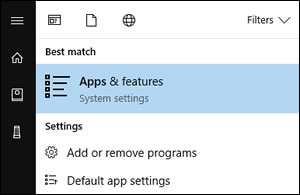
  1. In Windows, search for and open Apps & features.

    Searching for Apps & features

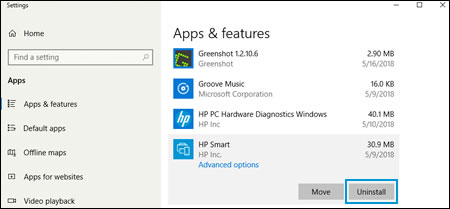
  2. Click HP Smart in the list of apps, and then click Uninstall.

    Uninstalling HP Smart app

Now, try installing the HP Smart App and try scanning.


If the issue persists, I would suggest Using the HP Scan and Capture App (Windows 8 and 10) to scan. 


Hope this helps! Keep me posted. 


Please click “Accept as Solution” if you feel my post solved your issue, it will help others find the solution. Click the “Kudos/Thumbs Up" on the bottom right to say “Thanks” for helping!


TEJ1602
I am an HP Employee

View solution in original post

3 REPLIES 3
HP Recommended

@TP99, Welcome to HP Support Community!


Uninstall the app from your Windows 10 device through the All Apps list.

  1. In Windows, search for and open Apps & features.

    Searching for Apps & features

  2. Click HP Smart in the list of apps, and then click Uninstall.

    Uninstalling HP Smart app

Now, try installing the HP Smart App and try scanning.


If the issue persists, I would suggest Using the HP Scan and Capture App (Windows 8 and 10) to scan. 


Hope this helps! Keep me posted. 


Please click “Accept as Solution” if you feel my post solved your issue, it will help others find the solution. Click the “Kudos/Thumbs Up" on the bottom right to say “Thanks” for helping!


TEJ1602
I am an HP Employee

HP Recommended

Reinstalling did not work.

HP scan en capture works great!

Thank you!

HP Recommended

@TP99


That's great! Happy to hear that.


TEJ1602
I am an HP Employee

† The opinions expressed above are the personal opinions of the authors, not of HP. By using this site, you accept the <a href="https://www8.hp.com/us/en/terms-of-use.html" class="udrlinesmall">Terms of Use</a> and <a href="/t5/custom/page/page-id/hp.rulespage" class="udrlinesmall"> Rules of Participation</a>.