• ×
    Information
    Need Windows 11 help?
    Check documents on compatibility, FAQs, upgrade information and available fixes.
    Windows 11 Support Center.
  • post a message
  • ×
    Information
    Need Windows 11 help?
    Check documents on compatibility, FAQs, upgrade information and available fixes.
    Windows 11 Support Center.
  • post a message
Guidelines
Join the HP Community Solve‑a‑thon | Help Others & Share Your Solutions | Live on Zoom | 2:30 PM to 2:30 AM IST | Every Wednesday Click here to know more
Common problems HP Solution Center not working : Adobe Flash Player Error and Unable to scan
We would like to share some of the most frequently asked questions about HP Solution Center not working : Adobe Flash Player Error and Unable to Scan.
HP Recommended
hp2655

HP2655 printer continuously drops wifi connection, so cannot print nor scan from laptop, tablet nor phone.

2 REPLIES 2
HP Recommended

@1Celeste,


Welcome to the HP Support Community!


I recommend you follow the below steps and check if it helps.


The HP Print and Scan Doctor might get this sorted out


Please download and run the HP Print and Scan Doctor from this Link: https://ftp.hp.com/pub/printers/hppsdr/HPPSdr.exe


Run PSDR v5.0.2 

Once the PSDR detects the Printer, it will show up the IP address and Software Status. 

Select the correct Printer and click on Next. 

PSDR will check if the Printer is on the Network and communication between the PC and the Printer. Once the connection check is done, click on Fix Printing 

Once PSDR goes through all checks and automatic fixes, click on Print a test page. 

Regardless if PSDR printed the test page or not, click on “NO PRINT” 

PSDR will then notify you that there is an update available, click on continue, and PSDR will apply the patch and ask for a reboot. 

Post restart the PSDR will run automatically to check for more issue.  If no issue found close PSDR. 


Also try using the HP Smart App and let me know if that helps. Link: https://www.microsoft.com/en-us/p/hp-smart/9wzdncrfhwlh


You can refer to this Link: https://support.hp.com/in-en/document/c04675142 for more information on HP Smart App


Let me know how it goes and you have a great day!


If you wish to show appreciation for my efforts, mark my post as Accept as Solution. Your feedback counts!


Cheers!

The_Fossette
I am an HP Employee

HP Recommended

@1Celeste

Thank you for posting back.


I have a few troubleshooting steps we could try to fix the issue:  

Set your default printer in Windows 10.

  1. Search Windows for devices, and then click Printers & scanners from the list of results.

  2. If it is checked, uncheck the box beside Let Windows manage my default printer.

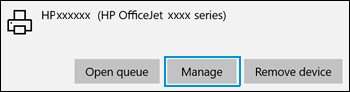
  3. From the list of printers, click the printer name that matches the name of your printer, and then click Manage. If there are multiple names listed, select the printer that has a status of idle or online.

    Clicking the Manage  selection

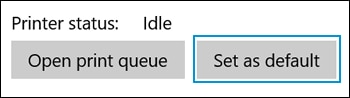
  4. Under Manage your device, click Set as default.

    Clicking Set as default

  5. Try to print. If the printer remains offline, continue to the next step from here: https://support.hp.com/us-en/document/c06184808

Hope this helps! Keep me posted for further assistance.
Please click “
Accept as Solution” if you feel my post solved your issue, it will help others find the solution.

ECHO_LAKE
I am an HP Employee

† The opinions expressed above are the personal opinions of the authors, not of HP. By using this site, you accept the <a href="https://www8.hp.com/us/en/terms-of-use.html" class="udrlinesmall">Terms of Use</a> and <a href="/t5/custom/page/page-id/hp.rulespage" class="udrlinesmall"> Rules of Participation</a>.