• ×
    Information
    Need Windows 11 help?
    Check documents on compatibility, FAQs, upgrade information and available fixes.
    Windows 11 Support Center.
  • post a message
  • ×
    Information
    Need Windows 11 help?
    Check documents on compatibility, FAQs, upgrade information and available fixes.
    Windows 11 Support Center.
  • post a message
Guidelines
Join the HP Community Solve‑a‑thon | Help Others & Share Your Solutions | Live on Zoom | 2:30 PM to 2:30 AM IST | Every Wednesday Click here to know more
Common problems HP Solution Center not working : Adobe Flash Player Error and Unable to scan
We would like to share some of the most frequently asked questions about HP Solution Center not working : Adobe Flash Player Error and Unable to Scan.
HP Recommended
HP 8610
macOS 10.15 Catalina

Prior to OS Catalina I was able to scan multi-pages to my iMac desktop  by Selecting ✔️feature (Single Document) in Print Memu. Selection Box No Longer exists!

1 REPLY 1
HP Recommended

@LakeAnna, Welcome to HP Support Community!


Restart the devices and see if that helps, if not let us isolate and resolve the issue-


Ensure that the printer is up to date with its firmware and Mac is up to date with its software. If you are unsure you may use the links below to update the printer firmware and Mac software:

Update printer firmware

Update software on Mac 


Try scanning.


If you still have issues, reinstall the printer software on the computer, here is how you do it-


  1. Go to 123.hp.com/setup, and then click Download.

  2. After the software downloads, open HP Easy Start.

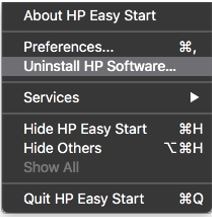
  3. Click File, and then select Uninstall HP Software... from the menu.

    Figure : Select Uninstall HP Software...

    Select Uninstall HP Software...
  4. Read any warnings that display, and then click Continue.

  5. When prompted, type your administrator user name and password.

  6. HP Uninstaller removes all HP printer software previously installed.

  7. If you are reinstalling the HP printer software, click Set Up New Device, and then follow the instructions to install the printer with HP EasyStart.

Try scanning.


Hope this helps! Keep me posted. 


Please click “Accepted Solution” if you feel my post solved your issue, it will help others find the solution. Click the “Kudos/Thumbs Up" on the bottom right to say “Thanks” for helping!

TEJ1602
I am an HP Employee

† The opinions expressed above are the personal opinions of the authors, not of HP. By using this site, you accept the <a href="https://www8.hp.com/us/en/terms-of-use.html" class="udrlinesmall">Terms of Use</a> and <a href="/t5/custom/page/page-id/hp.rulespage" class="udrlinesmall"> Rules of Participation</a>.