-
×InformationNeed Windows 11 help?Check documents on compatibility, FAQs, upgrade information and available fixes.
Windows 11 Support Center. -

-
×InformationNeed Windows 11 help?Check documents on compatibility, FAQs, upgrade information and available fixes.
Windows 11 Support Center. -
- HP Community
- Printers
- Scanning, Faxing, and Copying
- How to change default mail program on HP Smart scanner softw...

Create an account on the HP Community to personalize your profile and ask a question
07-15-2021 10:37 AM
Hi. I am on Windows 10 , my default mail application is set as Outlook. I am using HP Smart software. After scanning, when I click on 'SHARE', Microsoft Mail populates, NOT Outlook. How can I change the settings in the HP Smart software so that Outlook populates?
Solved! Go to Solution.
Accepted Solutions
07-15-2021 11:06 AM
HP Smart Windows supports those email addresses added to Windows Mail.
There is no direct connection in HP Smart to Outlook or other installed mail client software.
The best you can do is to add your "sender" email address to Windows Mail.
Example - HP Smart Windows - Mail address(es) for Share
HP_Smart_W10_Scan_Share_to_Mail_1
HP Printer Home Page - References and Resources – Learn about your Printer - Solve Problems
“Things that are your printer”
NOTE: Content depends on device type and Operating System
Categories: Alerts, Access to the Print and Scan Doctor (Windows), Warranty Check, HP Drivers / Software / Firmware Updates, How-to Videos, Bulletins/Notices, Lots of How-to Documents, Troubleshooting, Manuals > User Guides, Product Information (Specifications), more
When the website support page opens, Select (as available) a Category > Topic > Subtopic
Thank you for participating in the HP Community.
The Community is a separate wing of the HP website - We are not an HP business group.
Our Community is comprised of volunteers - people who own and use HP devices.
Click Thumbs Up to say Thank You.
Question / Concern Answered, Click "Accept as Solution"
07-15-2021 11:06 AM
HP Smart Windows supports those email addresses added to Windows Mail.
There is no direct connection in HP Smart to Outlook or other installed mail client software.
The best you can do is to add your "sender" email address to Windows Mail.
Example - HP Smart Windows - Mail address(es) for Share
HP_Smart_W10_Scan_Share_to_Mail_1
HP Printer Home Page - References and Resources – Learn about your Printer - Solve Problems
“Things that are your printer”
NOTE: Content depends on device type and Operating System
Categories: Alerts, Access to the Print and Scan Doctor (Windows), Warranty Check, HP Drivers / Software / Firmware Updates, How-to Videos, Bulletins/Notices, Lots of How-to Documents, Troubleshooting, Manuals > User Guides, Product Information (Specifications), more
When the website support page opens, Select (as available) a Category > Topic > Subtopic
Thank you for participating in the HP Community.
The Community is a separate wing of the HP website - We are not an HP business group.
Our Community is comprised of volunteers - people who own and use HP devices.
Click Thumbs Up to say Thank You.
Question / Concern Answered, Click "Accept as Solution"
07-15-2021 11:56 AM
You are welcome.
@Tim_Rodger wrote:Thank you. My last computer had a different version of the scanner software from HP that allowed me to use Outlook. Thank you for setting this straight for me. 🙂
You are perhaps referring to the full driver printer software and HP Scan.
Category Software and Drivers
and Full Solution / Full Feature Software / full driver printer software:
HP LaserJet Pro MFP M130fw/M132fw Full Feature Software and Drivers
Download-Save-Install the Full Feature Software (Printer Software)
Reminder
- If using USB, disconnect the USB cable between the printer and the computer before starting the installation. Connect the cable when instructed to do so (toward the end of the installation procedure).
Next
- Navigate to the folder in which you saved the software installation package (likely Downloads)
- Right-Click on the downloaded package and "Run as Administrator" to start the installation
- Reminder: If using USB > Connect the USB cable when instructed (toward the end of the installation)
- After the software is installed, Restart the computer and log in
+++++++++++++++++++++++++++++++++++++++++
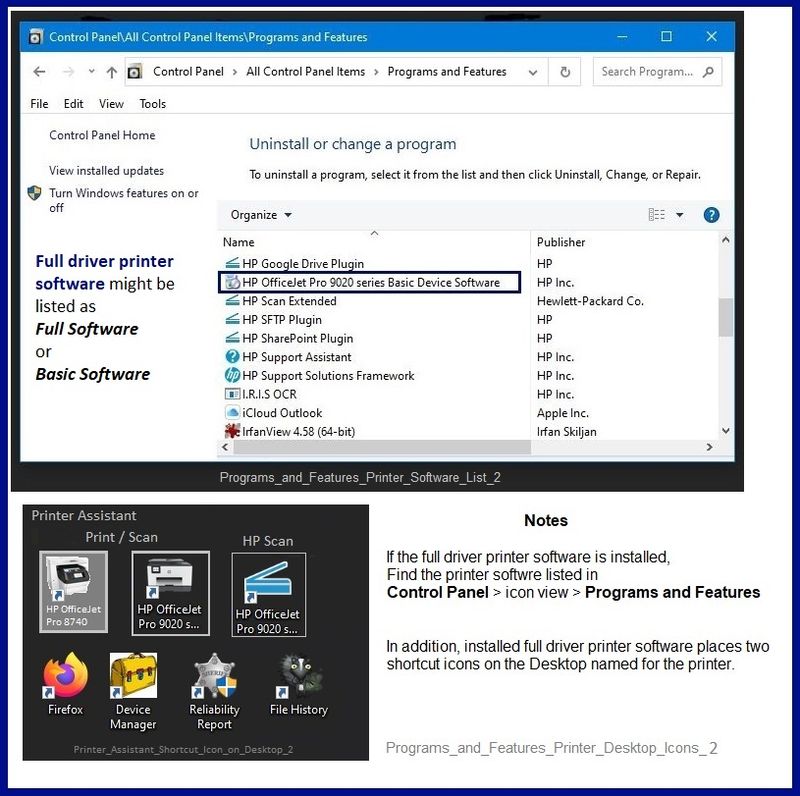
If the full driver printer software is installed, you will see the printer listed in Control Panel > icon view > Programs and Features.
In addition, the installed software places two shortcut icons on the Desktop named for the printer.
Programs_and_Features_Printer_Desktop_Icons_2
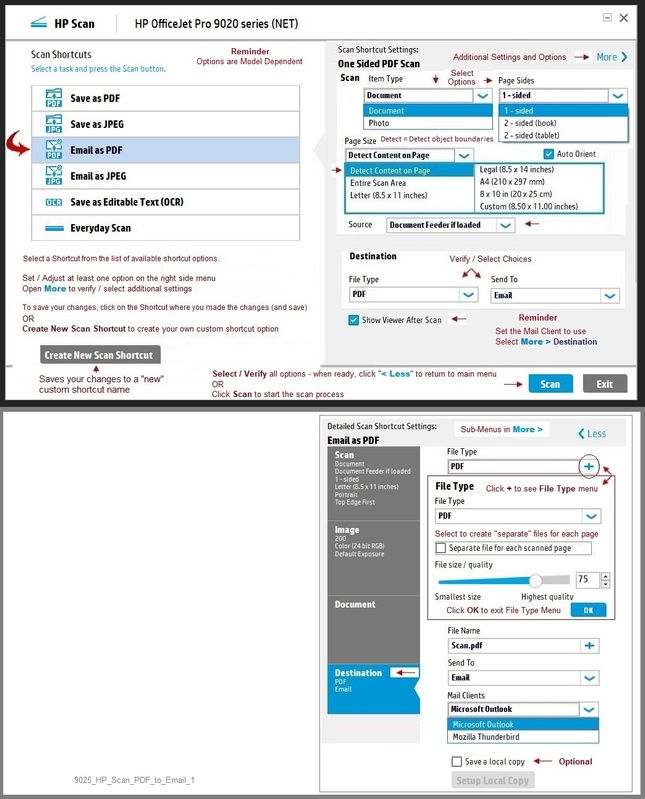
Example - HP Scan - Scan to Email
9025_HP_Scan_PDF_to_Email_1
Thank you for participating in the HP Community.
The Community is a separate wing of the HP website - We are not an HP business group.
Our Community is comprised of volunteers - people who own and use HP devices.
Click Thumbs Up to say Thank You.
Question / Concern Answered, Click "Accept as Solution"