• ×
    Information
    Need Windows 11 help?
    Check documents on compatibility, FAQs, upgrade information and available fixes.
    Windows 11 Support Center.
  • post a message
  • ×
    Information
    Need Windows 11 help?
    Check documents on compatibility, FAQs, upgrade information and available fixes.
    Windows 11 Support Center.
  • post a message
Guidelines
Join the HP Community Solve‑a‑thon | Help Others & Share Your Solutions | Live on Zoom | 2:30 PM to 2:30 AM IST | Every Wednesday Click here to know more
Common problems HP Solution Center not working : Adobe Flash Player Error and Unable to scan
We would like to share some of the most frequently asked questions about HP Solution Center not working : Adobe Flash Player Error and Unable to Scan.
HP Recommended
Envy 5030 Printer
Microsoft Windows 10 (64-bit)

I recently replaced my HP Envy 120 printer with an HP Envy 5030 printer. When scanning, the old printer asked whether I wanted a 'document' or a 'photo' (I think; can't quite remember). I always chose 'document' and the resultant scan was a pdf file. This new printer will only scan as a jpeg. Why, and how can I get it to scan as pdf?


Please and thank you!

1 ACCEPTED SOLUTION

Accepted Solutions
HP Recommended

@Vizzle1 


@Vizzle1 wrote:

I recently replaced my HP Envy 120 printer with an HP Envy 5030 printer. When scanning, the old printer asked whether I wanted a 'document' or a 'photo' (I think; can't quite remember). I always chose 'document' and the resultant scan was a pdf file. This new printer will only scan as a jpeg. Why, and how can I get it to scan as pdf?


Please and thank you!


The Basics

 How to Scan (Windows)

and

Help for HP Smart for Windows (includes a link to the store and an FAQ section)


Answer

I would guess the reason for the limited response is because you do not have the Full Feature Software installed.


If that is the case, then

Download-save-install the Full Feature Software

Restart the computer and log in


and


Reinstall / Update your PDF Reader (Adobe Reader DC /Optional  Foxit Reader)

  • HINT: Watch out for and UNCHECK unwanted extra software
  • Adobe Reader DC software should be installed even if you do not open / view / print PDF files directly from the software.


Additional Information...


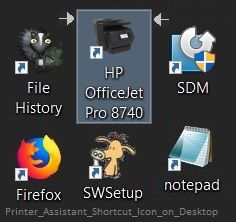
The software installs the Printer Assistant shortcut icon on the Desktop named for your printer.

Printer Assistant gives you access to printer features, including HP Scan (tab Scan > Scan a Document or Photo)


Examples

Printer_Assistant_Shortcut_Icon_on_DesktopPrinter_Assistant_Shortcut_Icon_on_Desktop


Printer_Assistant_Scan_1Printer_Assistant_Scan_1


More...

HP Scan and Capture

Windows Store - Requires Windows 8 or higher

 Scan_and_Capture_0Scan_and_Capture_0


Need or want more information?  Search for additional solutions...

Reference and Resources – Places to find (more) help and learn about your Printer

Printer Homepage – “Things that are your printer”

NOTE:  Content depends on device type

HP Drivers / Software / Firmware Updates, How-to Videos, Bulletins/Notices, Lots of How-to Documents, Troubleshooting, Access to the Print and Scan Doctor (Windows), User Guides, Product Information, more

HP ENVY 5030 All-in-One Printer


Thank you for participating in the HP Community Forum.

We are a world community of HP enthusiasts dedicated to supporting HP technology.

Click Thumbs Up on a post to say Thank You!

Answered? Click post "Accept as Solution" to help others find it.


Dragon-Fur

View solution in original post

3 REPLIES 3
HP Recommended

@Vizzle1 


@Vizzle1 wrote:

I recently replaced my HP Envy 120 printer with an HP Envy 5030 printer. When scanning, the old printer asked whether I wanted a 'document' or a 'photo' (I think; can't quite remember). I always chose 'document' and the resultant scan was a pdf file. This new printer will only scan as a jpeg. Why, and how can I get it to scan as pdf?


Please and thank you!


The Basics

 How to Scan (Windows)

and

Help for HP Smart for Windows (includes a link to the store and an FAQ section)


Answer

I would guess the reason for the limited response is because you do not have the Full Feature Software installed.


If that is the case, then

Download-save-install the Full Feature Software

Restart the computer and log in


and


Reinstall / Update your PDF Reader (Adobe Reader DC /Optional  Foxit Reader)

  • HINT: Watch out for and UNCHECK unwanted extra software
  • Adobe Reader DC software should be installed even if you do not open / view / print PDF files directly from the software.


Additional Information...


The software installs the Printer Assistant shortcut icon on the Desktop named for your printer.

Printer Assistant gives you access to printer features, including HP Scan (tab Scan > Scan a Document or Photo)


Examples

Printer_Assistant_Shortcut_Icon_on_DesktopPrinter_Assistant_Shortcut_Icon_on_Desktop


Printer_Assistant_Scan_1Printer_Assistant_Scan_1


More...

HP Scan and Capture

Windows Store - Requires Windows 8 or higher

 Scan_and_Capture_0Scan_and_Capture_0


Need or want more information?  Search for additional solutions...

Reference and Resources – Places to find (more) help and learn about your Printer

Printer Homepage – “Things that are your printer”

NOTE:  Content depends on device type

HP Drivers / Software / Firmware Updates, How-to Videos, Bulletins/Notices, Lots of How-to Documents, Troubleshooting, Access to the Print and Scan Doctor (Windows), User Guides, Product Information, more

HP ENVY 5030 All-in-One Printer


Thank you for participating in the HP Community Forum.

We are a world community of HP enthusiasts dedicated to supporting HP technology.

Click Thumbs Up on a post to say Thank You!

Answered? Click post "Accept as Solution" to help others find it.


Dragon-Fur

HP Recommended

Brilliant, thank you! Problem solved.

HP Recommended

@Vizzle1 


You are welcome.


Happy Printing.


Thank you for participating in the HP Community Forum.

We are a world community of HP enthusiasts dedicated to supporting HP technology.

Click Thumbs Up on a post to say Thank You!

Answered? Select the relevant post "Accept as Solution" to help others find it.


Dragon-Fur

† The opinions expressed above are the personal opinions of the authors, not of HP. By using this site, you accept the <a href="https://www8.hp.com/us/en/terms-of-use.html" class="udrlinesmall">Terms of Use</a> and <a href="/t5/custom/page/page-id/hp.rulespage" class="udrlinesmall"> Rules of Participation</a>.