
-
×InformationNeed Windows 11 help?Check documents on compatibility, FAQs, upgrade information and available fixes.
Windows 11 Support Center. -
-
×InformationNeed Windows 11 help?Check documents on compatibility, FAQs, upgrade information and available fixes.
Windows 11 Support Center. -
- HP Community
- Printers
- Scanning, Faxing, and Copying
- MFP M479fdn scanning issue

Create an account on the HP Community to personalize your profile and ask a question
Your account also allows you to connect with HP support faster, access a personal dashboard to manage all of your devices in one place, view warranty information, case status and more.
Common problems HP Solution Center not working : Adobe Flash Player Error and Unable to scan
We would like to share some of the most frequently asked questions about HP Solution Center not working : Adobe Flash Player Error and Unable to Scan.

It has been a while since anyone has replied. Simply ask a new question if you would like to start the discussion again.

04-26-2023 10:26 AM
 HP Recommended
Product: HP Color LaserJet Pro MFP M479fdn
When I hit scan to computer with a document directly on the glass, it works fine and the item shows up in my documents on my PC. When I try to Scan to Computer using the ADF, I get a message on the screen saying it was sent but nothing shows up in my documents. It was working 2 days ago and no settings have been changed.
11 REPLIES 11


04-26-2023 11:10 AM
HP Recommended
Hi,
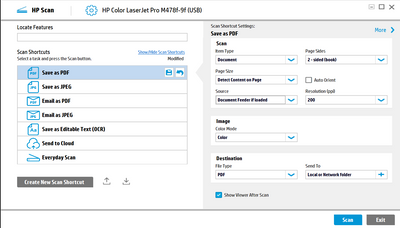
- Switch source to ADF
- Place A4 in the ADF as far as it will go
- Press the Scan button
Hope this helps! Keep me posted.
Andr-1611
If my post resolved your problem please mark this post as an "Accepted Solution".
Or click on the YES button to reply that the response was helpful and/or to say “Thank You”.
I'm not an employee of HP, I'm as volunteer here.


04-26-2023 12:34 PM
HP Recommended
Hi,
and the document is also fed and the scanner lamp turns on (there is a small gap between the scanner and the scanner lid)?
How did it work with the ADF before?
What scanner software is used on the computer?
I'm not an employee of HP, I'm as volunteer here.
04-26-2023 12:46 PM
HP Recommended
Hi, I just put the paper in the ADF, I would get a notification that a document was loaded, I would hit Scan and then Scan to Computer then select my computer(this is done on the small touch screen on the printer itself). It would run through, and then I would get a notification that the document was sent to my computer. I would go to my computer and the file icon on the task bar would blink and the document would be in My Documents. Now when I do it, everything else is the same but the document doesn't show up. However, if I scan it directly on the glass, it works fine. It's just weird. I just set it up with the HP software I downloaded.

04-26-2023 02:14 PM
HP Recommended
Save the new setting.
Then restart the computer and printer:
- shut down printer via on/off switch
- shut down the computer
- wait about 60 sec.
- Switch on the printer, wait until the printer has finished its initialization
- switch on computer, log in (with admin rights) and wait about 10 sec.
Test scan ... and now everything's working again?
I'm not an employee of HP, I'm as volunteer here.

Be alert for scammers posting fake support phone numbers and/or email addresses on the community.
If you think you have received a fake HP Support message, please report it to us by clicking on "Flag Post".
† The opinions expressed above are the personal opinions of the authors, not of HP. By using this site, you accept the Terms of Use and Rules of Participation.


Didn't find what you were looking for?
Ask the community
† The opinions expressed above are the personal opinions of the authors, not of HP. By using this site, you accept the <a href="https://www8.hp.com/us/en/terms-of-use.html" class="udrlinesmall">Terms of Use</a> and <a href="/t5/custom/page/page-id/hp.rulespage" class="udrlinesmall"> Rules of Participation</a>.