
-
×InformationNeed Windows 11 help?Check documents on compatibility, FAQs, upgrade information and available fixes.
Windows 11 Support Center. -
-
×InformationNeed Windows 11 help?Check documents on compatibility, FAQs, upgrade information and available fixes.
Windows 11 Support Center. -
- HP Community
- Printers
- Scanning, Faxing, and Copying
- Macromedia Projector has Stopped Working

Create an account on the HP Community to personalize your profile and ask a question
Your account also allows you to connect with HP support faster, access a personal dashboard to manage all of your devices in one place, view warranty information, case status and more.
Common problems HP Solution Center not working : Adobe Flash Player Error and Unable to scan
We would like to share some of the most frequently asked questions about HP Solution Center not working : Adobe Flash Player Error and Unable to Scan.

It has been a while since anyone has replied. Simply ask a new question if you would like to start the discussion again.

08-14-2014 11:40 AM
 HP Recommended
I'm trying to load HP scanning software 14.5.1. After all the files are extracted I get a message "Macromedia Projector has Stopped Working" and the installation quits. I have no idea what this means. If anyone know how to fix this problem, please let me know.
I'm using an HP ScanJet 5590 (L1911B). I'm running Windows 7 Professional (64 bit).
8 REPLIES 8
08-25-2014 03:13 AM
HP Recommended
I had exactly this problem trying to install the Scanjet 5590 software on Windows 7 64-bit. I tried all manner of compatibility settings but nothing would avoid the 'Macromedia Projector has Stopped Working' message.
In the end, what I found worked was to UNZIP the 'setup_full_5590_14-5' installer, rather than running it. This unpacks all the individual files into an installation folder. From there, you can avoid running the part of the software that uses Projector, and skip straight to the actual installation routine.
When you've unzipped setup_full_5590_14-5 into a directory, inside that directory you'll find an application called 'HPZstub' or 'HPZstub.exe' (not hpzsetup or anything else, you don't want those). If you double click HPZstub, that seems to immediately start the installer and it installs all the software and drivers.
So far this has worked fine for me. I hope it works for you too!
08-27-2014 02:47 AM
HP Recommended
>how do I unzip this .exe installation file?
I was thinking it would be as easy as renaming it to add a .zip to the end.
But windows explorer doesn't like that nor does WinZip.
Or perhaps my executable was special? You can always rename it back if it doesn't work.
You can download 7-Zip and that will work.
08-27-2014 03:56 AM
HP Recommended
I did exactly that, but used a program called "Universal Extractor." I was able to get the scanning software to install, but had to download and install the drivers seperately. Only problem is that the newly released HP software is not much different from the old software which I don't like. Oh well.
03-16-2015 04:20 PM
HP Recommended
I am trying to load the software for an HP Scanjet 4890 from the CD that came with the scanner. I have a Windows Vista 32 bit operating system. When the software loads, I get the response "Media Projector has stopped working." What does this mean, and how do I overcome the problem?
Bill Blackler

09-22-2016 01:29 AM - edited 09-22-2016 01:30 AM
HP Recommended
Hello ,
This issue is coming due to OS update pending or some time few of the package of OS crashed while installation.
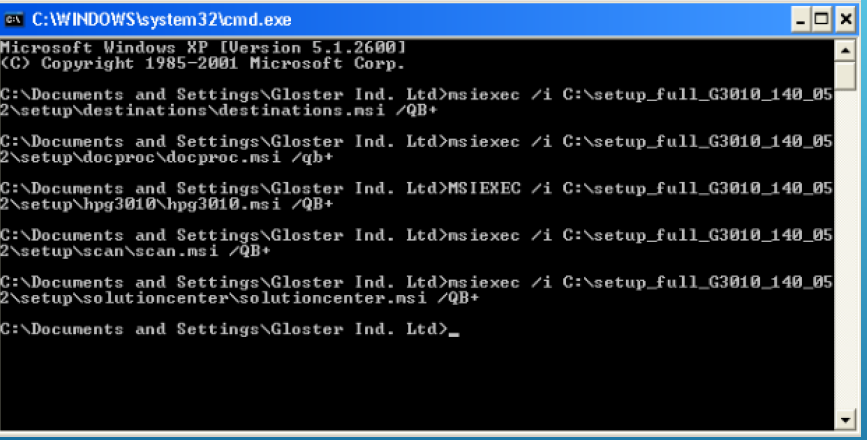
This error will stop installation process, which requires a forcefull installation from command prompt. you need to download full solution software & extract it in one folde(folder name should not be having any space in between).
Need to do forcefull installation now.we need to run 4-5 packages depending upon scanner model.
Packages are 1. Destinations, 2. Docproc, 3. Hpg5590(this package name will chnage as per your scanner model name in extracted folder), 4. Scan , 5. solutioncenter(if its available).
1. Open command prompt,
2. Type exact command , > msiexec /i C:\g3110\setup\destinations\destinations.msi /qb+
(you can copy paste this address from folder address bar & type the last word again i.e. destinations.msi again for exicution.)
3. Run the next package now > msiexec /i C:\g3110\setup\docproc\docproc.msi /qb+
4. Run rest 2-3 packages & you can find the scanning Logo on your desktop , restart the scanner & try to scan .
This work around should resolve the issue. screen shot of command is attched to this(sample for model G3110, command will remain the same for all models).
Regards
Vishal vaibhav

Be alert for scammers posting fake support phone numbers and/or email addresses on the community.
If you think you have received a fake HP Support message, please report it to us by clicking on "Flag Post".
† The opinions expressed above are the personal opinions of the authors, not of HP. By using this site, you accept the Terms of Use and Rules of Participation.


Didn't find what you were looking for?
Ask the community
† The opinions expressed above are the personal opinions of the authors, not of HP. By using this site, you accept the <a href="https://www8.hp.com/us/en/terms-of-use.html" class="udrlinesmall">Terms of Use</a> and <a href="/t5/custom/page/page-id/hp.rulespage" class="udrlinesmall"> Rules of Participation</a>.