
-
×InformationNeed Windows 11 help?Check documents on compatibility, FAQs, upgrade information and available fixes.
Windows 11 Support Center. -
-
×InformationNeed Windows 11 help?Check documents on compatibility, FAQs, upgrade information and available fixes.
Windows 11 Support Center. -
- HP Community
- Printers
- Scanning, Faxing, and Copying
- Officejet Pro 8610 Not Found when Scanning

Create an account on the HP Community to personalize your profile and ask a question
Your account also allows you to connect with HP support faster, access a personal dashboard to manage all of your devices in one place, view warranty information, case status and more.
Common problems HP Solution Center not working : Adobe Flash Player Error and Unable to scan
We would like to share some of the most frequently asked questions about HP Solution Center not working : Adobe Flash Player Error and Unable to Scan.

It has been a while since anyone has replied. Simply ask a new question if you would like to start the discussion again.

03-10-2017 11:52 AM
 HP Recommended
Product: HP Officejet Pro 8610
Operating System: Microsoft Windows 10 (64-bit)
Hi, I can't scan with my Officejet Pro 8610 printer. I've tried to start a scan from the computer and from the printer but the same error message appears each time.
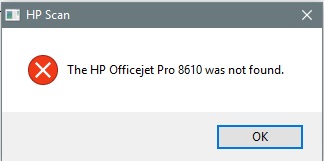
I opened HP Printer Assistant and clicked on "Manage Scan to Computer" and it is enabled. The checkbox is checked by "Automatically start Scan to Computer when I log on to Windows."
What am I missing? Please help as I don't know what to do 😞
Solved! Go to Solution.
1 ACCEPTED SOLUTION
Accepted Solutions


03-10-2017
12:13 PM
- last edited on
07-23-2025
01:06 PM
by
 Irfan_06
HP Recommended
Hi,
Welcome to HP Support Forum. Firstly, please download an run the following tool:
http://ftp.hp.com/pub/printers/hppsdr/HPPSdr.exe
It may fix the problem for you. If not, post back full error message(s).
Regards.
BH
***
**Click the KUDOS thumb up on the left to say 'Thanks'**
Make it easier for other people to find solutions by marking a Reply 'Accept as Solution' if it solves your problem.


***
**Click the KUDOS thumb up on the left to say 'Thanks'**
Make it easier for other people to find solutions by marking a Reply 'Accept as Solution' if it solves your problem.
6 REPLIES 6
03-10-2017
12:13 PM
- last edited on
07-23-2025
01:06 PM
by
Irfan_06
HP Recommended
Hi,
Welcome to HP Support Forum. Firstly, please download an run the following tool:
http://ftp.hp.com/pub/printers/hppsdr/HPPSdr.exe
It may fix the problem for you. If not, post back full error message(s).
Regards.
BH
***
**Click the KUDOS thumb up on the left to say 'Thanks'**
Make it easier for other people to find solutions by marking a Reply 'Accept as Solution' if it solves your problem.
***
**Click the KUDOS thumb up on the left to say 'Thanks'**
Make it easier for other people to find solutions by marking a Reply 'Accept as Solution' if it solves your problem.
05-29-2017 10:57 PM
HP Recommended
I tried the latest version of the tool you suggested (HP Print & Scan doctor) but that didnt work. I got the same message.
BTW, when I open the HP Printer Assistant, I do not see a Scan tab (I do see a Print tab) where I can go to Manage Scan to Computer to enable it.
I have restarted the printer, installed HP Scan Extended and tried to run HP Scan Extended, but that came back and said "HP IMaging Device was not found".
I was able to scan by going through the Windows Fax & Scan and scanning to Other Computers -> desktop, but that does not allow me to save the file in pdf format.
I'm on WIndows 10 and have updated the latest drivers.
Any help would be greatly appreciated.
09-22-2017
10:34 AM
- last edited on
07-23-2025
01:07 PM
by
Irfan_06
HP Recommended
My OfficeJet Pro 8710 is still giving me Printer Not Found error. I tried downloanding this link http://ftp.hp.com/pub/printers/hppsdr/HPPSdr.exe.
My printer is still showing my computer Id if i want to scan wirelessly but not connecting.
Need Help Please??



05-12-2019 06:59 PM
HP Recommended
Thank you for posting in this thread. Unfortunately based on when the last response was made, I have closed this thread to help keep comments current and up to date. We recommend starting a new thread for your issue by clicking here.
To be more helpful with your post, you can add key information if you desire:
1. Product Name and Number (please do not post Serial Number)
• Example: HP Pavilion DV2-1209AX or HP Deskjet 3000 Printer CH393A
2. Operating System installed (if applicable)
• Example: Windows XP, Windows Vista 32-bit, Windows 7 64-bit
3. Error message (if any)
• Example: ""Low disk space"" error in Windows
4. Any changes made to your system before the issue occurred
• Examples: Upgrading your Operating System or installing a new software; or installing new hardware like a printer, modem, or router.
If you have any other questions about posting in the community, please feel free to send me a private message!
Thank you
I work on behalf of HP

Be alert for scammers posting fake support phone numbers and/or email addresses on the community.
If you think you have received a fake HP Support message, please report it to us by clicking on "Flag Post".
† The opinions expressed above are the personal opinions of the authors, not of HP. By using this site, you accept the Terms of Use and Rules of Participation.


Didn't find what you were looking for?
Ask the community
† The opinions expressed above are the personal opinions of the authors, not of HP. By using this site, you accept the <a href="https://www8.hp.com/us/en/terms-of-use.html" class="udrlinesmall">Terms of Use</a> and <a href="/t5/custom/page/page-id/hp.rulespage" class="udrlinesmall"> Rules of Participation</a>.