• ×
    Information
    Need Windows 11 help?
    Check documents on compatibility, FAQs, upgrade information and available fixes.
    Windows 11 Support Center.
  • post a message
  • ×
    Information
    Need Windows 11 help?
    Check documents on compatibility, FAQs, upgrade information and available fixes.
    Windows 11 Support Center.
  • post a message
Guidelines
Seize the moment! nominate yourself or a tech enthusiast you admire & join the HP Community Experts!
Common problems HP Solution Center not working : Adobe Flash Player Error and Unable to scan
We would like to share some of the most frequently asked questions about HP Solution Center not working : Adobe Flash Player Error and Unable to Scan.
HP Recommended
Envy 5055
iOS

I noticed a line printing on the left edge of all pages after the first.  It’s one clear line, not due to the print heads being misaligned or cleaning needed, or drivers needing to be updating.  How do I know this?  Because I did all of that trying to get rid of the line.  I’m working from home, don’t need the headache of an extraneous line!

5 REPLIES 5
HP Recommended

@JB42267, Welcome to HP Support Community!


To be able to assist you better, I'd like to know the following-

  • What happens when you make photocopies on the printer? Do you see the line?
  • Which application are you trying to print from?
  • Are you using the AirPrint feature or the HP Smart App to print from?
  • Does the print preview look good?

Keep me posted for further assistance.

TEJ1602
I am an HP Employee

HP Recommended
  • What happens when you make photocopies on the printer? Do you see the line?

No line shows up when I photocopy.


  • Which application are you trying to print from?

Google docs/Chrome (my work laptop). I don’t get the line when I print from my iPad

  • Are you using the AirPrint feature or the HP Smart App to print from?

AirPrint.  I am not able to download the hp smart app to my work laptop.

  • Does the print preview look good?

Yes.  I can print 10 copies of one page.  The first one is great, the rest have the line.  I printed postcards to send to students and the line showed up.  I had to increase my pages in instaink because of this issue.  

HP Recommended

@JB42267


Thanks for replying!


Try printing from different applications to isolate the issue. Also, check if the print preview looks good.


ensure that the printer is up to date with its firmware and Mac is up to date with its software. If you are unsure you may use the links below to update the printer firmware and Mac software:

Update printer firmware

Update software on Mac 


Remove and add the printer

Click the Apple menu, and then select System Preferences.

Depending on your operating system version, click Print & Fax, Print & Scan, or Printers & Scanners.

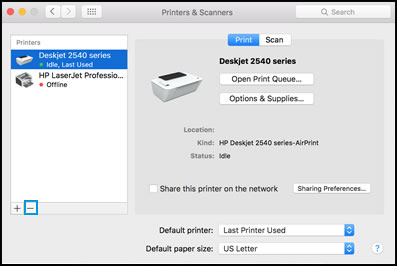
Click the name of your printer, click the Minus sign, and then delete the printer.


Select printer and click the minus sign

Click the Plus sign, and then click Add Printer or Scanner.
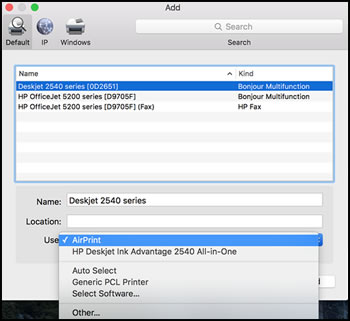
Click the Use or Print Using box, and then select AirPrint


Select AirPrint from the Use menu


Click Add to add the printer to the list.

Try to print.


Keep me posted for further assistance.


Please click “Accepted Solution” if you feel my post solved your issue, it will help others find the solution. Click the “Kudos/Thumbs Up" on the bottom right to say “Thanks” for helping!

TEJ1602
I am an HP Employee

HP Recommended

It’s not AirPrint, I made a mistake.  I am printing from my work laptop, which is a ThinkPad.  Other than adding the printer, I can’t add any apps, or download anything.  That is all blocked.  I will try to delete the printer and add it again.  

When I print from my iPad, the prints are fine.


Regarding the preview from my laptop, they look fine.  

I will delete the printer and reinstall and see if that fixes it.

HP Recommended

@JB42267


Sure, keep me posted.

TEJ1602
I am an HP Employee

† The opinions expressed above are the personal opinions of the authors, not of HP. By using this site, you accept the <a href="https://www8.hp.com/us/en/terms-of-use.html" class="udrlinesmall">Terms of Use</a> and <a href="/t5/custom/page/page-id/hp.rulespage" class="udrlinesmall"> Rules of Participation</a>.