• ×
    Information
    Need Windows 11 help?
    Check documents on compatibility, FAQs, upgrade information and available fixes.
    Windows 11 Support Center.
  • post a message
  • ×
    Information
    Need Windows 11 help?
    Check documents on compatibility, FAQs, upgrade information and available fixes.
    Windows 11 Support Center.
  • post a message
Guidelines
Is your HP DeskJet 3830 series scanner not working? Here is the solution Click here to view the instructions!
Common problems HP Solution Center not working : Adobe Flash Player Error and Unable to scan
We would like to share some of the most frequently asked questions about HP Solution Center not working : Adobe Flash Player Error and Unable to Scan.
HP Recommended
Envy 5530 all-in-one
macOS 10.13 High Sierra

When printing photos the printer window box opens for preview and the picture shows centered on the 4 X 6 HP photo paper. But when it actually prints the image it is off center by 1/4 to 3/8 of an inch. I have checked many times to see if printing misaligned with the diagnostic printer sheet but no errors. I cannot adjust the paper size to exact measurement as indicated in the image. I had to back the last image with black background to see the difference even though it is cockeyed.Image 02.pngImage 01.pngImage 3.jpeg

1 REPLY 1
HP Recommended

@RAGsb1561, Welcome to HP Support Community!


This could be an issue with the drivers installed or the settings. Let us try to isolate and resolve the issue.


Ensure the driver settings are set to your requirements. Refer to the document HP Printers - How to Print Photos (Mac)  for help.


Also, you can try the steps below-


ensure that the printer is up to date with its firmware and Mac is up to date with its software. If you are unsure you may use the links below to update the printer firmware and Mac software:

Update printer firmware

Update software on Mac 


Remove and add the printer

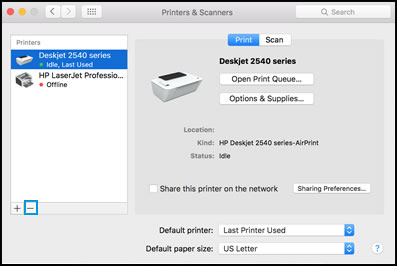
Click the Apple menu, and then select System Preferences.

Depending on your operating system version, click Print & Fax, Print & Scan, or Printers & Scanners.

Click the name of your printer, click the Minus sign, and then delete the printer.


Select printer and click the minus sign

Click the Plus sign, and then click Add Printer or Scanner.
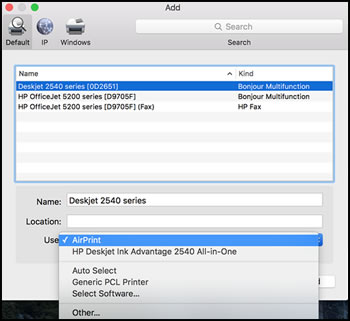
Click the Use or Print Using box, and then select AirPrint


Select AirPrint from the Use menu


Click Add to add the printer to the list.

Try to print.


Keep me posted for further assistance.


Please click “Accepted Solution” if you feel my post solved your issue, it will help others find the solution. Click the “Kudos/Thumbs Up" on the bottom right to say “Thanks” for helping!

TEJ1602
I am an HP Employee

† The opinions expressed above are the personal opinions of the authors, not of HP. By using this site, you accept the <a href="https://www8.hp.com/us/en/terms-of-use.html" class="udrlinesmall">Terms of Use</a> and <a href="/t5/custom/page/page-id/hp.rulespage" class="udrlinesmall"> Rules of Participation</a>.