• ×
    Information
    Need Windows 11 help?
    Check documents on compatibility, FAQs, upgrade information and available fixes.
    Windows 11 Support Center.
  • post a message
  • ×
    Information
    Need Windows 11 help?
    Check documents on compatibility, FAQs, upgrade information and available fixes.
    Windows 11 Support Center.
  • post a message
Guidelines
Seize the moment! nominate yourself or a tech enthusiast you admire & join the HP Community Experts!
Common problems HP Solution Center not working : Adobe Flash Player Error and Unable to scan
We would like to share some of the most frequently asked questions about HP Solution Center not working : Adobe Flash Player Error and Unable to Scan.
HP Recommended
HP Officejet Pro 6970
Microsoft Windows 10 (64-bit)

Can a custom scan area be set on the Officejet Pro 6970. I so how is this done. When it comes to scanning the Pro 6970 seems quite inferior to my old Pro 6380.

1 REPLY 1
HP Recommended

Hello, @Billytea – Hope you are well 🙂
 

Thanks for engaging in the HP Forums! I see by your post that you are experiencing printer issues. I will certainly do my best to help you!


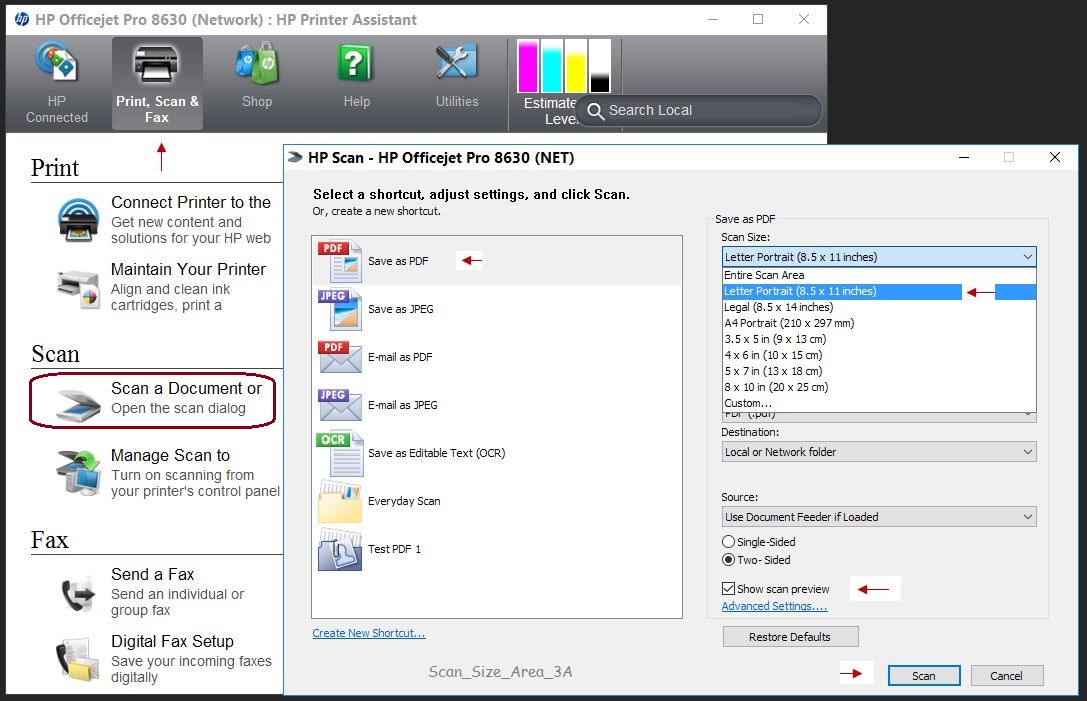
Going through your post, I understand that you are trying to scan a custom area on your Officejet printer. You need to use the HP printer software to have this option.


Your HP printer scan software has an auto detect feature which will detect the image that you have kept on the scanner bed and will scan only that area.  


Double-click the HP printer icon on your PC and then select HP Scan / Scan a document or image option. Also, make sure the source is "Flatbed scanner" and not the ADF. Check under "Advanced scan settings" to get the Auto crop feature if not enabled.


Check the image below:


Thanks, Let me know how that goes!

Good luck 🙂
 

Please click "Accepted as Solution" on the post that solves your issue to help others find the solution. To show appreciation for my help, please click the "Thumbs Up Icon" below!

Please click "Accepted as Solution" on the post that solves your issue to help others find the solution. To show appreciation for my help, please click the "Thumbs Up Icon" below!

DVortex
I am not an HP Employee
† The opinions expressed above are the personal opinions of the authors, not of HP. By using this site, you accept the <a href="https://www8.hp.com/us/en/terms-of-use.html" class="udrlinesmall">Terms of Use</a> and <a href="/t5/custom/page/page-id/hp.rulespage" class="udrlinesmall"> Rules of Participation</a>.