
-
×InformationNeed Windows 11 help?Check documents on compatibility, FAQs, upgrade information and available fixes.
Windows 11 Support Center. -
-
×InformationNeed Windows 11 help?Check documents on compatibility, FAQs, upgrade information and available fixes.
Windows 11 Support Center. -
- HP Community
- Printers
- Scanning, Faxing, and Copying
- Scan destination change

Create an account on the HP Community to personalize your profile and ask a question
Your account also allows you to connect with HP support faster, access a personal dashboard to manage all of your devices in one place, view warranty information, case status and more.
Common problems HP Solution Center not working : Adobe Flash Player Error and Unable to scan
We would like to share some of the most frequently asked questions about HP Solution Center not working : Adobe Flash Player Error and Unable to Scan.

It has been a while since anyone has replied. Simply ask a new question if you would like to start the discussion again.

01-18-2021 07:51 AM
 HP Recommended
Product: Envy 5530
Operating System: Microsoft Windows 10 (64-bit)
How to change the current scan destination ?
Solved! Go to Solution.
1 ACCEPTED SOLUTION
Accepted Solutions


01-18-2021 08:21 AM
HP Recommended
==============================================================
Welcome to the HP Community.
Reminder to those reading:
Do NOT respond to individuals who post phone numbers or email addresses.
These might be scammers trying to steal your information / money.
HP does not post phone numbers or email in Community messages.
==============================================================
@Oskafl wrote:How to change the current scan destination ?
How you do this depends on the particular application / software you are using.
Two examples of the more popular / likely scenarios.
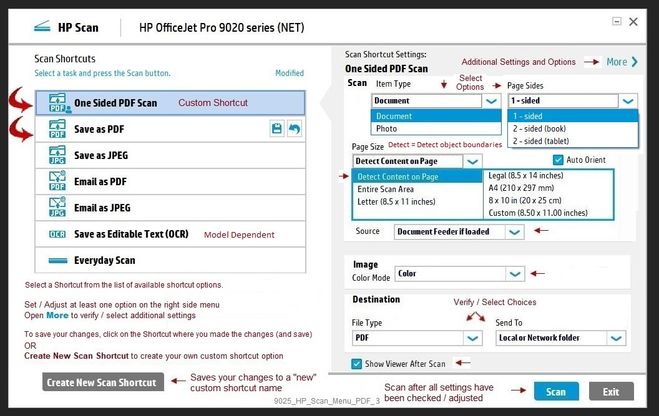
HP Scan (part of the Full Feature Software)
Example
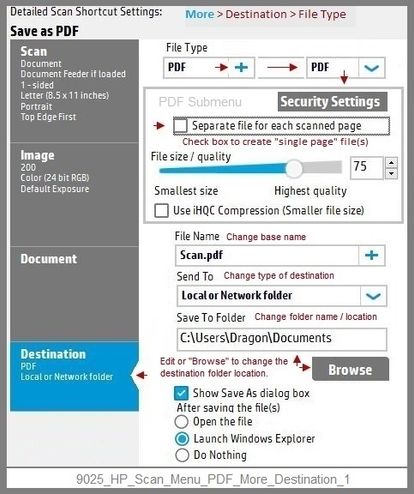
NOTE: Setup is similar for both Image JPEG and PDF scanning
Some options are model dependent.
>>>> Be sure to check / adjust the Destination settings in More >
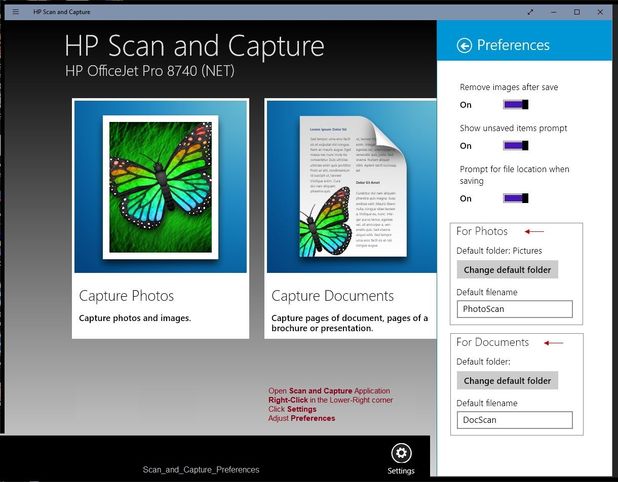
HP Scan and Capture - Microsoft Store (formally Windows Store) - Requires Windows 8 or higher
- Download-Save-Install HP Scan and Capture
Printer Home Page - References and Resources – Learn about your Printer - Solve Problems
“Things that are your printer”
NOTE: Content depends on device type and Operating System
Categories: Alerts, Access to the Print and Scan Doctor (Windows), Warranty Check, HP Drivers / Software / Firmware Updates, How-to Videos, Bulletins/Notices, Lots of How-to Documents, Troubleshooting, Manuals > User Guides, Product Information (Specifications), more
When the website support page opens, Select (as available) a Category > Topic > Subtopic
Open Support Home
Enter the name of your HP device
Thank you for participating in the HP Community.
The Community is a separate wing of the HP website - We are not a business group of HP..
Our Community is comprised of volunteers - people who own and use HP devices.
Click Thumbs Up to say Thank You.
Question Resolved / Answered, Click "Accept as Solution"
Dragon-Fur
4 REPLIES 4
01-18-2021 08:21 AM
HP Recommended
==============================================================
Welcome to the HP Community.
Reminder to those reading:
Do NOT respond to individuals who post phone numbers or email addresses.
These might be scammers trying to steal your information / money.
HP does not post phone numbers or email in Community messages.
==============================================================
@Oskafl wrote:How to change the current scan destination ?
How you do this depends on the particular application / software you are using.
Two examples of the more popular / likely scenarios.
HP Scan (part of the Full Feature Software)
Example
NOTE: Setup is similar for both Image JPEG and PDF scanning
Some options are model dependent.
>>>> Be sure to check / adjust the Destination settings in More >
HP Scan and Capture - Microsoft Store (formally Windows Store) - Requires Windows 8 or higher
- Download-Save-Install HP Scan and Capture
Printer Home Page - References and Resources – Learn about your Printer - Solve Problems
“Things that are your printer”
NOTE: Content depends on device type and Operating System
Categories: Alerts, Access to the Print and Scan Doctor (Windows), Warranty Check, HP Drivers / Software / Firmware Updates, How-to Videos, Bulletins/Notices, Lots of How-to Documents, Troubleshooting, Manuals > User Guides, Product Information (Specifications), more
When the website support page opens, Select (as available) a Category > Topic > Subtopic
Open Support Home
Enter the name of your HP device
Thank you for participating in the HP Community.
The Community is a separate wing of the HP website - We are not a business group of HP..
Our Community is comprised of volunteers - people who own and use HP devices.
Click Thumbs Up to say Thank You.
Question Resolved / Answered, Click "Accept as Solution"
Dragon-Fur
01-18-2021 10:27 AM
HP Recommended
You are welcome.
Stay Safe!
FYI...
HP Scan - what is it and where does it come from?
HP Scan is part of the Full Driver / Full Feature Software for the printer.
Typically, it can be installed using the Easy Start wrapper.
If you have not done so, download-save-install the Full Feature Software / Full Driver for the printer
If using USB cable between the printer and the computer, disconnect the cable.
HP Easy Start Printer Setup Software
- Download-and-Save the printer software (Full Feature Software / HP Smart / Easy Start)
- Right-Click on the downloaded package and "Run as Administrator" to start the installation
- Reminder: If using Easy Start, select the Full Driver
About 2/3 of the way through the setup, you will be given the opportunity to select the software - select the "Full" driver set (as opposed to the basic driver).
If using USB: Connect the cable when instructed to do so (near the last part of the driver installation)
After the software is installed, Restart the computer and log in.
Full driver provides print and scan functions (even if HP Smart proves to be stubborn).
After Full Driver is installed shortcut icons are added to the Desktop for printer and for scan.
Thank you for participating in the HP Community.
The Community is a separate wing of the HP website - We are not a business group of HP..
Our Community is comprised of volunteers - people who own and use HP devices.
Click Thumbs Up to say Thank You.
Question Resolved / Answered, Click "Accept as Solution" .
Dragon-Fur
03-17-2021 09:45 PM
HP Recommended
It's important to note that this feature is NOT part of the full feature HP Smart application. That suite of tools does not include HP Scan. (It has a Scan program, but does not do what's described above.)
Additionally, There is no program called HP Scan to launch from Windows directly, even after installing the 'Full Feature Software'.
To launch HP Scan, I had to open the program that's called by my printer's name, in my case, the program was HP OfficeJet 6950.

Be alert for scammers posting fake support phone numbers and/or email addresses on the community.
If you think you have received a fake HP Support message, please report it to us by clicking on "Flag Post".
† The opinions expressed above are the personal opinions of the authors, not of HP. By using this site, you accept the Terms of Use and Rules of Participation.


Didn't find what you were looking for?
Ask the community
† The opinions expressed above are the personal opinions of the authors, not of HP. By using this site, you accept the <a href="https://www8.hp.com/us/en/terms-of-use.html" class="udrlinesmall">Terms of Use</a> and <a href="/t5/custom/page/page-id/hp.rulespage" class="udrlinesmall"> Rules of Participation</a>.