• ×
    Information
    Need Windows 11 help?
    Check documents on compatibility, FAQs, upgrade information and available fixes.
    Windows 11 Support Center.
  • post a message
  • ×
    Information
    Need Windows 11 help?
    Check documents on compatibility, FAQs, upgrade information and available fixes.
    Windows 11 Support Center.
  • post a message
Guidelines
Seize the moment! nominate yourself or a tech enthusiast you admire & join the HP Community Experts!
Common problems HP Solution Center not working : Adobe Flash Player Error and Unable to scan
We would like to share some of the most frequently asked questions about HP Solution Center not working : Adobe Flash Player Error and Unable to Scan.
HP Recommended
HP color laser jat pro MFP M181 fw
Linux

Goodmorning,

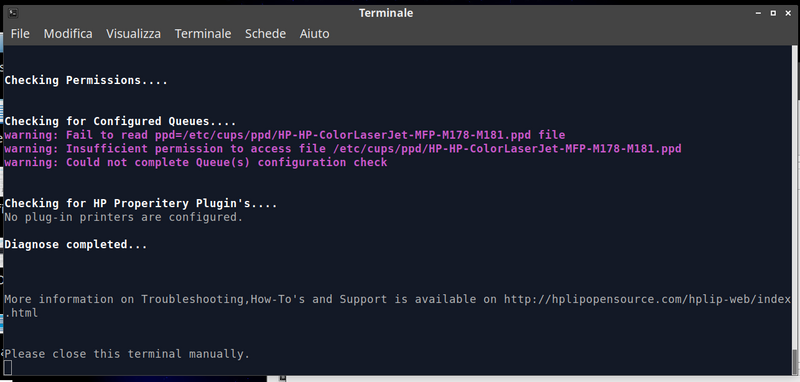
I install my printer and scanner drivers. then I read:


Istantanea_2019-04-24_14-13-28.png


Missing "hp color laserjet mfp m178-m181.ppd"


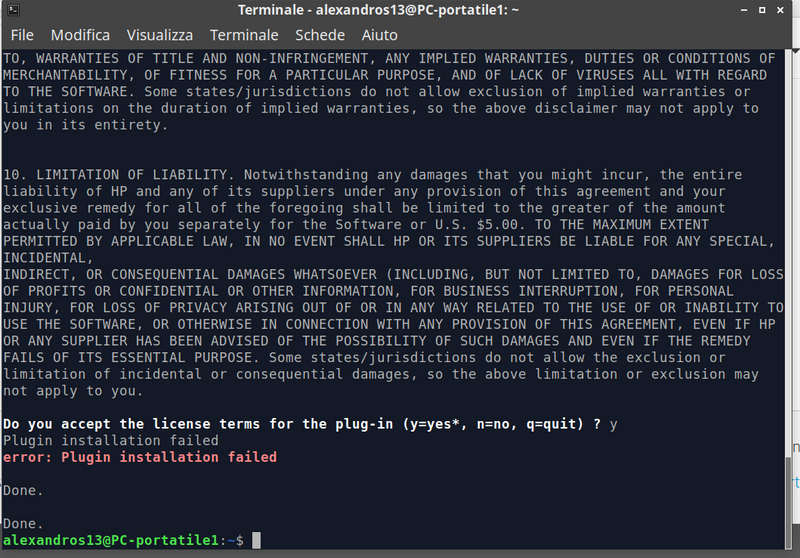
Run the "hp-plugin" and read:


Istantanea_2019-04-24_15-28-09.png


Where am I wrong?

2 REPLIES 2
HP Recommended

@AlexandrosXIII 


Not sure if this is relevant - found the following notation in the All Supported Printer Models document:


Model Name               HP Color LaserJet Pro MFP M181fw


Min. HPLIP

Version                        3.18.5


Driver Plug-in 8           No   


Support Level 9           Full


Print Mode                  Color


Scan to PC3                 Yes


PC Send Fax 5              No


Connectivity

USB

Network

Parallel 1                     USB, Network


Note                            -


8 ("Required") A downloadable driver plug-in is required for printing support. ("Optional") A downloadable driver plug-in is optional for printing support and may increase the speed, quality, or other aspect of printed output. ("No" or "None") A driver plug-in is not required nor available. Driver plug-ins are released under a proprietary (non-open) license and are not part of the HPLIP tarball release. For more information, please refer to this KB article


Thank you for participating in the HP Community Forum.

We are a world community of HP enthusiasts dedicated to supporting HP technology.

Click Thumbs Up on a post to say Thank You!

Answered? Click post "Accept as Solution" to help others find it.


Dragon-Fur

HP Recommended

My version "Hplip-3.19.3".

Without file.ppd my scan NOT WORK.

Now?


P.S. The printers paid for it.

† The opinions expressed above are the personal opinions of the authors, not of HP. By using this site, you accept the <a href="https://www8.hp.com/us/en/terms-of-use.html" class="udrlinesmall">Terms of Use</a> and <a href="/t5/custom/page/page-id/hp.rulespage" class="udrlinesmall"> Rules of Participation</a>.