• ×
    Information
    Need Windows 11 help?
    Check documents on compatibility, FAQs, upgrade information and available fixes.
    Windows 11 Support Center.
  • post a message
  • ×
    Information
    Need Windows 11 help?
    Check documents on compatibility, FAQs, upgrade information and available fixes.
    Windows 11 Support Center.
  • post a message
Guidelines
Join the HP Community Solve‑a‑thon | Help Others & Share Your Solutions | Live on Zoom | 2:30 PM to 2:30 AM IST | Every Wednesday Click here to know more
Common problems HP Solution Center not working : Adobe Flash Player Error and Unable to scan
We would like to share some of the most frequently asked questions about HP Solution Center not working : Adobe Flash Player Error and Unable to Scan.
HP Recommended
HP 8022e
Microsoft Windows 10 (32-bit)

Scan to email is not showing up on the printer menu screen. Nor is it showing up when I log into the printer from my computer. No way to set this up. Only option coming is to scan to a computer. I’ve tried everything … resetting the printer, etc. Nothing works. Help. 

1 REPLY 1
HP Recommended

@George689 


Welcome to the HP Community.


There are two models in the results list for "HP 8022e":

Results for "HP 8022e" (2) 


It is likely the printer supports "Print Anywhere" (not the question but nice to know).

Reference

“Print Anywhere App” Supported on Select Printers

  HP Printers - Print Anywhere with the HP Smart App

 Step 3:  Use Print Anywhere


========================================================================

Answer

HP Smart supports Scan and then Share to Email from within the HP Smart application.


HP Scan (part of the full driver printer software) supports sending scanned content to email using installed email client software.


Why not available in EWS?

Printers that do not support SMTP (digital send operations) generally do not include the Scan to Email Profiles and setup in the Embedded Web Server (EWS).


Guide:

HP Printers - How to Scan


Details / How-to / Examples 


HP Smart - Windows

Preparation:  Add your "sending from" mailing address to the Windows Mail application

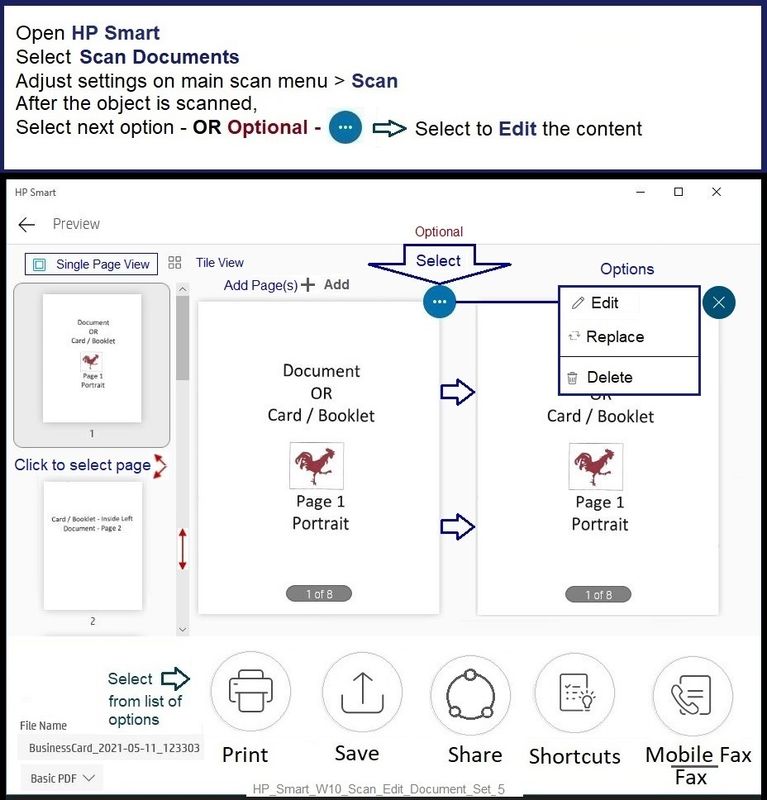
Use HP Smart to scan the content - after the content is scanned, select "Share" to send that scan to an email recipient.


Partial Example - HP Smart - Windows - Scan > Optional Edit > Select Destination (next steps)

HP_Smart_W10_Scan_Edit_Document_Set_5HP_Smart_W10_Scan_Edit_Document_Set_5


Printer Software - Full Feature Software / full driver printer software


The printer software supports scan to Email from the printer software (HP Scan) via an Email client installed on the computer.  Examples of Email Client software:  Installed Outlook, Mozilla Thunderbird.


Preparation:

  • Install the Full Feature Software / full Driver printer software

Example Video: 

HP Officejet Pro 8025 | 8020 | 8035 : Download and install full software solution (updated Feb2021)


  • Install and set up an email client software


--------------------------------------------------------------------------------------------------------

Example - HP Scan - Scan to Email client

9025_HP_Scan_PDF_to_Email_29025_HP_Scan_PDF_to_Email_2


HP Printer Support Home Page - References and Resources – Learn about your Printer  - Solve Problems

 “Things that are your printer”

NOTE:  Content depends on device type and Operating System

Categories:  Alerts, Access to the Print and Scan Doctor (Windows), Warranty Check, HP Drivers / Software / Firmware Updates, How-to Videos, Bulletins/Notices, Lots of How-to Documents, Troubleshooting, Manuals > User Guides, Product Information (Specifications), more

When the website support page opens, Select (as available) a Category > Topic > Subtopic

Results for "HP 8022e" (2) 

OR

Open Product Home

Enter the type and name of your HP device


Printer and  HP+ service

Contact HP+ Support

OR

>>> Open your HP+ Printer Homepage > Concierge Help > Click Contact Us link in the Orange box


Note that Concierge assistance is only available for registered HP+ printers.


NOTE:  Where available, the Homepage website for the non HP+ model includes any missing "Category" sections not found in the HP+ printer site.  What?  The “+” and “not +” printers are the same printer – HP+ is a benefit / service.


 HP+ Printers – HP Store / Information

 HP+ Printers


HP+ > Benefits, Requirements, Your Responsibilities

HP+ Printing – Website / Information / FAQ


Thank you for participating in the HP Community.

The Community is a separate wing of the HP website - We are not an HP business group.

Our Community is comprised of volunteers - people who own and use HP devices.

Click Helpful = Yes to say Thank You.

Question / Concern Answered, Click "Accept as Solution"


Dragon-Fur

† The opinions expressed above are the personal opinions of the authors, not of HP. By using this site, you accept the <a href="https://www8.hp.com/us/en/terms-of-use.html" class="udrlinesmall">Terms of Use</a> and <a href="/t5/custom/page/page-id/hp.rulespage" class="udrlinesmall"> Rules of Participation</a>.