• ×
    Information
    Need Windows 11 help?
    Check documents on compatibility, FAQs, upgrade information and available fixes.
    Windows 11 Support Center.
  • post a message
  • ×
    Information
    Need Windows 11 help?
    Check documents on compatibility, FAQs, upgrade information and available fixes.
    Windows 11 Support Center.
  • post a message
Guidelines
Seize the moment! nominate yourself or a tech enthusiast you admire & join the HP Community Experts!
Common problems HP Solution Center not working : Adobe Flash Player Error and Unable to scan
We would like to share some of the most frequently asked questions about HP Solution Center not working : Adobe Flash Player Error and Unable to Scan.
HP Recommended
office jet 8710
Microsoft Windows 10 (64-bit)

Dur to the.recent Windows 10 update oir 8710 has lost the ability to scan to email. Need to reset accounts etc. This is a primary home business unit used daily

1 REPLY 1
HP Recommended

@Mitch1060 


Preparation


Full Feature Software


If the update impacted the Full Feature Software on the printer,

you may need to uninstall and then (re)install a fresh copy of the printer software


HP Easy Start Printer Setup Software


"Easy Start" is a wrapper that can find and install your printer software.

When asked (or given the opportunity to choose), select the Full Driver option (wording may vary).

After the software is installed, Restart the computer and log in.


Firmware Update


If you have not done so, install the latest Firmware for the printer.


HP Officejet Pro 8710/8720 Firmware Update


Fixes

  • Resolves error message when configuring certain settings in the embedded web server.


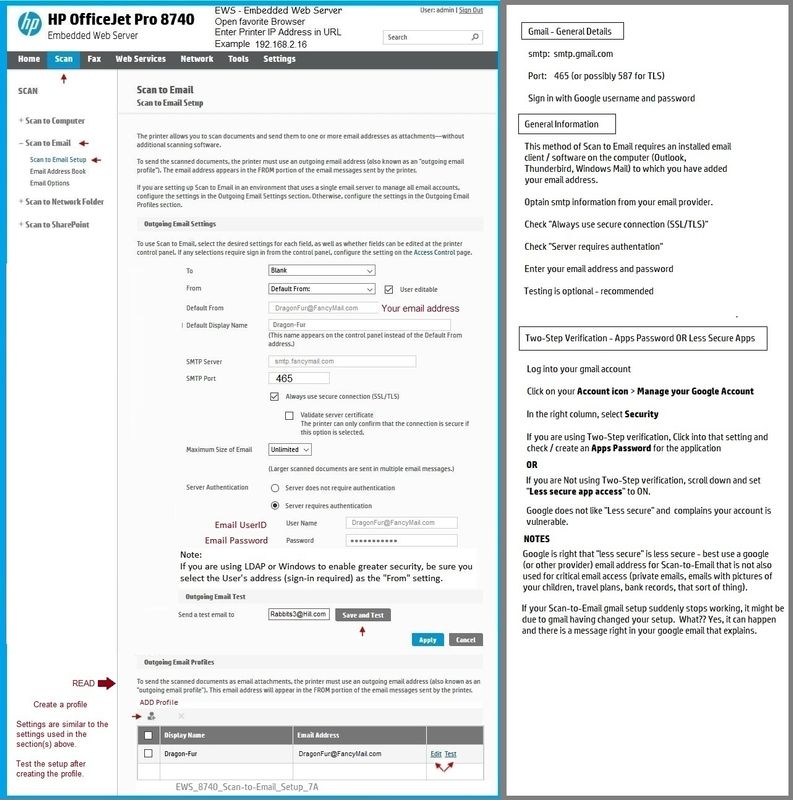
Embedded Web Server (EWS) > Scan > Scan to Email


If you are using Google and the Scan to Email suddenly stopped working,

If you are using "Less Secure Apps" setup,

Google might have gone in out from under you and changed your settings.

Check in your Google Account.


If necessary, you can add / remove / edit existing Scan-to-Email profile(s) in EWS.


General Example - EWs - Scan to Email - Officejet Pro 8740

EWS_8740_Scan-to-Email_Setup_7AEWS_8740_Scan-to-Email_Setup_7A


Printer  Home Page - References and Resources – Learn about your Printer  - Solve Problems

 “Things that are your printer”

NOTE:  Content depends on device type and Operating System

Categories:  Alerts, Access to the Print and Scan Doctor (Windows), Warranty Check, HP Drivers / Software / Firmware Updates, How-to Videos, Bulletins/Notices, Lots of How-to Documents, Troubleshooting, User Guides / Manuals, Product Information (Specifications), more

When the website support page opens, Select (as available) a Category > Topic > Subtopic

HP OfficeJet Pro 8710 All-in-One Printer series 


Thank you for participating in our HP Community.

We are a world community of volunteers dedicated to supporting HP technology


Dragon-Fur

† The opinions expressed above are the personal opinions of the authors, not of HP. By using this site, you accept the <a href="https://www8.hp.com/us/en/terms-of-use.html" class="udrlinesmall">Terms of Use</a> and <a href="/t5/custom/page/page-id/hp.rulespage" class="udrlinesmall"> Rules of Participation</a>.